Boliban/dsh-enter-customizer
A DSH plugin that allows customizable input modes
Listed
2
Session
Bundle verified
Preview
What it does
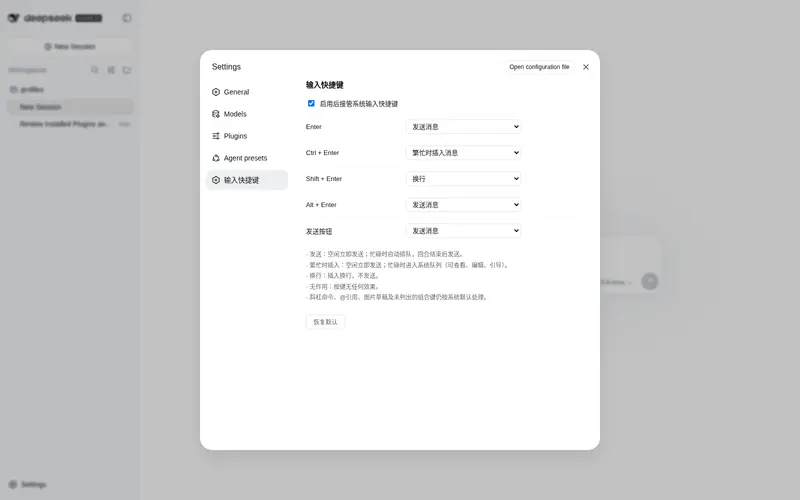
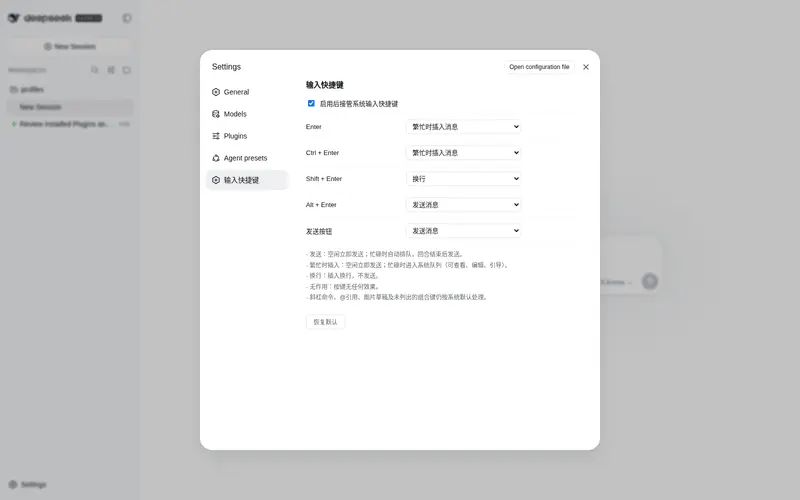
Take over the system input shortcuts for the chat input box and configure behavior independently for each shortcut.
Best for
- DSH Web users who want different actions for Enter, modified Enter shortcuts, and the send button.
- Users who need shortcut preferences persisted in DSH settings, including send, queue, newline, or no action.
Not ideal for
- Users satisfied with DSH's default composer shortcuts and queue behavior.
- Workflows seeking to override IME composition, slash-command overlays, image or mention drafts, empty drafts, or stop-button handling; those cases are deliberately left to DSH defaults.
README
DSH Enter Customizer
DSH(DeepSeek Harness)Web 插件:接管聊天输入框的系统输入快捷键,为每个快捷键独立配置行为。配置通过 DSH 用户设置持久化保存。
功能
-
接管系统输入快捷键:
Enter、Ctrl+Enter、Shift+Enter、Alt+Enter和右下角发送按钮 -
每个快捷键可独立选择行为:
- 发送消息:空闲立即发送;忙碌时自动排队,回合结束后发送
- 繁忙时插入消息:空闲立即发送;忙碌时进入系统队列(与系统内置的”在繁忙时插入消息”机制完全一致,可在输入框上方的队列栏查看、编辑、引导入回合)
- 换行:插入换行,不发送
- 无作用:按键无任何效果(也不触发系统默认行为)
-
设置持久化:配置写入用户设置文档(
~/.dsh/settings.yaml的dsh-enter-customizer段),重启不丢失;系统设置页「输入快捷键」直接编辑 - 发送失败提示:失败时在输入栏正上方浮动显示错误提示(3.2 秒后自动消失)
- 安全护栏:中文输入法组合输入(IME)、斜杠命令菜单/弹层打开、机器忙碌(提交中)、含 @引用/图片的草稿、空草稿、停止按钮等场景自动放行给系统默认处理
截图
设置界面
设置 → 输入快捷键,每个快捷键独立配置行为:

默认配置
| 快捷键 | 默认行为 |
|---|---|
| Enter | 发送消息 |
| Ctrl + Enter | 繁忙时插入消息 |
| Shift + Enter | 换行 |
| Alt + Enter | 发送消息 |
| 发送按钮 | 发送消息 |
安装
dsh plugin --profile web add github:Boliban/dsh-enter-customizer
卸载与更新
dsh plugin --profile web update dsh-enter-customizer   # 更新到最新
dsh plugin --profile web remove dsh-enter-customizer   # 卸载
文件结构
├── package.json         # dsh.client(Web 插件)+ dsh.bundle(profile patch)声明;deepseek-ai/* 为 peerDependencies
├── cordis.patch.yml     # bundle patch:插入插件行
├── pnpm-lock.yaml       # 插件依赖快照(link 安装时 Node 从项目目录解析)
├── lib/
│   ├── index.js         # Host 半部:注册持久化 settings 命名空间
│   └── client.js        # Client 半部:快捷键拦截 + 设置页 + 失败提示
└── assets/
    └── settings.png     # 设置界面截图
实现要点
- 快捷键拦截:在
conversation.input.dock挂载组件,使用 document 级 capture 监听keydown/click,仅当事件目标位于[data-composer-card]内时按配置处理;preventDefault+stopPropagation覆盖系统默认行为 - 发送/繁忙时插入均通过
session.prompt(content, 'queue')提交——与系统内置队列完全同一通道,消息显示在系统队列栏 - 换行通过 DOM 写入 +
inputActions.setDraft()立即同步,文本区即时刷新 - 持久化:Host 半部
settings.register注册dsh-enter-customizer命名空间(schemastery schema),Client 半部经settingsScope.bind读写(scope.set逐字段写入,scope.subscribe同步外部变更) - Client bundle 为纯 JS(仅依赖
react),无需打包步骤,直接以__ModuleLoader__工厂格式发布
Frequently Asked QuestionsFAQ
Use the verified command dsh plugin --profile default add github:Boliban/dsh-enter-customizer in a DSH-enabled shell. The command resolves the public package metadata and keeps the plugin attached to the catalog identity shown on this page.
Compatibility follows the bundle and profile status shown above. If a profile is not detected, keep the plugin disabled there and check the repository documentation before enabling it in production.
The GitHub link and activity metadata are the source of truth for releases and maintenance. Revisit this page after a new release to confirm the catalog has observed the latest version.