caoyiwei850/dsh-client-ui-skins
DSH Web skin plugin with built-in themes and custom image skins
Listed
4
Theme
Bundle verified
Preview
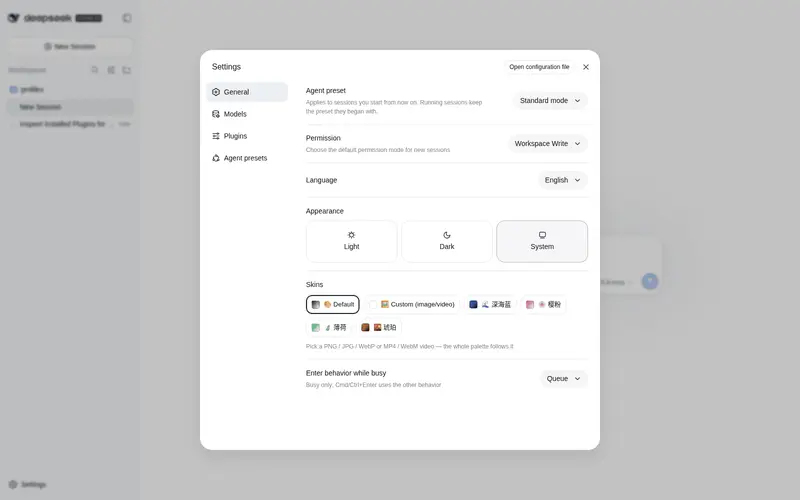
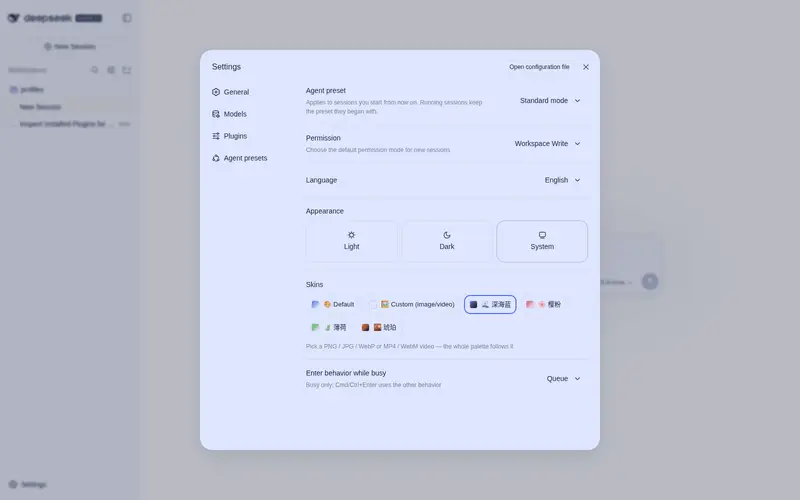
What it does
Skin plugin for the DSH Web UI: 4 built-in skins plus custom image skins with the photo as a full-interface background and the palette following its dominant hue.
Best for
- DSH Web users who want a selectable visual theme without modifying DSH source code.
- Users who want a personal image as the full-interface background with colors derived from its dominant hue.
- Local setups that should keep custom skin images in browser localStorage rather than upload them.
Not ideal for
- Headless or terminal-only DSH workflows, because this is a client-side Web UI skin.
- Users seeking functional workflow changes rather than appearance customization.
- Environments without the required DSH Web profile and pnpm-based installation path.
README
DSH 皮肤插件 · dsh-client-ui-skins v0.1.10
给 DeepSeek Harness (DSH) Web 界面换肤:4 套内置皮肤 + 自定义图片/视频皮肤 (图片作为整个界面的背景,配色自动跟随图片主色调)。已更新支持MP4 或 WebM 视频动态壁纸,
效果预览
自定义图片皮肤支持任意 PNG / JPG / WebP:导入自己的图片后,背景、强调色与交互高亮会自动跟随图片主色调。以下仅为界面效果示例。


文件
| 文件 | 作用 |
|---|---|
dsh-client-ui-skins-0.1.10.tgz |
插件安装包(npm tarball) |
install-dsh-skins.sh |
一键安装脚本 |
uninstall-dsh-skins.sh |
一键卸载脚本 |
安装(二选一)
方式 A:一键脚本(推荐)
bash install-dsh-skins.sh
脚本会自动:装包 → 注册 → 重启。完成后刷新 http://127.0.0.1:3080,
左下角 设置 → 通用设置 → 皮肤 即可换肤。
方式 B:手动
# 1. 装包
cd ~/.dsh/profiles/web && pnpm add -w ./dsh-client-ui-skins-0.1.10.tgz

# 2. 注册(编辑 ~/.dsh/profiles/web/cordis.patch.yml,追加:)
#    - insert:
#        - id: ui-skins
#          name: 'dsh-client-ui-skins'

# 3. 重启 web
launchctl kickstart -k gui/$(id -u)/com.deepseek.dsh.web
其实你也可以直接扔给DeepSeek harness自己安装。
卸载
bash uninstall-dsh-skins.sh
备注
- 插件是纯 client 插件,不改任何 DSH 源码;卸载后完全恢复原生外观。
- 自定义皮肤图片只在本机流转(localStorage),不会上传到任何服务器。
- 需要 DSH web profile(
~/.dsh/profiles/web),依赖 pnpm。
Frequently Asked QuestionsFAQ
Use the verified command dsh plugin --profile default add github:caoyiwei850/dsh-client-ui-skins in a DSH-enabled shell. The command resolves the public package metadata and keeps the plugin attached to the catalog identity shown on this page.
Compatibility follows the bundle and profile status shown above. If a profile is not detected, keep the plugin disabled there and check the repository documentation before enabling it in production.
The GitHub link and activity metadata are the source of truth for releases and maintenance. Revisit this page after a new release to confirm the catalog has observed the latest version.