chinaRXQ/dsh-wallpaper
Wallpaper skin for the DeepSeek Harness (dsh) web UI: image background with opacity, mask and blur controls.
Listed
2
Theme
Bundle verified
Preview
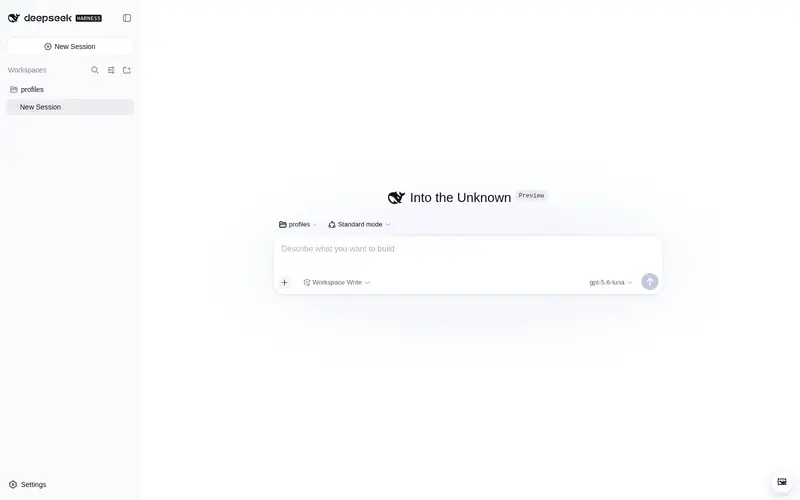
What it does
Wallpaper skin for the DSH Web UI: image background with opacity, mask and blur controls.
Best for
- DSH Web users who want a personal image background with adjustable image, panel, mask, and blur settings.
- Users tuning wallpaper contrast and panel transparency for readability across light and dark themes.
- Single-browser setups that benefit from locally persisted wallpaper preferences.
Not ideal for
- Non-web DSH interfaces or browsers without modern `color-mix()` support.
- Users who need wallpaper settings synchronized across browsers; configuration is stored in each browser's `localStorage`.
- Workflows relying on HEIC images or image URLs that cannot be loaded; HEIC decoding is unsupported and inaccessible links are rejected.
README
dsh-wallpaper — DeepSeek Harness 图片壁纸皮肤插件
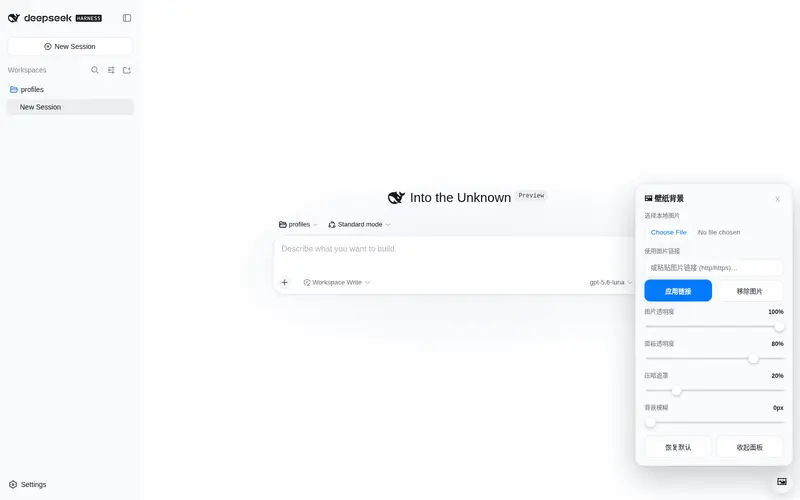
用一张图片作为 DSH Web 界面的窗口背景,并可通过右下角小面板实时控制:
- 图片透明度(0–100%)
- 面板透明度(0–100%,越小背景图越透)
- 压暗遮罩(0–100%,提高文字可读性)
- 背景模糊(0–40px)
原理
- 在
<body>里插入两个固定全屏层:#dsh-wallpaper-bg(背景<img>,object-fit: cover+referrerpolicy="no-referrer"以绕开防盗链)与#dsh-wallpaper-mask(遮罩),并把应用根节点#root抬到z-index: 1,图片层垫在应用之下。 - 把
--dsw-alias-*语义 token 用color-mix()改为半透明(!important压过主题 presenter 的内联 token),让图片从所有面板后面透出来;浅色 / 深色两套底色分别处理。 - 配置存于浏览器
localStorage(key:dsh-wallpaper:v1)。图片支持本地文件(自动缩放并压缩成 JPEG,稳稳落进 localStorage 配额)或 http(s) 链接(应用前先探测能否加载,失败会在面板提示)。
文件
| 文件 | 说明 |
|---|---|
package.json |
包元数据:dsh.bundle.patch(可被 dsh plugin add 安装)+ dsh.client.platform=web、immediately=true、exports["./client"]
|
cordis.patch.yml |
bundle patch:把 dsh-wallpaper 插入 composition |
index.js |
host half(空实现,仅满足 cordis loader 导入) |
client.js |
浏览器 half:window.__ModuleLoader__.load({ id: "dsh-wallpaper", factory }),含样式注入、背景层、控制面板 |
安装
发布到 npm 后(或直接以 GitHub 仓库 owner/repo 形式),一条命令装进 web profile:
dsh plugin --profile web add dsh-wallpaper     # npm 包名
# 或
dsh plugin --profile web add <owner>/dsh-wallpaper   # GitHub 仓库
然后启动 web:
dsh --profile web
本机开发时的做法(源码在
~/Desktop/harness/dsh-wallpaper/):改动后把client.js index.js package.json cordis.patch.yml同步到~/.dsh/profiles/web/node_modules/dsh-wallpaper/,并在~/.dsh/profiles/web/cordis.patch.yml里保留- insert: [{ id: wallpaper, name: 'dsh-wallpaper' }],再重启 web 服务。
使用
- 页面右下角出现 🖼 按钮,点开面板:
- 选本地图片 / 粘贴图片链接 → 应用;
- 拖动滑块实时调整透明度 / 遮罩 / 模糊;
- 「移除图片」或「恢复默认」关闭壁纸。
- 配置自动保存在浏览器本地,刷新 / 重开浏览器仍生效(换浏览器需重新设置)。
卸载
dsh plugin --profile web remove dsh-wallpaper
然后重启 web 服务。
备注
- 需要较新的浏览器(
color-mix(),Chrome/Safari/Firefox 2023+ 均支持)。 - 第三方主题(
ctx.theme.register注册的皮肤)与壁纸半透明层可共存;壁纸层的 token 覆盖优先级更高。 - 显示不出来的常见原因已做处理:HEIC(iPhone 照片)无法解码会明确提示、过大的本地图会自动压缩、链接失效/防盗链会在面板报错;如仍显示黑色背景,请打开浏览器开发者工具 Console 看
[dsh-wallpaper]开头的报错。
Frequently Asked QuestionsFAQ
Use the verified command dsh plugin --profile default add github:chinaRXQ/dsh-wallpaper in a DSH-enabled shell. The command resolves the public package metadata and keeps the plugin attached to the catalog identity shown on this page.
Compatibility follows the bundle and profile status shown above. If a profile is not detected, keep the plugin disabled there and check the repository documentation before enabling it in production.
The GitHub link and activity metadata are the source of truth for releases and maintenance. Revisit this page after a new release to confirm the catalog has observed the latest version.