eric-song-dev/dsh-ikun-pet
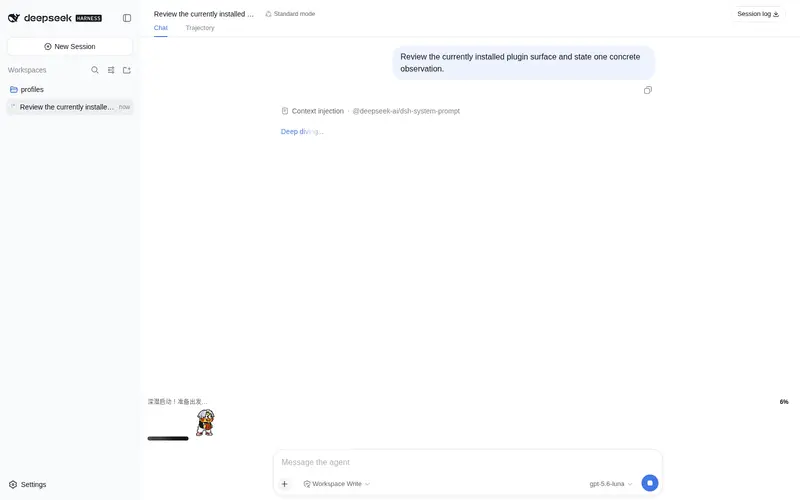
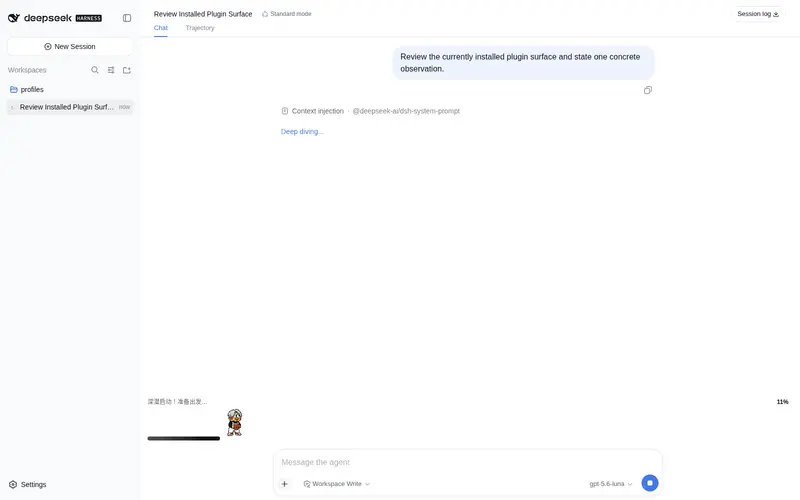
🐤 DeepSeek Harness(DSH)永久插件:Deep diving 回答期间用坤宠动图填满深潜状态行下方区块——进度条 0%→100%,每 20% 切换动作与文案,完成时系统级播放「你干嘛~哎哟」
Listed
8
Fun
Bundle verified
Preview
What it does
An ikun (basketball meme) pet that fills the dock under the "Deep diving..." status row during replies: a sprite-sheet pet walks a 0→100% progress bar, switching animation and text every 20%, and plays a system-level "nǐ gàn ma~" voice cue at completion.
Best for
- DSH users who want an animated basketball-meme pet and staged progress display during every running reply.
- Users who want an audible system-level completion cue even when the browser is muted.
Not ideal for
- Quiet or productivity-focused interfaces where an animated dock on every reply would be distracting or add little value.
- Windows or Linux users who require a verified completion-sound setup; those platforms need a custom command and are documented as untested.
- Users who need actual task completion percentage rather than an adaptive progress estimate.
README
🐤 dsh-ikun-pet · ikun Desktop Pet





📖 中文文档:README.zh.md

A DeepSeek Harness (DSH) plugin that fills the full row under the “Deep diving…” status line with an ikun pet during every reply: a
0% → 100%progress bar, a new animation and text every 20%, and a jump celebration with a system-level “你干嘛~哎哟” voice cue at completion 🏀
✨ Features
-
Only fills the deep-dive dock: registered at
conversation.input.dock— the full row directly below DSH’s “Deep diving…” status line, between the conversation and the composer. Visible only while a session isrunning(deep diving); completely invisible the rest of the time. - The pet walks the progress bar: the ikun pet walks from 3% to 97%, playing frame-by-frame on top of the progress bar (8 columns × 9 rows sprite-sheet contract).
- A new stage every 20%: six stages at 0/20/40/60/80/100, each switching both the animation and the text (see docs/PROGRESS-STAGES.md).
- Universal adaptive progress: a layered estimation model — real anchors (0% start / 100% done) + real goal-round progress + self-calibration from this session’s turn durations + activity pacing for tools/streaming/approval-waiting + a shrinking reserve. Short tasks run fast, long tasks run slow, waiting for your approval slows it down honestly, and it never fakes 100% (details in docs/PROGRESS-STAGES.md).
-
Completion heard system-wide: at 100% the host process plays “你干嘛~哎哟” (
assets/voice.mp3) with a system command — audible from any window and any session, independent of browser mute (tested on macOS). -
Permanent plugin form: written into the DSH composition (
cordis.patch.yml) and auto-loaded on every DSH start — install once, works in every session. Dynamic-plugin sources (src/) are kept as an alternative for session-level installs.
🚀 Install
Option A: clone (for tinkerers)
git clone https://github.com/eric-song-dev/dsh-ikun-pet && cd dsh-ikun-pet
dsh plugin add "$PWD" --profile web
Option B: remote one-liner (for users)
dsh plugin add github:eric-song-dev/dsh-ikun-pet --profile web
# or: dsh plugin add https://github.com/eric-song-dev/dsh-ikun-pet.git --profile web
Option C: npm (prebuilt — installs without the allowBuilds build-approval step)
dsh plugin add dsh-ikun-pet --profile web
💡 If your profile isn’t named
web, swap--profile webfor your own profile name in the commands above.
Then restart dsh web and refresh the browser. Verify:
curl -sI http://127.0.0.1:3080/ikun-pet/spritesheet.webp   # sprite route (should be image/webp)
curl -s  http://127.0.0.1:3080/plugins/dsh-ikun-pet/client.js   # client bundle (should return JS)
🎬 Stage → animation → text
| Progress | Animation | Text |
|---|---|---|
| 0% – 20% | waiting | 深潜启动!准备出发… |
| 20% – 40% | runRight | 正在收集线索… |
| 40% – 60% | working | 埋头苦干中… |
| 60% – 80% | review | 认真思考中… |
| 80% – 100% | wave | 快好啦!马上见结果~ |
| 100% (done) | jump | 完成啦!你干嘛~哎哟 🔉 (host plays the voice cue) |
⚙️ Configuration (optional)
Everything lives in the plugin line’s config inside the bundled cordis.patch.yml:
spritePath / voicePath / playVoiceAtDone / playCommand (assets default to the bundled assets/).
-
Disable: remove the
#in front of# disabled: true, restartdsh web(put it back to re-enable) -
Mute the voice:
config.playVoiceAtDone: false(the animated bar is unaffected) -
Voice on Windows/Linux: swap
playCommandto PowerShell / ffplay (examples in the comments; macOS defaults toafplay, tested)
🗑 Uninstall / 🔄 Update
dsh plugin remove dsh-ikun-pet --profile web     # uninstall (bundles are reconciled automatically), then restart dsh web
# update: cd <repo dir> && git pull && dsh plugin add "$PWD" --profile web
🧪 Session-level install (dynamic plugin)
node scripts/build-package.mjs # produces the ikun.package.json install payload
Hand the payload to your Agent to install via cordis_define + cordis_run — current session only.
⚠️ Don’t run it alongside the permanent plugin (their sprite routes conflict).
🖥 Platform support
| Part | macOS | Windows / Linux |
|---|---|---|
| Animated UI + progress bar (pure Web) | ✅ tested | ⚠️ should work, untested |
| Completion voice (system command) | ✅ tested (afplay) |
⚠️ commands provided, untested |
🛟 Troubleshooting
| Symptom | Fix |
|---|---|
| Plugin line fails on restart |
node -e "require('dsh-ikun-pet')" in the profile dir should succeed; reinstall if it doesn’t |
| Dock not showing but routes work | hard refresh (Cmd+Shift+R); make sure the dynamic plugin isn’t enabled at the same time |
| No voice | check config.playVoiceAtDone; macOS uses afplay, other OSes need a different playCommand
|
| Don’t want it to load | add disabled: true to the plugin line and restart |
📄 License
MIT
Frequently Asked QuestionsFAQ
Use the verified command dsh plugin --profile default add github:eric-song-dev/dsh-ikun-pet in a DSH-enabled shell. The command resolves the public package metadata and keeps the plugin attached to the catalog identity shown on this page.
Compatibility follows the bundle and profile status shown above. If a profile is not detected, keep the plugin disabled there and check the repository documentation before enabling it in production.
The GitHub link and activity metadata are the source of truth for releases and maintenance. Revisit this page after a new release to confirm the catalog has observed the latest version.