hellosky983/dsh-qrcode
DSH plugin: offline QR code (SVG/PNG/ASCII) and barcode (Code128/EAN-13) generator, no network, no shell.
Listed
3
Memory
Bundle verified
Preview
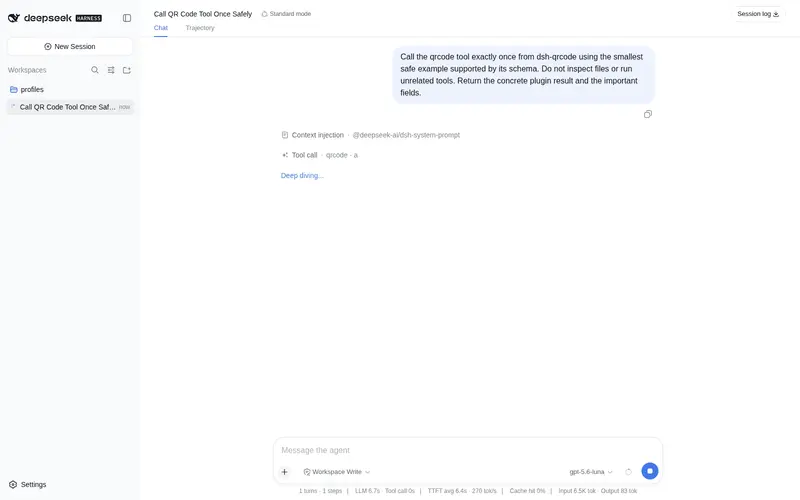
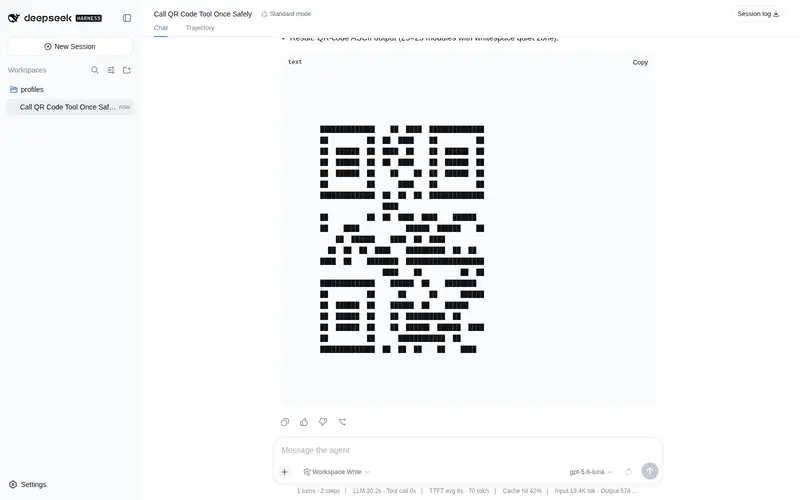
What it does
Offline QR code (SVG/PNG/ASCII) and barcode (Code128/EAN-13) generator for DeepSeek Harness, no network and no shell.
Best for
- Offline or sandboxed DSH sessions that need locally generated QR codes without network or shell access.
- Workflows generating URLs, Wi-Fi payloads, vCards, telephone/SMS data, or plain text as SVG, PNG, or ASCII QR output.
- Users who need local Code128 or EAN-13 barcode generation.
Not ideal for
- Barcode workflows requiring symbologies other than Code128 or EAN-13.
- EAN-13 inputs that are not 12 or 13 digits, or Code128 inputs outside the documented ASCII input.
- Workflows expecting the plugin to write image files directly; it returns SVG text, ASCII, or a PNG data URL.
README
dsh-qrcode

An offline QR code and barcode generator for DeepSeek Harness. Pure local computation — no network, no shell, no dependencies.
Overview
DeepSeek Harness sessions often run with restricted network access (no npm, no CDN, no online encoder APIs), so generating a scannable code from inside a session is not trivial. This plugin solves that: it provides qrcode and barcode model tools that encode and render entirely locally, with zero runtime dependencies. It is for agents and users who need QR codes (URLs, WiFi, vCard, tel, sms) or 1D barcodes (Code128, EAN-13) as SVG / PNG / ASCII output inside any DSH session — including fully offline or sandboxed ones.
Compatibility
- DSH version:
0.1.0-rc.6 - Mainline: verified against
deepseek-harnessmainline snapshots of 2026-08-14 - Last verified: 2026-08-14
Install / Uninstall
Install (from GitHub):
dsh plugin add github:hellosky983/dsh-qrcode
Or clone and install locally:
git clone https://github.com/hellosky983/dsh-qrcode.git
cd dsh-qrcode
dsh plugin add .
Upgrade: re-run the install command after git pull.
Disable temporarily: remove the plugin row from your profile composition, or run:
dsh plugin remove dsh-qrcode
Uninstall: remove the dsh-qrcode dependency and its bundle entry from the profile package.json, then pnpm install.
Quick start
Tell the agent:
把这个链接做成二维码: https://example.com
or call the tools directly:
qrcode text="https://example.com" format=svg
barcode text="ABC-123" symbology=code128 format=svg
qrcode returns SVG markup (save to a .svg file), PNG data URLs, or ASCII previews. barcode supports code128 and ean13.
Configuration
| Tool | Option | Default | Description |
|---|---|---|---|
qrcode |
text |
— (required) | Content to encode: URL, WIFI:..., vCard, tel/sms, or plain text |
qrcode |
format |
svg |
svg / ascii / png
|
qrcode |
ecl |
M |
Error correction level L/M/Q/H |
qrcode |
scale / border / fg / bg / mask
|
4 / 4 / #000 / #fff / auto | Rendering options |
barcode |
text |
— (required) | Content for Code128 (ASCII) or EAN-13 (12/13 digits) |
barcode |
symbology |
code128 |
code128 / ean13
|
No environment variables, no secrets.
Permissions & data
- Reads: nothing (pure function of the input arguments).
- Writes: nothing. Tools return text/SVG/PNG data in the result.
- Network: none. Encoding and rendering are fully local.
- Credentials: none.
Troubleshooting
-
Tool not visible after install: restart dsh, or check that the bundle row appears in
dsh --dump-config. -
“cannot get property tools without inject”: the plugin requires
inject = ['tools']; reinstall from the latest commit which declares it. -
PNG output is a data URL: the agent should prefer
format=svgand save the returned markup as a.svgfile when a file artifact is needed. -
Logs: dsh profile logs under
~/.dsh/profiles/<name>/. - Rollback: revert to the previous plugin version by reinstalling the earlier git commit.
Development
git clone https://github.com/hellosky983/dsh-qrcode.git
cd dsh-qrcode
node --check index.js
The encoder was validated against zxing-cpp (96/96 test vectors, versions 1–40, all masks/EC levels) and cross-checked with segno for mask scoring. The suite lives in the commit history of this repository.
Contributions: open issues and pull requests on GitHub. Keep changes dependency-free (the encoder is self-contained). Report bugs with a minimal reproduction case.
License & security
MIT — see LICENSE. No secrets are shipped; report security issues privately via GitHub issue (repo is public) or email to the repository owner.
Frequently Asked QuestionsFAQ
Use the verified command dsh plugin --profile default add github:hellosky983/dsh-qrcode in a DSH-enabled shell. The command resolves the public package metadata and keeps the plugin attached to the catalog identity shown on this page.
Compatibility follows the bundle and profile status shown above. If a profile is not detected, keep the plugin disabled there and check the repository documentation before enabling it in production.
The GitHub link and activity metadata are the source of truth for releases and maintenance. Revisit this page after a new release to confirm the catalog has observed the latest version.