keke050/dsh-wallpaper
Set a custom background wallpaper for the DeepSeek Harness desktop app — presets, image URL, upload, and an opacity slider
Listed
0
Theme
Bundle verified
Preview
What it does
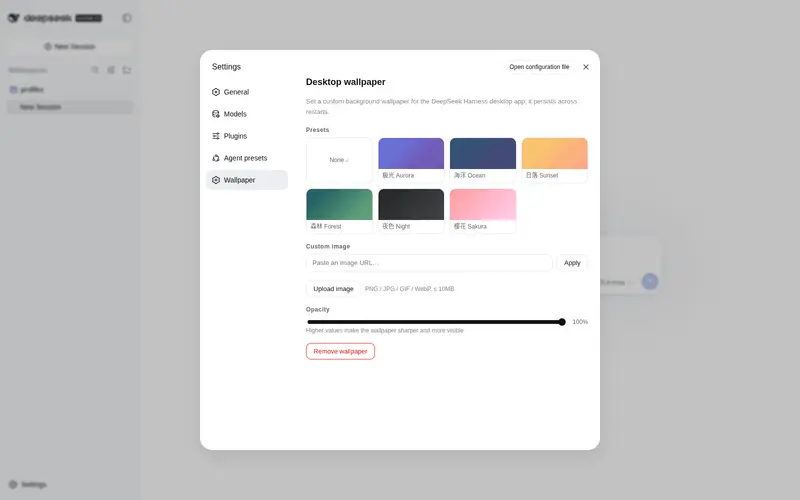
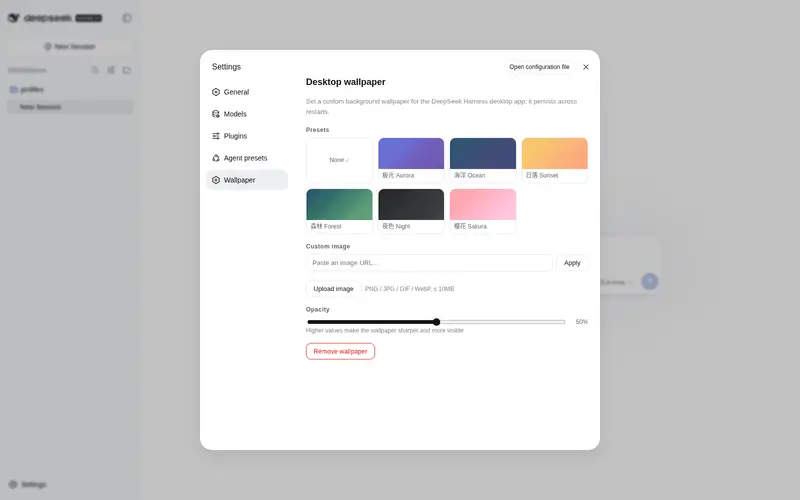
Wallpaper skin for the DSH Web UI: presets, image URL or upload, and an opacity slider that fades the interface to reveal the wallpaper.
Best for
- DSH Web users who want to personalize the interface with preset, remote, or uploaded wallpaper images.
- Users who want adjustable UI translucency so a wallpaper remains visible across conversations and sidebars.
- Desktop-style installations that need uploaded wallpaper and configuration to persist across restarts and loopback-port changes.
Not ideal for
- Headless or non-Web workflows with no visual interface to customize.
- Users who prefer the default DSH appearance or need maximum text/background contrast.
- Uploads larger than 10 MB or local formats other than PNG, JPG, GIF, and WebP.
README
dsh-wallpaper
Set a custom background wallpaper for the DeepSeek Harness desktop app.

| English | 中文 |
Features
- Presets — 6 built-in gradient wallpapers (aurora, ocean, sunset, forest, night, sakura), plus a “none” option.
-
Custom image URL — paste any
http(s)image URL. - Upload — pick a local PNG / JPG / GIF / WebP (≤ 10MB); it is stored on the host and survives restarts.
- Opacity slider — controls how strongly the wallpaper shows through the UI, from hidden (0%) to dominant (100%). At 100% the base background, cards and even the message bubbles become translucent so the wallpaper fills the whole window.
- Durable: config and the uploaded image live in
$DSH_HOME/storages/wallpaper/, served at a stable/dsh-wallpaper/imagepath, so nothing is lost when the desktop app rebinds its random loopback port.
Install
dsh plugin --profile web add github:keke050/dsh-wallpaper
Then restart DeepSeek Harness. Open Settings → 壁纸 / Wallpaper.
Usage
- Pick a preset, paste an image URL, or upload a local image.
- Drag the opacity slider to taste — higher means the wallpaper is more visible.
- Click Remove wallpaper to restore the default background.
How it works
- The host half registers three loopback HTTP routes (
/dsh-wallpaper/config,/dsh-wallpaper/upload,/dsh-wallpaper/image) and persists the wallpaper to$DSH_HOME/storages/wallpaper/. - The client half renders the settings section and injects CSS that puts the wallpaper on
bodyand makes the app’s background surfaces translucent (by overriding--dsw-alias-bg-*/--dsw-specific-*design tokens), so the wallpaper shows through the conversation area, not just the sidebar.
License
MIT
Frequently Asked QuestionsFAQ
Use the verified command dsh plugin --profile default add github:keke050/dsh-wallpaper in a DSH-enabled shell. The command resolves the public package metadata and keeps the plugin attached to the catalog identity shown on this page.
Compatibility follows the bundle and profile status shown above. If a profile is not detected, keep the plugin disabled there and check the repository documentation before enabling it in production.
The GitHub link and activity metadata are the source of truth for releases and maintenance. Revisit this page after a new release to confirm the catalog has observed the latest version.