LeslieWylie/dsh-task-relay
DSH 跨会话任务接力板:task_push/list/claim/done + handoff_write/read
Listed
3
Session
Bundle verified
Preview
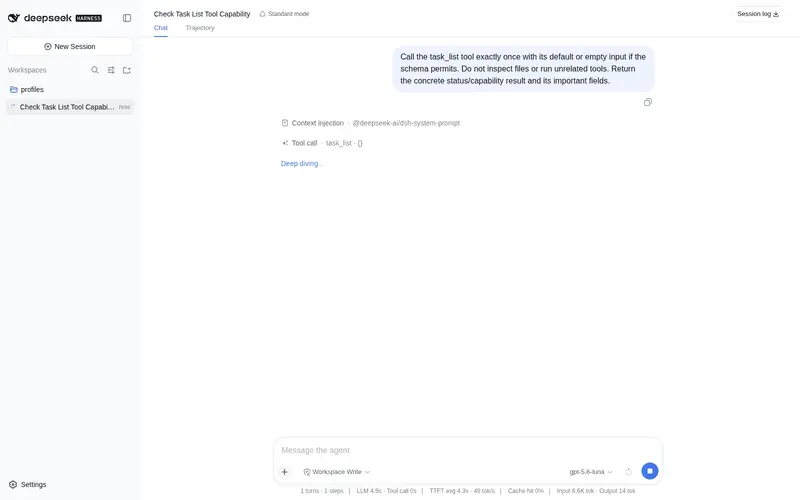
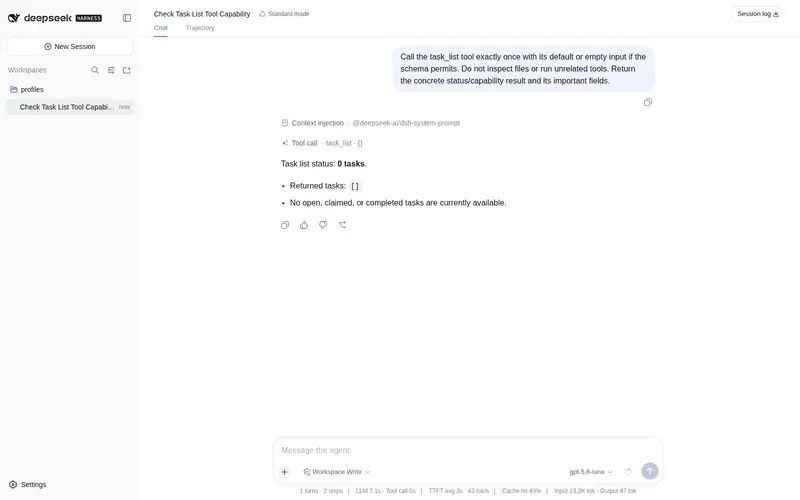
What it does
Cross-session task queue with handoff notes: sessions and subagents push, claim, complete and cancel tasks on a shared file-backed queue, and leave a handoff summary for whoever picks up next.
Best for
- Teams or agents handing tasks between independent DSH sessions or subagents.
- Long-running work that needs a persistent shared queue with claim, completion, cancellation, priority, and tag states.
- Session transitions that benefit from a concise handoff summary and visible remaining work.
Not ideal for
- Single-session work with no task handoff or need for persistent coordination.
- Distributed coordination that requires a networked service or database rather than one shared file-backed queue.
- Workflows whose task descriptions, summaries, or tag sets exceed the documented input limits.
README
📋 dsh-task-relay
DSH 跨会话任务接力板插件 —— 基于持久队列的跨会话/子agent 任务接力 + 交接摘要。

为什么
DSH 的会话生命周期是独立的:会话 A 做完的工作,会话 B 默认不知道。dsh-task-relay 填补了这个空白——它提供一个跨会话共享任务队列,任何会话(包括子 agent)都可以:
- 投递任务给未来的自己 / 其他会话 / 子 agent
- 认领和完成开放任务
- 记录会话交接摘要,供后续会话查看
工具一览
| 工具 | 能力 | 描述 |
|---|---|---|
task_push |
推送任务 | 投递新任务到共享队列,指定标题/描述/优先级/标签 |
task_list |
查询任务 | 按状态/优先级/标签筛选,返回降序列表 |
task_claim |
认领任务 | 认领一个开放任务,标记为 claimed |
task_done |
完成任务 | 标记任务为已完成,记录结果 |
task_cancel |
取消任务 | open 则删除,claimed 则退回 open |
handoff_write |
写交接摘要 | 记录当前会话的工作进展和待办事项 |
handoff_read |
读交接摘要 | 按会话 ID 或最近 N 条读取 |
安装
# 安装到 web profile
dsh plugin --profile web add github:LeslieWylie/dsh-task-relay

# 安装到 headless profile
dsh plugin --profile headless add github:LeslieWylie/dsh-task-relay
或者在 cordis.yml 中追加:
- id: task-relay
  name: 'dsh-task-relay'
使用示例
跨会话任务接力
会话 A:推送一条任务
task_push title="修复登录页 Bug" priority="high" tags=["bug","frontend"]
→ { "id": "T1723647600000-1", "title": "修复登录页 Bug", "status": "open", ... }
会话 B:查看并认领
task_list status="open" priority="high"
→ 共 1 条任务,显示 1 条
task_claim id="T1723647600000-1"
→ { "id": "T1723647600000-1", "status": "claimed", "claimedBy": "session-b", ... }
会话 B:完成后通知
task_done id="T1723647600000-1" result="已修复,commit abc123"
→ { "id": "T1723647600000-1", "status": "done", "result": "已修复,commit abc123", ... }
会话交接
会话结束时:
handoff_write summary="完成了功能 A 的开发,剩余功能 B 和 C 待做。功能 B 的前端组件已搭好框架,后端 API 需要从 session-x 的交接中获取接口文档。"
→ { "sessionId": "session-a", "summary": "...", "openTasks": 2, ... }
新会话启动时:
handoff_read
→ 共 3 条交接摘要,显示最近 5 条
数据存储
所有数据存储在 $HOME/.dsh/task-relay/queue.json,使用原子写入(temp file + rename)防止数据损坏。
改用别的目录,在 bundle 行加 config.root:
- id: task-relay
  name: 'dsh-task-relay'
  config:
    root: '~/.dsh/task-relay-staging'
| 配置项 | 默认值 | 说明 |
|---|---|---|
root |
$HOME/.dsh/task-relay |
队列文件所在目录。不同 profile 指向不同目录即可各自独立。 |
架构
dsh-task-relay/
├── src/
│   ├── index.ts      # 插件入口:注册 7 个工具
│   ├── store.ts      # 持久化存储层(JSON 文件 + 原子写入)
│   ├── tools.ts      # 工具定义(defineTool)
│   ├── types.ts      # 类型定义
│   └── invariant.ts  # 输入验证
├── tests/
│   ├── store.spec.ts # 存储层单元测试(18 个)
│   └── tools.spec.ts # 工具注册与执行测试(8 个)
├── cordis.patch.yml  # DSH bundle patch
├── LICENSE           # MIT
├── README.md         # 中文文档
├── README.en.md      # English docs
└── package.json
开发
npm install
npm run typecheck   # tsc --noEmit
npm test            # vitest run (26 tests)
npm run test:boot   # 通过真实 cordis registry 执行已构建产物
npm run build       # tsc
npm run check       # typecheck + test + build
为什么 lib/ 提交进了仓库
因为不提交就没人装得上。
包的入口是 lib/index.js,由 tsc 生成。而 pnpm 出于安全考虑,默认拒绝为 git 依赖执行构建脚本,所以从 GitHub 安装会直接失败:
ERR_PNPM_GIT_DEP_PREPARE_NOT_ALLOWED  The git-hosted package "dsh-task-relay@0.0.1"
needs to execute build scripts but is not in the "onlyBuiltDependencies" allowlist.
包甚至没能进入 node_modules。而 v0.0.1 期间 26 个单测始终全绿——因为它们 import 的是 src/*.ts,从不碰包对外承诺的那个入口。作者本机一直正常,只是因为 profile 用 link: 指向了一份本地已构建的目录。
提交构建产物换来了可安装性,代价是可能与源码脱节。tests/boot.test.mjs 和 CI 各自重新构建一次再比对,脱节就报错——这是为那个代价买的单。
为什么 peer 范围写得这么别扭
@deepseek-ai/dsh-tools 的 peer 范围是:
>=0.0.1-rc.1 <0.1.0 || >=0.1.0-rc.1 <0.2.0-0
看着啰嗦,但直觉写法是错的。semver 规定:预发布版本只有在某个比较符与它 major.minor.patch 完全相同、且该比较符自身也带预发布标签时,才算命中。
所以 v0.1.0 用的 >=0.0.1-rc.1 <0.2.0 匹配不上 0.1.0-rc.6——而这正是当前 harness 实际运行的版本(npm 上 latest 标签停在旧的 0.0.1-rc.1,当前线在 next 标签)。npm 于是转而去装 0.0.1-rc.1,在任何真实 profile 里都会 ERESOLVE 报错。
顺带一提,>=0.0.0-0 <0.2.0-0 这种”通配预发布”的写法同样无效——实测它一个 0.1.0 的预发布都匹配不到。只有显式 || 把两条预发布线分别列出来才行。
安全边界
- 纯工具插件,不联网、不执行外部命令
- 数据存储在用户主目录下的
~/.dsh/task-relay/,目录权限 700 - 输入验证:标题 200 字符、描述 4000 字符、摘要 2000 字符、标签 10 个
- 认领/完成操作有会话归属校验
许可
MIT
Frequently Asked QuestionsFAQ
Use the verified command dsh plugin --profile default add github:LeslieWylie/dsh-task-relay in a DSH-enabled shell. The command resolves the public package metadata and keeps the plugin attached to the catalog identity shown on this page.
Compatibility follows the bundle and profile status shown above. If a profile is not detected, keep the plugin disabled there and check the repository documentation before enabling it in production.
The GitHub link and activity metadata are the source of truth for releases and maintenance. Revisit this page after a new release to confirm the catalog has observed the latest version.