Lhy723/dsh-neu-theme
DeepSeek Harness Web 的轻拟物与磨砂玻璃主题插件,提供浅色/深色主题、环境光、材质纹理和细腻微交互。Neumorphism + glassmorphism theme plugin for DeepSeek Harness Web with warm light/dark palettes, ambient lighting, grain texture, and subtle micro-interactions.
Listed
3
Theme
Bundle verified
Preview
What it does
Neumorphic DSH Web theme with light and dark palettes, ambient lighting, material shadows, grain texture, frosted-glass surfaces, and micro-interactions.
Best for
- DSH Web users who prefer neumorphic and frosted-glass visual styling.
- Users who want selectable light and dark theme variants with persisted preferences.
- Interfaces where reduced-motion-aware micro-interactions and material-style surfaces improve personal readability or comfort.
Not ideal for
- Headless or non-Web DSH environments, because the plugin changes browser presentation only.
- Users who prefer the native DSH appearance or minimal visual effects; selecting Default leaves the interface unchanged.
- Workflows seeking functional agent, tool, or session capabilities rather than a visual theme.
README

dsh-neu-theme


A Neumorphism (soft-UI) theme plugin for DeepSeek Harness web — gentle raised-and-recessed surfaces in a cream light palette and an ink-dark palette, complete with ambient lighting, material gloss, grain texture, glassmorphism and micro-interactions.
中文说明见 README.zh.md。
Features
-
Two themes registered into the built-in ThemeRuntime:
-
neu-light— cream warm-white canvas, soft slate-blue accent -
neu-dark— ink-blue night canvas, luminous indigo accent
-
- Lighting — ambient top glow + corner fill painted on the visible surfaces (conversation canvas, sidebar, details column), not just body.
- Material — three-layer shadows (contact + cast + top-edge highlight), 145° gloss gradients aligned to the light direction, code blocks with a backlit inner wall.
- Texture — fine grayscale grain (inline SVG feTurbulence) over the canvas, sidebar, details column and code blocks.
-
Glassmorphism — the composer capsule and its popovers (permission
menu, model menu, context panel) share one frosted-glass language: the
card’s blur lives on a
::beforepseudo-layer so the nested popovers keep their own realbackdrop-filterblur (the card is not their backdrop root). -
Micro-interactions — conversation nodes fade in on mount, bubbles
lift on hover, the composer recess deepens on hover/focus, tool rows and
reasoning rows strengthen on hover; all gated under
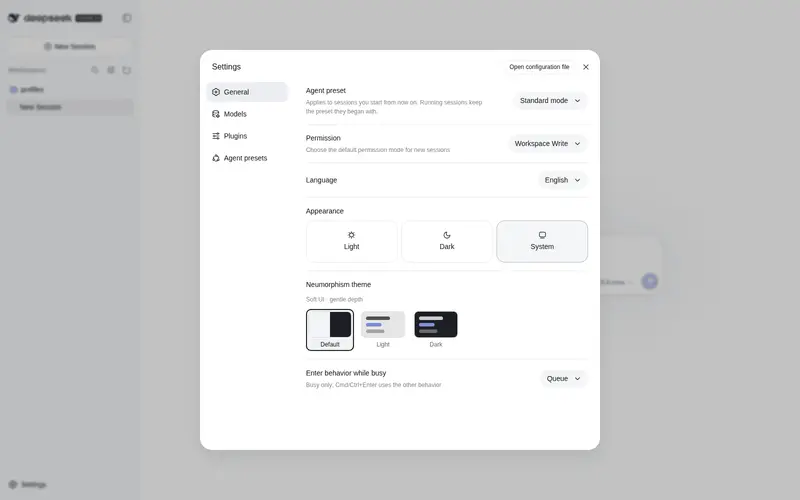
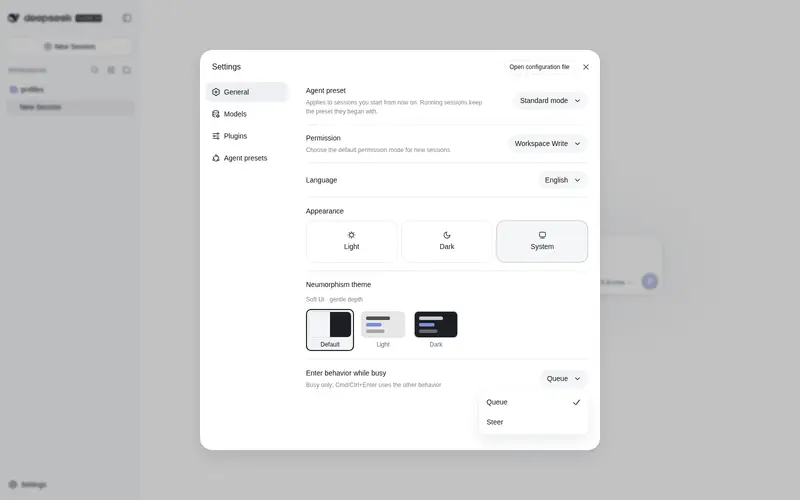
@media (prefers-reduced-motion: no-preference). - Settings row — Settings → General gains a Neumorphism picker (Default / Neu Light / Neu Dark), persisted in localStorage.
- Default is pristine — selecting Default (or having no saved skin) leaves the document exactly as dsh ships it: no injected stylesheet, no body attribute, native colors and shadows.
Preview
Neu Light

Neu Dark

Install
Install the published package into a dsh profile (works with the web
profile):
dsh plugin --profile web add dsh-neu-theme
# or install manually in the web profile:
cd ~/.dsh/profiles/web
pnpm add dsh-neu-theme
The package is also available on npm.
Then add "dsh-neu-theme" to dsh.profile.bundles in the profile’s
package.json, and restart dsh web.
Once running: Settings → General → Neumorphism theme → pick
Default / Neu Light / Neu Dark. The choice is stored in
localStorage under dsh-neu:skin (clear the key to go back to the
built-in appearance).
Develop
npm run build   # regenerates lib/client.js from src/client.tpl.js + themes/*.json
npm run check   # syntax-checks the built bundles
While dsh web runs with the HMR chain mounted, rebuilding
lib/client.js is picked up by the polling watcher and hot-reloads only
this plugin’s fiber.
Repository layout
dsh-neu-theme/
├── package.json          # dsh.bundle.patch + dsh.client manifest
├── cordis.patch.yml      # loader entry insert (id: neu-theme)
├── themes/               # neu-light.json / neu-dark.json — the palettes
├── src/
│   ├── index.js          # host half (no-op loader entry)
│   └── client.tpl.js     # browser half template (build injects themes)
├── scripts/build.mjs     # zero-dependency build
└── lib/                  # generated artifacts (gitignored)
License
MIT
Frequently Asked QuestionsFAQ
Use the verified command dsh plugin --profile default add github:Lhy723/dsh-neu-theme in a DSH-enabled shell. The command resolves the public package metadata and keeps the plugin attached to the catalog identity shown on this page.
Compatibility follows the bundle and profile status shown above. If a profile is not detected, keep the plugin disabled there and check the repository documentation before enabling it in production.
The GitHub link and activity metadata are the source of truth for releases and maintenance. Revisit this page after a new release to confirm the catalog has observed the latest version.