lyq3/dsh-skin-nebula
Anime skin pack for DeepSeek Harness Web UI: 5 AI-generated HD themes, top-right switcher, adjustable transparency · DSH 动漫皮肤包
Listed
0
Theme
Bundle verified
Preview
What it does
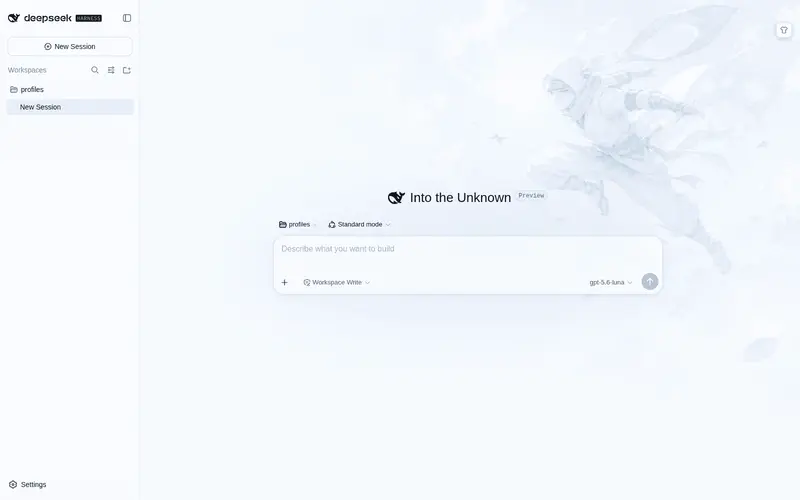
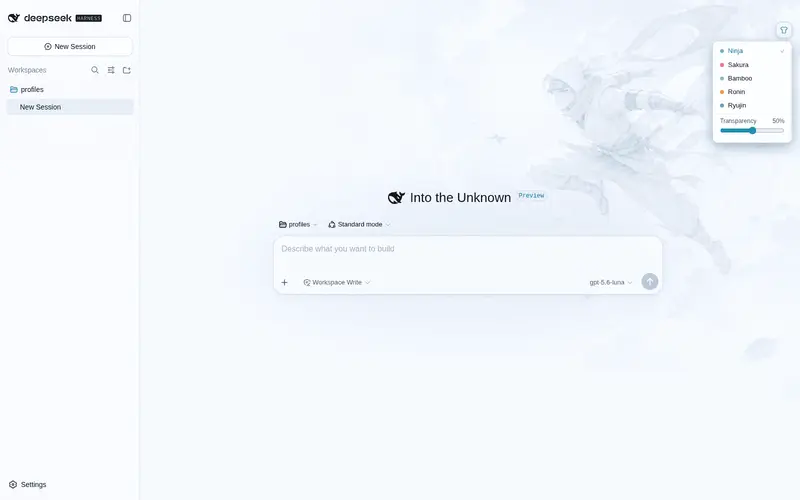
Anime skin pack for the DSH Web UI: five AI-generated HD themes (Ninja, Sakura, Bamboo, Ronin, Ryujin) with per-theme accent palettes, a top-right shirt-icon switcher, and an adjustable transparency slider.
Best for
- DSH Web users who want an anime-styled interface with translucent surfaces.
- Users who want five selectable visual themes covering both light and dark modes.
- Users who want to adjust how strongly background artwork shows through and retain the choice per browser.
Not ideal for
- Headless or non-Web DSH workflows where visual theming adds no value.
- Users who prefer the stock, distraction-free interface or do not want prominent background artwork.
- Deployments requiring a stable UI contract across release-candidate upgrades; DSH client APIs or theme tokens may change.
- Users who need theme preferences synchronized across browsers, since they are stored in each browser's localStorage.
README
dsh-skin-nebula
| English | 中文 |
Anime skin pack for the DeepSeek Harness Web UI — translucent surfaces over AI-generated HD artwork, a shirt-icon switcher at the top right to pick between five built-in skins, and an adjustable transparency slider.
Skins
| Skin | Accent | Dark artwork | Light artwork |
|---|---|---|---|
| Ninja | neon cyan | moonlit ninja over a cyberpunk skyline | white-clad ninja in a bright sky |
| Sakura | rose | kunoichi on a torii gate under a blood moon | sakura kunoichi in a pastel sky |
| Bamboo | emerald | night bamboo grove, emerald blade and fireflies | misty morning bamboo with sunbeams |
| Ronin | amber | wandering ronin against the last ember of dusk | golden-hour countryside |
| Ryujin | indigo | eastern dragon coiling through a night storm | white dragon gliding among sunlit clouds |
The dropdown also has a transparency slider (0-100%, default 50%): higher = more artwork showing through; menus and popovers keep a readability floor. Skin choice and transparency persist in localStorage per browser. Both color schemes (light/dark) are covered by every skin; the backdrop follows body[data-ds-dark-theme] automatically.
Preview
| Dark | Light | |
|---|---|---|
| Ninja |  |
 |
| Sakura |  |
 |
| Bamboo |  |
 |
| Ronin |  |
 |
| Ryujin |  |
 |
Install
From GitHub (recommended):
dsh plugin --profile web add github:lyq3/dsh-skin-nebula
From a local checkout:
dsh plugin --profile web add file:/path/to/dsh-skin-nebula
Ensure dsh-skin-nebula is listed in the profile’s dsh.profile.bundles (the dsh plugin add command does this automatically), then restart dsh.
Upgrade: re-run the same add command (for github: installs, add github:lyq3/dsh-skin-nebula pulls the latest main), then restart dsh.
Uninstall: dsh plugin --profile web remove dsh-skin-nebula and drop the entry from bundles.
How it works
-
index.mjs— host plugin: registers the/skin-nebulaprefix route on the dsh webserver to serve artwork fromassets/(prefix routes must be registered without a trailing slash). -
client/client.js— browser plugin (__ModuleLoader__bundle, hand-written, no bundler):- one
ctx.theme.overrideTokens()layer per active skin, covering the--dsw-alias-*semantic tokens and the--dsw-static-neutral-bluish-*surface scale (the sidebar and some panels read statics directly and would otherwise stay stock gray); every value is a{ light, dark }pair so neither scheme bleeds into the other, and re-calling with the same source swaps the whole layer atomically on skin switch; - a body-level backdrop stylesheet (no product DOM selectors);
- the switcher registered in the
shell.overlayslot, with zh/en dictionaries through the optionallocaleservice.
- one
-
assets/— ten 1536×1024 artworks (dark + light per skin) generated with gpt-image-2. -
cordis.patch.yml— inserts the host plugin into the profile’s bundle layer.
Compatibility
Built against @deepseek-ai/dsh 0.1.0-rc.6 (Developer Preview) and re-verified on 0.1.0-rc.7 — the --dsw-alias-* and --dsw-static-neutral-bluish-* token inventories are unchanged between the two. rc releases may still break the dsh.client contract or the token inventory; if the skin stops applying after a dsh upgrade, re-check the alias/static token names against dsh-client-ui-theme’s style sheets first.
License
MIT
Frequently Asked QuestionsFAQ
Use the verified command dsh plugin --profile default add github:lyq3/dsh-skin-nebula in a DSH-enabled shell. The command resolves the public package metadata and keeps the plugin attached to the catalog identity shown on this page.
Compatibility follows the bundle and profile status shown above. If a profile is not detected, keep the plugin disabled there and check the repository documentation before enabling it in production.
The GitHub link and activity metadata are the source of truth for releases and maintenance. Revisit this page after a new release to confirm the catalog has observed the latest version.