omdsh-dev/dsh-kb-sieve
DSH knowledge-base plugin: build audit-able KB packs (references + SQLite FTS5) from md/txt/docx/pdf, deterministic retrieval (kb_query) and original-text reading (kb_read), zero-script generated skills. Apache-2.0.
Listed
2
Memory
Bundle verified
Preview
What it does
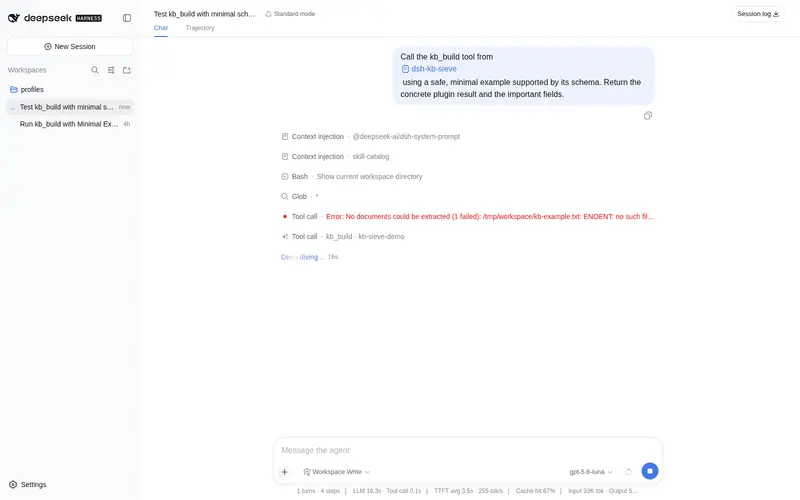
Build auditable KB packs (SQLite FTS5) from md/txt/docx/pdf with deterministic retrieval and original-text reading.
Best for
- Teams building auditable, deterministic knowledge packs from Markdown, text, DOCX, and PDF collections.
- Agents that need lexical FTS5 retrieval with document and line-level evidence, followed by original-text reading.
- Projects wanting incrementally rebuilt, dynamically discoverable DSH skills whose generated packs contain data but no scripts.
Not ideal for
- Workflows requiring semantic or embedding-based retrieval; querying is deliberately lexical and deterministic.
- Memory-constrained builds of very large documents without tuning extraction concurrency; a documented 32 MB case peaks around 0.6–2 GB.
- Source collections outside the supported `.md`, `.txt`, `.docx`, and `.pdf` formats.
README
@dsh-external/dsh-kb-sieve
知识库筛子——把文档做成可审计、确定性检索的知识库插件(DSH 版 kb-sieve)。
三个工具,纯计算(零子代理、零 workflow、零外部服务):
| 工具 | 干什么 | 核心机制 |
|---|---|---|
kb_build |
文档 → 知识包(支持增量) | 抽取(md/txt/docx/pdf,并发 4 可调)→ 分词 → references/ 原文 + kb.sqlite(FTS5,BM25 title=10/body=1)→ manifest + SKILL.md + build_state.json |
kb_query |
确定性检索 | FTS5 BM25 → 精确标识符匹配(标准号/章节号/型号)→ 文档类型加权 → 窗口密度重排 → 行级定位(doc_id+行号+匹配行)→ OOV 越界门 → 置信度 |
kb_read |
原文精读 | around(自动章节边界)/ sections(文档地图)/ find / jump / 命中标记 |
为什么是”干净的方式”
原版 kb-sieve 生成的 skill 自带 Python kbtool 脚本 + 包装器 + 可选 PyInstaller 二进制。
本插件把运行时(检索/精读)搬进插件工具(TS),生成的 skill 是纯数据:
SKILL.md 指令 + references/ + kb.sqlite——零脚本、零 Python、零依赖。
安装与使用方式
装进任意 profile(把 <profile> 换成 tui / headless / web 或自建 profile;
需要支持 dsh plugin 子命令的 dsh 版本):
# 安装
dsh plugin --profile <profile> add git+https://github.com/dsh-external/dsh-kb-sieve.git
dsh --profile <profile>        # 重启生效:kb_build / kb_query / kb_read 随 profile 注入

# 更新 / 卸载
dsh plugin --profile <profile> update
dsh plugin --profile <profile> remove @dsh-external/dsh-kb-sieve
# 或:从 profile 的 package.json 移除依赖后 dsh plugin --profile <profile> update
peer 依赖(@deepseek-ai/dsh-tools、cordis)由 dsh 组合提供;运行时仅需 fflate
(docx 抽取),由插件安装流程一并安装。
用法一:构建 + 动态加载(推荐)
对模型说人话:「把这些文档做成知识库」并给出文档路径。kb_build 默认输出到
当前项目根目录的 .dsh/skills/<name>/(最近的 .git 目录,或当前工作目录
之下)——这正是 DSH skill 系统的监听根目录:
- DSH 动态发现新 skill(目录热更新,下一轮对话模型目录里即出现该知识库)
- 模型加载 skill 后按 SKILL.md 指引调用
kb_query/kb_read(pack 路径) - skill 内容按需加载(每次调用重读文件,无缓存失效问题)
用法二:构建到任意目录 + 工具直查
kb_build 传 out 指定输出父目录;之后随时用 kb_query/kb_read 指定 pack 路径查询。
用法三:查询旧知识包
kb_query/kb_read 读的是 kb.sqlite + references/ —— schema 与原版 Python kb-sieve
产物一致,原版构建的知识包可直接查询。
开发与检查
pnpm install        # typescript/@types/node + fflate(docx 抽取)
pnpm run typecheck  # tsc -b,类型从 sibling deepseek-harness checkout 解析
回归测试(test/)与开发脚本(scripts/)不随本仓库发布(见 .gitignore)。
源码即运行时:包入口直接指向 src/index.ts,无构建步骤。profile 安装的副本位于
node_modules 下,由 dsh 源码启动器的 tsx hook 加载(Node 原生类型剥离拒绝
node_modules 内的文件);源码 checkout 在 node_modules 外直跑时也可用原生类型剥离
(Node ≥22.19,与 harness engines 一致;原生剥离默认开启自 22.18)。要求
erasable-only TS 语法。
工具参数
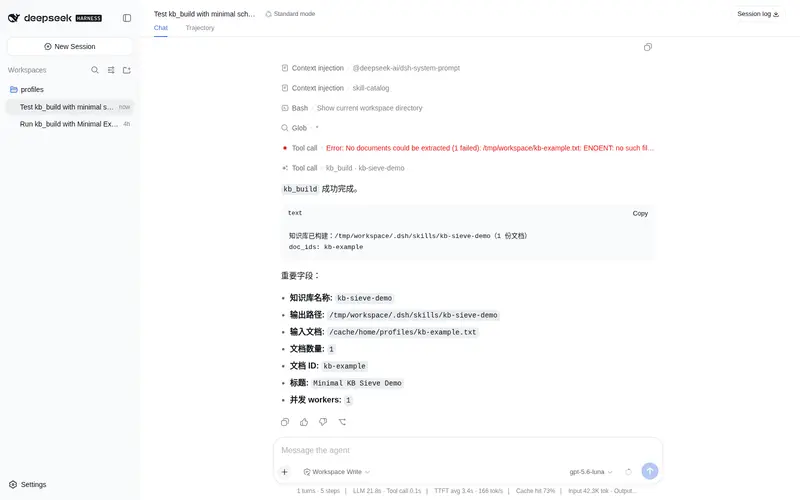
kb_build:name(必填,小写字母/数字/连字符)+ inputs(必填,文档路径数组,
.md/.txt/.docx/.pdf)+ out(可选输出父目录)+ title(可选)+ force(可选,
false=自动增量)+ workers(可选,抽取并发 1-8,默认 4)。
输出:{ok, skill_root, skill_name, doc_count, doc_ids, errors}。
增量构建:有 build_state.json 时(force=false 缺省)自动增量——按源文件字节指纹 +
抽取文本指纹判定四态:unchanged(跳过)/ changed(删旧行+重插)/ new(插入)/
removed(按路径比对删除)。实测:50 文档集改 1 个 ≈ 46ms(全量 483ms);全不变
≈ 150-470ms。已删除文档的 line_fts 旧行保留为孤儿(rowmap 显式过滤保证正确),
force: true 全量重建时回收。
内存控制:构建按文档流水线(抽取并发 → 完成即落库即释放),正文 token 化逐行
流式(O(行) 内存),SQLite 写入 5 万行分批提交。32MB 文档构建峰值约 0.6-2GB;
内存紧张时调小 workers。
kb_query:pack(必填,知识包路径)+ query(必填)+ limit(可选,默认 10)+
doc_ids(可选,逗号分隔限定范围)。输出:compact 摘要
{tool, cmd, query, status, fts_match, results:[{file, doc_id, title, score, matches:[{line, text}]}], next_action, oos_reason?, warning?}。
kb_read:pack + doc_id(必填)+ around/sections/find/after/jump/
start/count/tokens/expand。输出:逐行原文 + 命中标记。
行号是内部定位用的虚拟行号(doc.md 物理行号,供 kb_read 精读定位);生成的 SKILL.md 指引模型回答时引用章节名(如「第 D21.3 节」)而非行号——行号对读者 无意义,且大文档中精确行号追踪容易出错。
构建产物(知识包)
<pack>/
├── SKILL.md            # 生成的 skill 指令(零脚本;frontmatter: name/description)
├── manifest.json       # 全部文档 doc_id/标题/路径/哈希
├── kb.sqlite           # docs + doc_fts(external-content FTS5,title=10/body=1)
│                       # + line_text(text_lower/is_heading 列)/line_rowmap/line_fts(行级二级索引:
│                       #   行匹配 SQL 子串扫描、密度事件算法、置信度摘要)
└── references/<doc_id>/
    ├── doc.md          # frontmatter + 目录 + 统计 + 全文(行号基准 = doc.md 物理行号)
    ├── metadata.md     # 源文件/版本/哈希
    └── structure_report.json
与原版 kb-sieve 的差异(有意裁剪)
| 原版 | 本插件 |
|---|---|
| Python + 生成 skill 内嵌 kbtool 脚本/PyInstaller 二进制 | 纯 TS 插件工具,生成 skill 零脚本 |
| 增量构建 / fingerprint / 别名 / 图边 / LLM 变体 / TSV 索引 | v1 不做(全量重建 + --force 语义;kb_query 兼容原版 kb.sqlite) |
runs/*.md 审计文件 |
工具结果本身即会话审计轨迹(会话历史持久化) |
--preset quick/standard |
已实现为 limit 参数(原版 preset 无实际逻辑) |
设计说明
- 确定性:同样的输入产出同样的知识包;检索纯词法(BM25 + 密度窗口),无 LLM 参与、无随机性。
- 没有侵入:只注册工具,不碰 agent-loop / TUI / system-prompt;知识包是纯数据。
- 大语料可用:external-content FTS5 + 预分词 + 行级二级索引(line_text + line_rowmap + contentful line_fts)。查询主路径全索引化且语义与原版等价: 行匹配 = 每候选文档一次 SQL 子串扫描(instr 命中预小写的 text_lower 列, 流式 top-10 不物化命中集,与原版小写子串语义逐位一致); 窗口密度重排 = 命中行事件算法(窗口槽 ∈ [l-20, l-1],每个命中行至多 4 个槽, 成本 O(命中行数),与文档总行数解耦;仅计纯字母 token,与原版 [a-z]+ 窗口语义一致); 置信度 token 覆盖/整句命中 = 行扫描过程中的流式摘要(covered 集合 + phraseHit)。 kb_read 全部模式走 line_text 精准 SQL(sections 走构建时物化的 is_heading 列——标题判定单一来源(src/heading.ts),索引点查;around/find/jump/range 范围读 + (doc_id, line_number) 索引),32MB/86 万行文档下 sections ~1ms、 around ~3ms、find/jump 1-2ms;单文档查询 108-173ms;无变化增量构建 0.2-2s; 索引布局升级时触发一次全量重建(32MB/86 万行约 12s)。
-
向后兼容:无行索引的旧包(含原版 Python kb-sieve 产物)自动回退全文扫描路径;
缺 text_lower 列或行号基准过旧的库,下次构建时由
build_state.index_version门控触发一次性全量重建(行号重排到 doc.md 物理行、text_lower 按 JS 语义重写); 未重建前查询会返回warning提示行号基准过旧。 - 安全:kb_read 拒绝路径穿越;kb_build 输入/输出路径解析相对当前工作目录。
License
Apache License 2.0 — see LICENSE. Copyright 2026 dsh2026.
Frequently Asked QuestionsFAQ
Use the verified command dsh plugin --profile default add github:omdsh-dev/dsh-kb-sieve in a DSH-enabled shell. The command resolves the public package metadata and keeps the plugin attached to the catalog identity shown on this page.
Compatibility follows the bundle and profile status shown above. If a profile is not detected, keep the plugin disabled there and check the repository documentation before enabling it in production.
The GitHub link and activity metadata are the source of truth for releases and maintenance. Revisit this page after a new release to confirm the catalog has observed the latest version.