ovdoesw/dsh-xiangqi
DSH 中国象棋消遣插件:卡通小宠物邀请你在 AI 思考间隙下棋,内置引擎 + 中文记谱 + LLM 点评
Listed
1
Fun
Bundle verified
Preview
What it does
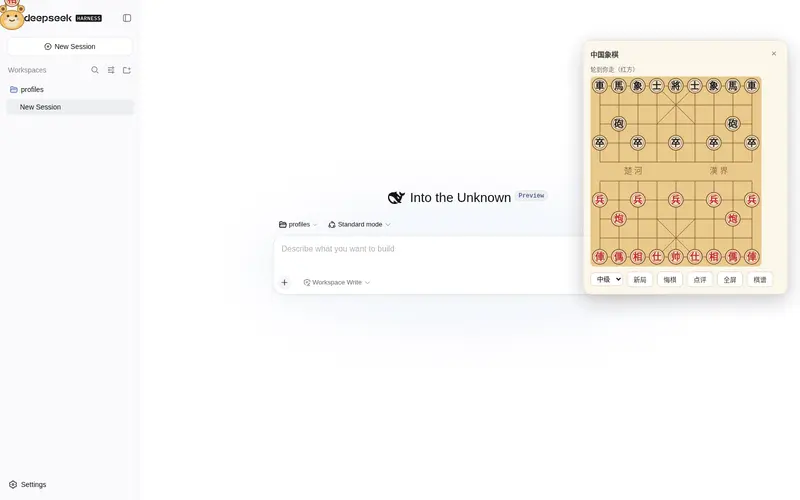
A draggable mascot invites you to play Xiangqi (Chinese chess) while the AI thinks, with a built-in engine, move-record export, and optional multi-model commentary.
Best for
- DSH Web users who want a casual Xiangqi game during agent wait time.
- Beginners or casual players who value offline play, adjustable difficulty, undo, and move-record export.
- Players who want optional LLM commentary while retaining an offline local engine.
Not ideal for
- Strong or competitive players seeking a high-strength engine or complete Asian repetition adjudication.
- Users looking for online multiplayer, an external UCI engine, or deep opening-book learning.
- Offline users who require LLM commentary; commentary depends on network access and tokens.
README
dsh-xiangqi


深度求索 Harness (DSH) Web 客户端插件:一个”AI 思考时可以下中国象棋”的消遣宠物。
一只卡通小宠物(抱着一枚”象”字棋子)悬浮在 DSH Web GUI 上,邀请你在 AI 思考的空档下棋。内置自写引擎(negamax + α-β + 迭代加深),并对局中即时提供”天天象棋定式名 + 三国杀风格击杀台词”,可选叠加多模型 LLM 局势点评。
- 玩法:纯消遣的人机对弈,跟对话 agent 完全独立,绝不阻塞主循环。
- 完全离线可玩:本地规则引擎负责走法与台词;LLM 点评仅作可选的锦上添花。
安装
插件是一个 Cordis 客户端插件包。源码托管在 GitHub:https://github.com/ovdoesw/dsh-xiangqi
# clone 源码并构建产物
git clone https://github.com/ovdoesw/dsh-xiangqi.git
cd dsh-xiangqi
npm install
npm run build        # 产出 lib/client.js + lib/index.js
装载方式见 INTEGRATION.md 的 cordis.patch.yml 配置与 dsh plugin 命令(本地开发可用 link: 指向本目录)。
纯 Node 环境即可
npm test跑核心层与 AI 层单测,无需 DSH 前端环境。
功能
- 悬浮宠物:拖拽可移动,位置会持久化;悬停时棋子升起 + 随机邀请气泡。
- 小面板棋盘:点击宠物展开;支持点选走子、难度切换、新局、悔棋、点评、放大全屏。
-
全屏棋盘:可放大到全屏对弈,
Esc收起;背板保持点击穿透,不影响底层应用。 - 本地台词:开局定式名(当头炮 / 仙人指路 / 屏风马 / 顺手炮 / 列手炮…)、三国杀风格击杀与将军/绝杀台词,全部离线即时触发。
- LLM 局势点评(可选):每步自动点评 + 手动点评按钮,风格可在”专业棋评 / 娱乐主播”间切换。
- 完整状态持久化:进度、难度、宠物位置、设置都会保存在浏览器。
难度分档
| 难度 | 引擎策略 |
|---|---|
初级 easy
|
深度 1 + 随机扰动(从分数接近的若干候选中随机挑一个),适合新手放松 |
中级 medium
|
深度 2 固定搜索 |
高级 hard
|
迭代加深到深度 4 或限时 5 秒 |
搜索以异步分片方式执行,绝不阻塞主线程。
给对弈者的一点坦白:本插件的开发者初学象棋,内置引擎写得不算强(”比较菜”)——它只是一个简化的 negamax + α-β + 迭代加深搜索,加上简单的子力/位置估值。如果你觉得对手棋力不够、下得不过瘾,可以直接让 DSH 里当前这个 AI Agent 帮你调引擎,改完即时生效:
- 想更强:让 Agent 加深
hard的搜索(改src/ai/search.ts的maxDepth或engine.ts的时限),或加强src/ai/evaluate.ts的估值函数(加入开中残局权重、威胁识别、过河兵/肋车等要点)。- 想更休闲:让 Agent 把
easy的随机扰动加大,或降低搜索深度。- 直接说就行,例如:”帮我让高级难度下得更强,别 5 秒就随便应招。”
Agent 能读懂这套纯 TypeScript 引擎代码,就地修改后跑
npm run build重新打包即可。
LLM 点评配置
-
默认:复用 DSH 已配置的 LLM 服务(
ctx.llm,opencode-go provider / 多个模型)。 -
覆盖配置:在插件设置里填入
base / key / model,走 OpenAI 兼容的/chat/completions直连端点。 - 所有 LLM 失败都会静默降级为
null,不会中断或遮挡对局。
目录结构
dsh-xiangqi/
├── src/
│   ├── core/                  # 纯 TS 核心,零依赖(可独立 node --test 单测)
│   │   ├── board.ts           # 9×10 棋盘、棋子表示、初始布局
│   │   ├── moves.ts           # 合法走法生成(马腿/炮架/象眼/九宫/照面/兵卒)
│   │   ├── rules.ts           # 将军、将杀、困毙、重复局面简化仲裁
│   │   ├── openings.ts        # 开局定式库与识别
│   │   ├── flavor.ts          # 三国杀风格击杀台词
│   │   └── fen.ts             # FEN 序列化 / 反序列化
│   ├── ai/                    # 纯 TS 引擎(零依赖)
│   │   ├── evaluate.ts        # 子力 + 位置分估值
│   │   ├── search.ts          # negamax + α-β + 迭代加深
│   │   └── engine.ts          # 难度分档封装 + 异步 getBestMove
│   ├── client/                # DSH 客户端(React + Cordis overlay)
│   │   ├── store.ts           # defineStore:局面/历史/难度/胜负/面板/宠物/设置
│   │   ├── game.ts            # 纯 FEN 游戏助手(可单测,无 React/Cordis 依赖)
│   │   ├── comment.ts         # LLM 点评调用与编排
│   │   ├── inject.ts          # 注入到各组件的 XiangqiInject 契约
│   │   ├── index.tsx          # 组装 Mascot + BoardPanel + FullscreenBoard 的根
│   │   ├── Mascot.tsx         # SVG 卡通宠物(悬停动画 + 气泡 + 拖拽)
│   │   ├── BoardPanel.tsx     # 小面板浮窗棋盘
│   │   ├── FullscreenBoard.tsx# 全屏棋盘
│   │   ├── board.tsx          # 共享棋盘渲染(网格/楚河汉界/走子提示)
│   │   └── pieces.tsx         # 棋子 SVG(红黑汉字)
│   ├── client.ts              # ./client 入口:转导 apply/inject
│   └── plugin.ts              # apply(ctx):slots.register shell.overlay
├── test/                      # node --test 单测(core + client game helpers)
├── package.json               # type:module + dsh 客户端元数据
└── docs/superpowers/specs/    # 设计规格文档
运行测试
核心层与 AI 层均为纯 TS / 纯函数,可用 Node 内置测试器直接跑,无需 DSH 环境:
npm test          # node --import tsx --test test/*.test.ts
npm run typecheck # tsc --noEmit(如需 DSH runtime 类型,需先装载进 DSH 或安装 peer 依赖)
范围边界与已知限制
- 长将 / 长捉为简化版:同一局面出现第三次判将方负;完整亚洲规则仲裁不在 v1 范围。
- 击杀台词为文字呈现,暂无音频播报。
- LLM 点评依赖网络与 token;离线时本地台词仍让体验完整。
- 不做联网对战、不做外部 UCI 引擎(Stockfish 等)、不做开局库深度学习。
许可证
MIT
Frequently Asked QuestionsFAQ
Use the verified command dsh plugin --profile default add github:ovdoesw/dsh-xiangqi in a DSH-enabled shell. The command resolves the public package metadata and keeps the plugin attached to the catalog identity shown on this page.
Compatibility follows the bundle and profile status shown above. If a profile is not detected, keep the plugin disabled there and check the repository documentation before enabling it in production.
The GitHub link and activity metadata are the source of truth for releases and maintenance. Revisit this page after a new release to confirm the catalog has observed the latest version.