Rain-Shuoyu/dsh-client-deep-sneak
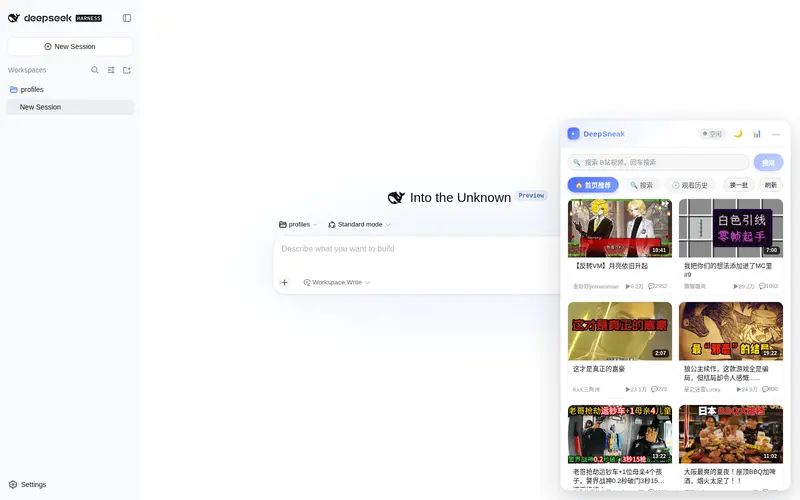
DeepSneak(深度摸鱼)是专门为 DeepSeek Harness 设计的插件,在 agent 工作时播放 B 站视频,并在 agent 需要操作时暂停并提醒用户,方便摸鱼的同时避免因为没有发现 agent 被阻塞而影响效率
Listed
2
Fun
Bundle verified
Preview
What it does
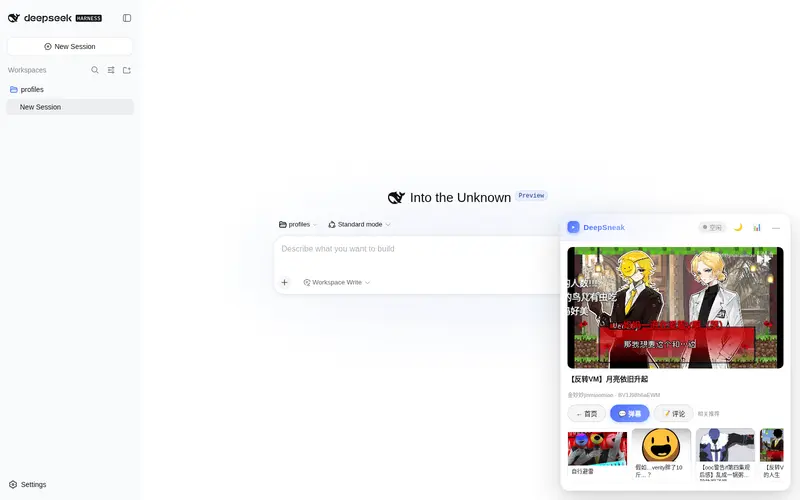
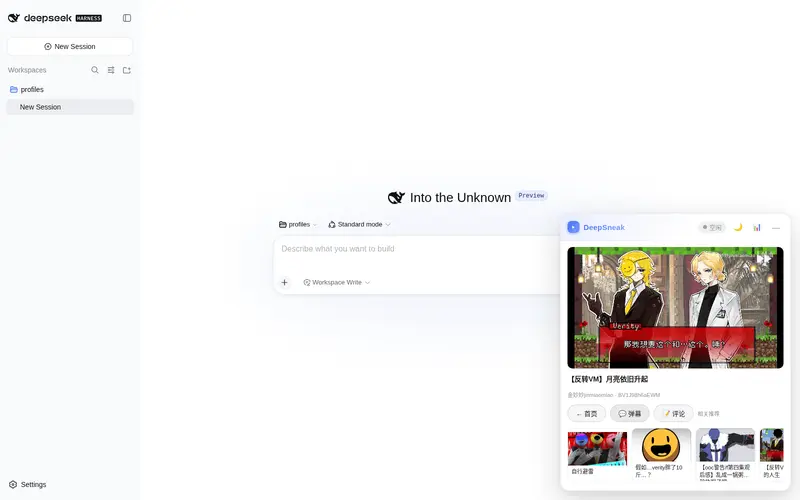
Slacking-off companion: a floating mini player that streams Bilibili videos (native player, danmaku, comments, search) and pauses when your agent needs you, resuming exactly where you left off.
Best for
- DSH Web users who watch Bilibili while waiting for agents to finish.
- People who want video to pause automatically when an agent completes, blocks, asks a question, or requests permission.
- Bilibili viewers who want search, danmaku, comments, local history, and exact resume position in a floating player.
Not ideal for
- Users who do not watch Bilibili or do not want entertainment embedded in their work interface.
- Viewers requiring quality above 720p; the unauthenticated Bilibili API limits available quality.
- Non-Web DSH surfaces; this is a DSH Web client plugin.
- Environments below the documented Node.js 18 minimum.
README

🐟 DeepSneak
右下角小窗看 B站 · agent 需要你时自动暂停提醒 · 处理完回来从原位置精确续播






✨ 功能一览
| 🏠 首页推荐 B站真实推荐流,免登录 |
▶️ 原生播放器 拖动 / 倍速 / 进度可控 |
⏸️ 精确续播 agent 提醒后原位置继续 |
| 💬 弹幕 滚动弹幕与播放同步 |
📝 评论区 播放页下方浏览,加载更多 |
🔗 相关推荐 横滑换片不中断 |
| ☀️/🌙 双主题 白天 / 黑夜一键切换 |
📊 摸鱼统计 今日 / 本周 / 累计时长 |
🔔 智能提醒 完成 / 阻塞 / 权限 / 提问 |
| 🟢 状态徽标 工作中 / 空闲 / 需要你 |
🔎 视频搜索 关键词搜全网,分页浏览 |
🕘 观看历史 本地记录,未看完续播 |
📦 安装
环境要求
- DeepSeek Harness (DSH) Web
- Node.js ≥ 18
一键安装(推荐)
# 在 DSH 部署目录(含 cordis.yml 的 profile,如 ~/.dsh/profiles/web)执行
dsh plugin --profile web add dsh-client-deep-sneak
或安装 dsh-market,在设置 → 插件市场里搜索 DeepSneak 一键安装。
手动安装
# 1. 在 DSH 部署目录(含 cordis.yml 的 profile,如 ~/.dsh/profiles/web)安装
cd ~/.dsh/profiles/web
npm install dsh-client-deep-sneak
# 2. 编辑该目录下的 cordis.patch.yml,追加:
- insert:
    - id: deep-sneak
      name: dsh-client-deep-sneak
# 3. 重启
npx @deepseek-ai/dsh web
刷新页面,右下角即出现 DeepSneak 小窗。
🚀 快速上手
- 看视频:首页推荐流点任意卡片 → 原生播放器自动播放,弹幕同步滚动
- 搜视频:看板顶部搜索框输入关键词(或点「🔍 搜索」tab),结果卡片带时长 / 播放 / 弹幕数,支持翻页
- 摸鱼:让 agent 开始干活,一边看一边等
- 被打断:agent 需要你时视频自动暂停 + 半透明蒙版提醒,点「回到对话」去处理
- 续播:点「继续看视频」→ 从原位置精确续播
- 个性化:☀️/🌙 切换主题,📊 查看今日 / 本周 / 累计摸鱼时长
- 观看历史:点「🕘 观看历史」看最近 50 条;未看完从上次进度继续,看完的下次从头播
⚙️ 配置
无需任何配置,安装即用。以下偏好自动保存(localStorage):
| 偏好 | 入口 |
|---|---|
| 主题(白天 / 黑夜) | 标题栏 ☀️ / 🌙 |
| 弹幕开关 | 播放页「💬 弹幕」 |
| 评论区开关 | 播放页「📝 评论」 |
🛠 工作原理
┌──────────────────────────────────────────────┐
│   DSH Web 页面 · 右下角 DeepSneak 小窗         │
│  ┌────────────┐   ┌───────────────────────┐  │
│  │  首页推荐流  │   │  原生播放器 + 弹幕层    │  │
│  └─────┬──────┘   └──────────┬────────────┘  │
│        │ fetch               │ <video>       │
└────────┼─────────────────────┼───────────────┘
         ▼                     ▼
┌──────────────────────────────────────────────┐
│   Host 半区 · 同源代理路由                     │
│  /dsh-bili/api     JSON(推荐 / 播放 / 评论)  │
│  /dsh-bili/dm      弹幕 XML(gzip 解压)       │
│  /dsh-bili/media   视频流(Range 支持拖动续播) │
└──────────────────────────────────────────────┘
-
agent 联动:通过会话快照(
useSessions)实时感知 agent 状态(权限 / 提问 / 完成 / 阻塞),触发暂停 + 蒙版 + Toast 提醒 -
精确续播:提醒时对
<video>执行pause()(元素保持挂载、进度不丢),继续时play()原位置恢复 - 摸鱼统计:真实播放时长累计,本地持久化,仅统计播放中的时间
- 观看历史:进度只存在当前浏览器 localStorage(最多 50 条);暂停 / 切视频 / 每 30 秒落盘;播完后进度归零,记录仍保留,下次从头播放
❓ FAQ
为什么最高只有 720p? B站对未登录 API 的画质限制。需要高清 / 弹幕全功能建议同时使用 B站网页版。
为什么不做抖音?
www.douyin.com 返回 X-Frame-Options: DENY + CSP 白名单,任何站点都无法 iframe 嵌入;其网页 API 也需签名鉴权,无免登录公开接口。
弹幕为什么感觉比较简单? 为保证「精确续播」,播放器不使用 B站 iframe,而是通过公开弹幕接口自绘轻量弹幕层,因此弹幕样式为极简风格(滚动 / 顶部 / 底部,支持颜色与字号)。
数据存在哪里? 全部本地(localStorage),不上传任何数据;代理请求仅用于拉取 B站公开内容。主题、弹幕/评论开关、摸鱼统计、观看历史都只保存在本机。
🗺 路线图
- 首页推荐流(免登录)
- 原生播放器 + 精确续播
- 弹幕 / 评论区
- 白天 / 黑夜主题
- 摸鱼统计(今日 / 本周 / 累计 / 近 7 天)
- 观看历史与「上次看到」续播(本地 localStorage,最多 50 条)
- 摸鱼目标提醒(超过阈值提醒你该干活了)
- 弹幕密度 / 字号 / 速度调节
🧑💻 开发
├── lib/
│   ├── index.js      # Host 半区:API / 弹幕 / 视频流代理
│   └── client.js     # Client bundle(手写源码,无需构建)
└── src/dynamic/      # 动态插件原型(bili-1)源码归档
- 客户端 bundle 为纯手写 JavaScript(
__ModuleLoader__格式),无需构建步骤,改完直接提交即可 - 本地快速体验:在 DSH 会话内以动态插件方式运行原型(见
src/dynamic/)
📄 License
Frequently Asked QuestionsFAQ
Use the verified command dsh plugin --profile default add github:Rain-Shuoyu/dsh-client-deep-sneak in a DSH-enabled shell. The command resolves the public package metadata and keeps the plugin attached to the catalog identity shown on this page.
Compatibility follows the bundle and profile status shown above. If a profile is not detected, keep the plugin disabled there and check the repository documentation before enabling it in production.
The GitHub link and activity metadata are the source of truth for releases and maintenance. Revisit this page after a new release to confirm the catalog has observed the latest version.