Rxiain/dsh-openviking
面向 DeepSeek Harness 的 OpenViking 检索、资源管理、自动召回与会话记忆插件
Listed
4
Memory
Bundle verified
Preview
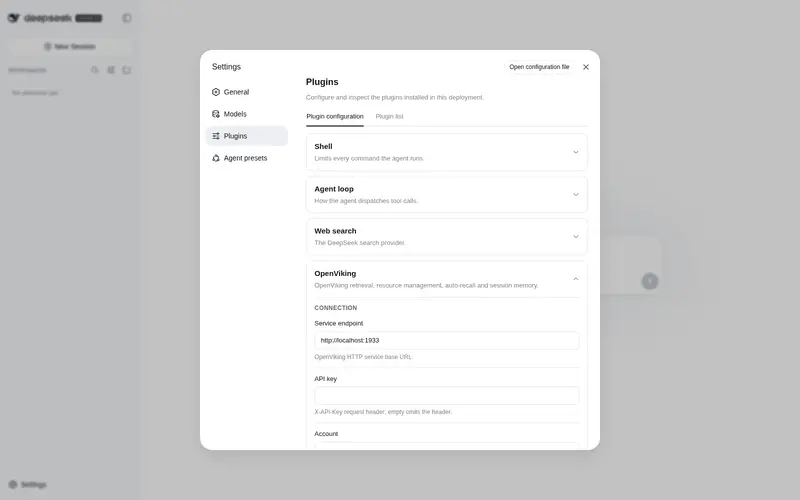
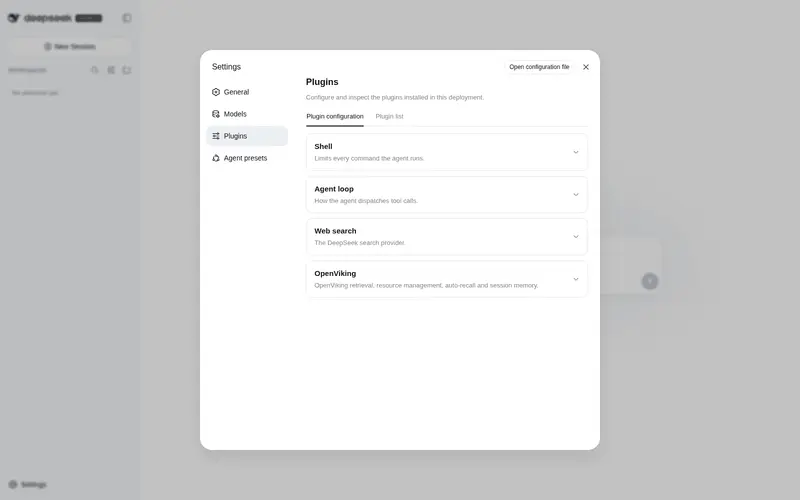
What it does
Semantic retrieval, resource management, auto-recall (user + agent dual spaces) and session memory for DeepSeek Harness: memsearch/memfind/memread/membrowse/memgrep/memglob over viking:// URIs, memadd/memremove resource management, memqueue observer status, memcommit session capture, and memlearn skill playbook minting.
Best for
- DeepSeek Harness users who need semantic search across memories, documents, and indexed resources addressed by viking:// URIs.
- Long-running agent workflows that benefit from automatic user/agent memory recall and periodic session capture.
- Teams that want reusable procedures or skill playbooks distilled from prior sessions.
Not ideal for
- Setups without a reachable OpenViking service or a supported Node.js version (^22.19.0 or >=24.0.0).
- Workflows needing only simple local keyword search, with no semantic retrieval or persistent memory.
- Users unwilling to maintain an external memory service and its account, API-key, and tenant configuration.
README





| 简体中文 | English |
dsh-openviking
面向 DeepSeek Harness 的 OpenViking 检索、资源管理、自动召回(user + agent 双空间)与会话记忆插件
功能
| 工具 | 功能 |
|---|---|
memsearch |
语义搜索(auto/fast/deep;deep 使用会话上下文) |
memfind |
快速语义查找,不带会话上下文 |
memread |
读取viking:// URI(abstract/overview/read/auto) |
membrowse |
浏览viking:// 文件系统(list/tree/stat) |
memgrep |
精确/正则内容搜索(默认viking://resources/) |
memglob |
按 glob 模式枚举文件 |
memadd |
在viking://resources/ 下添加远程 URL 或本地文本文件 |
memremove |
删除资源——需字面量confirm: true
|
memqueue |
查看观察者队列状态 |
memcommit |
提交当前会话并提取持久记忆 |
memlearn |
主动沉淀经验:写/合并记忆或铸 skill playbook;脱敏+查重+即时注入当前会话 |
另含:已索引仓库上下文注入、通过上下文注入通道自动召回、会话同步 + 自动提交。
流程经验自动召回
对审计、恢复、补偿、重放、验证、修复、诊断、迁移和步骤化流程问题,插件会在普通全局召回之外启用 procedure lane。它从缓存的用户记忆树中先筛选路径包含 方法论、playbook、workflow、runbook、pattern、case 或 skill 等标记的叶分支,再最多检索 16 个流程分支;每个分支限时 3 秒,失败或超时不会阻断当前模型步骤。若有满足既有相关度阈值的流程候选,最优候选保留一个注入槽位,其余容量才由普通 user/agent 结果填充。总 token 预算、去重、内容长度上限及插件上下文隔离仍然生效。
斜杠命令
| 命令 | 功能 |
|---|---|
/memlearn <lesson> |
人工触发记忆沉淀:与 memlearn 模型工具完全同源的脱敏 / 查重 / 持久化,不开启模型回合,原始输入不进会话日志 |

为什么选择 OpenViking?
| 维度 | 本地文件 / SQLite 方案 | OpenViking 方案(本插件) |
|---|---|---|
| 召回 | 关键词 / FTS5 精确匹配 | 语义检索:向量召回 + L0/L1 摘要层定位 |
| 内容形态 | 只能存自己写进去的文本 | 记忆、资源、技能统一在一个viking:// 虚拟文件系统里;远程 URL、本地文档都能 memadd 入库成为可检索资源 |
| 上下文开销 | 全量注入或手写精简 | L0 摘要(一句话)→ L1 概览(要点)→ L2 全文三层分级,按需加载,省 token |
| 跨工具 | 每个工具一套记忆,彼此孤岛 | 同一套记忆跨工具共享:Claude Code、Codex、MCP 客户端、ov CLI 与 DSH 读写同一个库 |
| 维护 | 靠手工整理 | 观察者队列自动完成嵌入、摘要生成与内容重组(memqueue 可查状态) |
快速开始
# 一键安装(GitHub 仓库,含预构建 lib/,无需构建授权):
sh install.sh [profile-name]          # 默认 profile: dsh-openviking

# 或手动安装:
dsh plugin --profile <name> add github:Rxiain/dsh-openviking
dsh --profile <name>
(在设置的插件配置中也可以配置哦)
配置默认指向 http://localhost:1933。如需覆盖任何设置,请在 profile 的
cordis.patch.yml 中以 id: openviking 写入完整配置(patch 整体替换
config):
- id: openviking
  config:
    endpoint: 'http://localhost:1933'
    # X-API-Key 认证头;为空则省略
    apiKey: !!js process.env.OPENVIKING_API_KEY ?? ''
    # X-OpenViking-Account 租户头;为空则省略
    account: ''
    # X-OpenViking-User 用户头;为空则省略
    user: ''
    # X-OpenViking-Agent agent 标识头;为空则省略
    agentId: 'deepseek-harness'
    # 单次请求超时(毫秒),范围 1000–300000
    timeoutMs: 30000
    # 会话同步状态文件(~ 会展开);只存消息 id,不存正文或密钥
    stateFile: '~/.dsh/openviking/state.json'
    # 将已索引仓库列表注入提示词
    repoContext:
      enabled: true
      # 仓库列表缓存 TTL(毫秒),范围 1000–3600000
      cacheTtlMs: 60000
    # 每个用户消息自动召回一次相关记忆
    autoRecall:
      enabled: true
      # 每回合最多注入的记忆条数,范围 1–50
      limit: 6
      # 补充记忆的最低分数,范围 0–1
      scoreThreshold: 0.15
      # 单条记忆内容上限(字符),范围 100–5000
      maxContentChars: 500
      # 注入预算 ≈ tokenBudget × 4 字符,范围 100–10000
      tokenBudget: 2000
      # 同时检索 agent 空间的 cases/patterns/tools/skills 记忆与技能手册
      agentSpaces: true
      # 同一条消息内每 N 个工具步骤刷新一次,只注入新记忆(0 关闭)
      refreshSteps: 10
      # 记忆库概览:会话启动注入一次,之后每 N 个用户回合刷新(1 = 仅启动,0 = 关闭)
      startupMapEveryTurns: 5
    # 按用户回合节奏自动提交会话
    autoCommit:
      enabled: true
      # 未提交的用户回合达到 N 个即提交(0 关闭回合触发)
      turns: 3
      # 时间兜底:已提交过的会话超过该间隔仍有未提交消息也会提交
      intervalMinutes: 10
创建账号与密钥
管理命令需要 root 密钥(本地服务通常位于 ~/.openviking/root_api_key.txt):
ROOT=$(cat ~/.openviking/root_api_key.txt)
printf '{"url":"http://localhost:1933","api_key":"%s"}' "$ROOT" > /tmp/ov-root.conf
export OPENVIKING_CLI_CONFIG_FILE=/tmp/ov-root.conf

ov admin create-account dsh --admin dsh-admin   # 建账号 dsh + 首个管理员,返回其密钥
ov admin register-user dsh dsh --role user      # 账号 dsh 内注册普通用户 dsh,返回其密钥
ov admin regenerate-key dsh dsh                 # 重新生成密钥(旧密钥立即失效)

unset OPENVIKING_CLI_CONFIG_FILE && rm -f /tmp/ov-root.conf
把返回的密钥填入插件配置的 apiKey,account/user 填对应的账号与用户。
贡献
欢迎贡献:
- Fork 仓库并创建功能分支(
git checkout -b feature/your-change) - 修改代码,并补充或更新测试
- 运行
npm test验证(默认套件无需 OpenViking 服务) - 提交并打开 Pull Request
许可证与致谢
参考了:
Frequently Asked QuestionsFAQ
Use the verified command dsh plugin --profile default add github:Rxiain/dsh-openviking in a DSH-enabled shell. The command resolves the public package metadata and keeps the plugin attached to the catalog identity shown on this page.
Compatibility follows the bundle and profile status shown above. If a profile is not detected, keep the plugin disabled there and check the repository documentation before enabling it in production.
The GitHub link and activity metadata are the source of truth for releases and maintenance. Revisit this page after a new release to confirm the catalog has observed the latest version.