SaiSenBox/dsh-prompt-manager
Session-level multi-prompt library and system prompt injector for DeepSeek Harness Web
Listed
1
Session
Bundle verified
Preview
What it does
Browser-local prompt library with a composer picker for injecting multiple session-scoped system prompts, branch inheritance, bilingual UI, favorites, and JSON backups.
Best for
- Individuals who repeatedly apply the same review, testing, writing, or other system instructions across DSH Web sessions.
- Users who want to combine several session-scoped prompts and preserve them when branching a conversation.
- Browser-centric workflows that need favorites, search, bilingual UI, and portable JSON backups.
Not ideal for
- Teams needing a centrally synchronized or server-hosted prompt library; data stays in the current browser.
- Users who frequently clear site data, change browsers, or change access origins without exporting backups first.
- Workflows needing organization-wide prompt governance rather than personal, session-level injection.
README
dsh-prompt-manager
一个给 DeepSeek Harness Web 用的个人提示词库。
我经常在不同会话里重复输入同一套要求:代码怎么审、测试要覆盖什么、周报按什么结构写。把它们散落在记事本里不太顺手,所以做了这个小插件——常用提示词放在 DSH 里,需要时敲一下 /提示词 就能找到。
界面预览
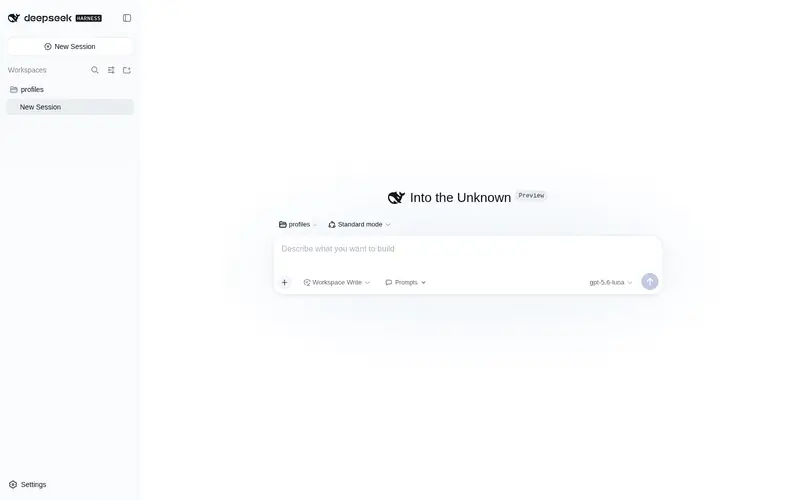
在设置中整理、搜索和备份提示词:

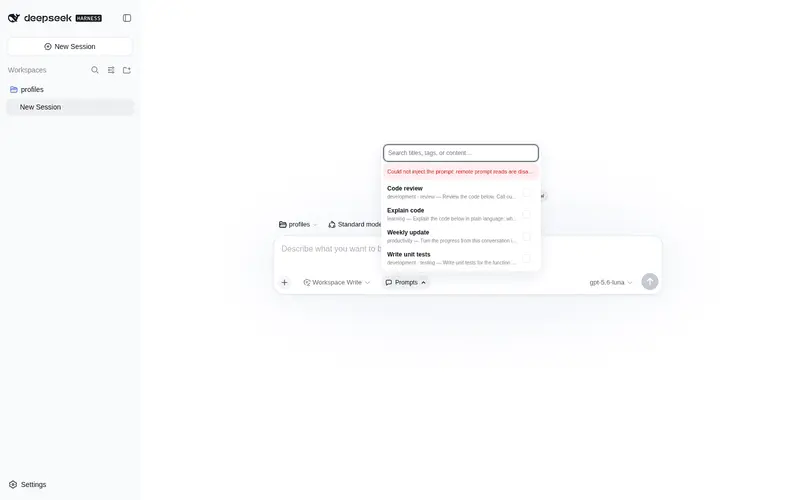
在聊天输入框里快速搜索并选择当前会话要使用的提示词:

能做什么
- 在 设置 → 提示词管理 中新建、编辑、删除和搜索提示词。
- 收藏常用提示词;候选列表也会参考使用次数和最近使用时间排序。
- 在聊天输入框使用
/prompt或/提示词打开提示词列表,也可以直接输入/关键词搜索。 - 聊天输入框的工具栏里有一个“提示词”按钮;展开栏会紧贴按钮显示,可以搜索并同时勾选多条提示词,也能单独移除。
- 启用后按钮会直接显示提示词名称;从当前会话新建的分支会继承提示词,并显示相同状态。
- 把提示词库导出为 JSON 备份,也可以用“合并”或“替换”方式导入。
- 跟随 DSH 的语言设置切换中文或英文。
- 数据只保存在当前浏览器,不会由插件上传到网络。
首次使用会放入 4 条示例提示词,随时可以改掉或删除。
安装
推荐使用 DSH 的插件命令安装 npm 版本:
dsh plugin --profile web add dsh-prompt-manager
安装后重启 DSH Web。
如果是从源码调试,也可以在本项目目录运行:
powershell -ExecutionPolicy Bypass -File .\install.ps1
脚本会把插件复制到 $DSH_HOME/local-plugins/dsh-prompt-manager,加入 Web profile,并安全地补充 cordis.patch.yml。
使用
- 打开 DSH Web 左下角的 设置,进入 提示词管理,这里只负责新建、编辑、整理和备份提示词。
- 点“新建”,填写标题、标签和正文。
{{占位符}}会按普通文本保留,不会被误当成 DSH 内部变量。 - 回到会话输入框,点击访问模式右侧的 提示词 按钮,在弹出的列表中搜索并选择一条或多条提示词。
- 启用后按钮会显示当前提示词名称或启用数量。再次打开列表即可继续添加或单独移除;提示词作为系统指令参与后续请求,不会伪装成聊天消息。
- 也可以输入
/提示词、/prompt或/关键词快速选择。选中后斜杠文本会自动消失。
编辑时可以按 Ctrl + Enter(macOS 为 ⌘ + Enter)快速保存。
备份与隐私
提示词默认保存在浏览器 localStorage 的 dsh-prompt-manager.prompts 键中;每个会话当前启用的提示词集合保存在 dsh-prompt-manager.session-injections 中。因此:
- 同一浏览器的多个标签页会同步;
- 换浏览器、清理站点数据或更换访问地址前,建议先点“导出”;
- 导入“合并”会保留现有条目,同 ID 的备份条目会覆盖旧条目;
- 导入“替换”会用备份完整替换当前提示词库。
系统提示词本身只在当前 DSH 进程内生效;如果 DSH 重启,Web 客户端会从浏览器本地记录为仍存在的会话恢复注入。会话分支继承最近祖先会话的提示词集合,也可以在分支内单独新增或移除其中一条。插件默认只允许本机页面修改注入状态。
插件会校验导入和本地数据。遇到损坏数据或浏览器拒绝写入时,界面会明确提示,不再静默假装保存成功。
卸载
powershell -ExecutionPolicy Bypass -File .\uninstall.ps1
卸载脚本会移除插件和 profile 注册,但会保留浏览器里的提示词数据。
开发检查
npm run check
npm test
npm run pack:check
License
MIT © 2026 SaiSenBox
Frequently Asked QuestionsFAQ
Use the verified command dsh plugin --profile default add github:SaiSenBox/dsh-prompt-manager in a DSH-enabled shell. The command resolves the public package metadata and keeps the plugin attached to the catalog identity shown on this page.
Compatibility follows the bundle and profile status shown above. If a profile is not detected, keep the plugin disabled there and check the repository documentation before enabling it in production.
The GitHub link and activity metadata are the source of truth for releases and maintenance. Revisit this page after a new release to confirm the catalog has observed the latest version.