SenryLee/dsh-frosted-window
Upload an image as a full-window frosted-glass theme for DeepSeek Harness Web.
Listed
1
Theme
Bundle verified
Preview
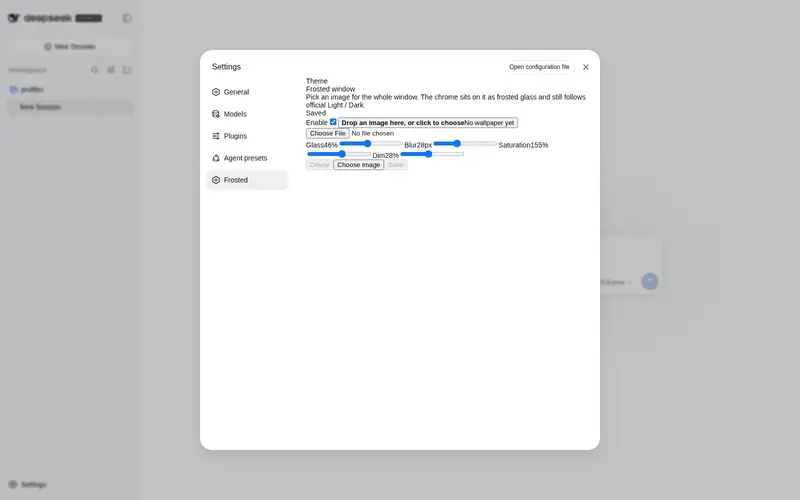
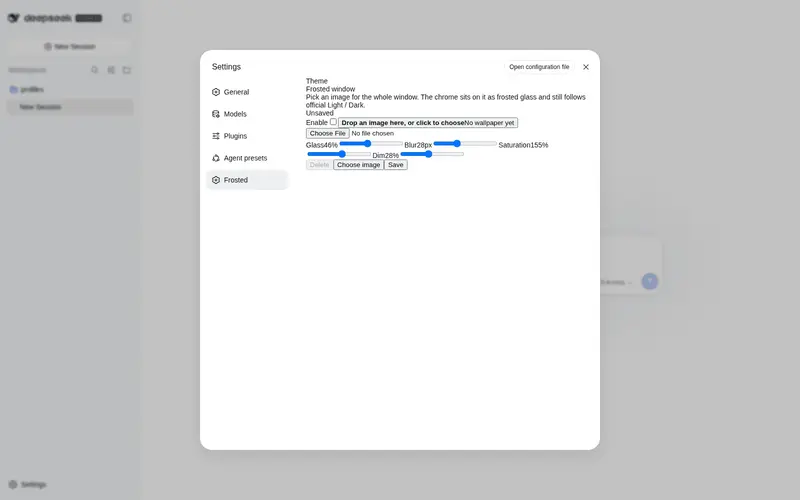
What it does
Upload an image as a full-window frosted-glass theme: sidebar/conversation/details share one frost layer, Save/Delete, official Light/Dark/System stay in charge.
Best for
- DSH Web users who want a personal image as a full-window frosted-glass theme.
- Users who want adjustable blur, density, saturation, and dimming while retaining official Light, Dark, or System mode.
- Privacy-conscious theming workflows that keep images in browser-local storage and do not fetch remote assets.
Not ideal for
- CLI-only or non-Web use, because the plugin changes the DSH Web appearance.
- Users who want URL-hosted or centrally synchronized wallpapers; images are stored locally in IndexedDB.
- Environments where restarting `dsh web` after installation is not practical.
- Storage-constrained browsers handling very large images, since the plugin documents no upload size cap.
README
dsh-frosted-window
| English | 中文 |
A DeepSeek Harness Web theme plugin. Upload an image, fill the window, and sit the sidebar, conversation, and details on one frosted-glass layer. Official Light / Dark / System stay in charge.
dsh plugin --profile web add github:SenryLee/dsh-frosted-window
Restart dsh web, then open Settings → Frosted.

Features
- Local JPEG / PNG / WebP / GIF upload, no file-size cap
- Full-window wallpaper with the same frost on sidebar, conversation, and details
- Sliders: glass density, blur, saturation, wallpaper dim
- Save / Delete so you can preview, then persist, then replace
- Toggle: green on, gray off; turn it off to restore the official look
- Does not steal official appearance:
overrideTokensonly, neversetTheme('custom')
The image lives in IndexedDB; knobs live in localStorage. Nothing is written to $DSH_HOME/settings.yaml, and nothing is fetched from a URL.
Install
dsh web must already run (the usual profile name is web).
A. From GitHub (recommended)
dsh plugin --profile web add github:SenryLee/dsh-frosted-window
pnpm ≥ 10 refuses git prepare scripts until you allow them. If the first add fails, put this in the profile’s pnpm-workspace.yaml (usually ~/.dsh/profiles/web/pnpm-workspace.yaml) and add again:
allowBuilds:
  dsh-frosted-window: true
The repo already ships lib/. Allowing the build only recompiles on a source install.
B. From a Release tarball
No allowBuilds needed:
dsh plugin --profile web add https://github.com/SenryLee/dsh-frosted-window/releases/latest/download/dsh-frosted-window-0.1.0.tgz
If dsh is not on PATH
npx @deepseek-ai/dsh plugin --profile web add github:SenryLee/dsh-frosted-window
pnpm must be on PATH as well.
Use
-
Quit and start
dsh webagain (a page refresh is not enough). - Open Settings at the bottom of the left rail.
- Open Frosted (or the same panel under General, below Appearance).
- Enable the theme, drop an image, tune the sliders.
- Click Save. The chip reads Saved when the next launch will restore it.
Replace: pick another image → Save. Clear: Delete.
Settings → Plugins lists the technical name frosted-window / dsh-frosted-window. Upload lives on the Frosted settings page, not in that catalog.
Uninstall
dsh plugin --profile web remove dsh-frosted-window
Then restart dsh web.
Develop
npm install
npm test
npm run build
Ships as dsh.bundle + dsh.client per the official package-and-install contract.
License
MIT
Frequently Asked QuestionsFAQ
Use the verified command dsh plugin --profile default add github:SenryLee/dsh-frosted-window in a DSH-enabled shell. The command resolves the public package metadata and keeps the plugin attached to the catalog identity shown on this page.
Compatibility follows the bundle and profile status shown above. If a profile is not detected, keep the plugin disabled there and check the repository documentation before enabling it in production.
The GitHub link and activity metadata are the source of truth for releases and maintenance. Revisit this page after a new release to confirm the catalog has observed the latest version.