skiuniverse/dsh-running-liang
A Chrome-dino style mini-game for DeepSeek Harness Web: play while waiting for the agent, score from 梁子 to 梁圣
Listed
2
Fun
Bundle verified
Preview
What it does
A Chrome-dino-style runner for the DeepSeek Harness Web UI: play while the agent replies, score from 梁子 to 梁圣 on a persistent progress strip.
Best for
- DSH Web users who want a small runner game during agent response waits.
- Users who value persistent progress, configurable controls, and custom sprite avatars in the waiting experience.
Not ideal for
- Users seeking productivity, automation, or agent-capability improvements; the plugin is an entertainment feature.
- TUI or non-web DSH workflows, since the game is integrated into the Web UI.
README
Liangda Runner · dsh-running-liang
| English | 中文 |
Poor folks play cars, rich folks play watches, the richest play Liangda Runner. 穷玩车,富玩表,顶富就玩梁大快跑。
Developed 100% via vibe coding by DeepSeek Harness + DeepSeek-V4-Flash. For fun only.

A Chrome-dino-style mini-game for DeepSeek Harness Web: while the agent is replying, a progress strip sits above the input bar (same row as the goal bar) with a play key — click it, run, jump (Space/↑), duck (↓), score from 梁子 toward 梁圣, and watch the progress bar survive the game and every reply.
Inspired by Chrome’s Dino Run — the offline T-Rex Runner game shipped in the Chrome browser (Chromium project).
Install
dsh plugin --profile web add dsh-running-liang
or GitHub-only:
dsh plugin --profile web add skiuniverse/dsh-running-liang
Restart dsh web, send a message, and press the strip’s play key.
How it plays
- Waiting window: the strip (and the game once expanded) lives while the session is running; on turn end the game pauses with a brief overlay, then collapses back to the strip.
- Fold = pause: clicking the play key (or ×) folds the panel and pauses — expanding again reopens PAUSED; any key or a click on the surface resumes. Collapsing never resets speed or score.
- Blur-pause: focusing the input OR clicking anywhere outside the game panel pauses; keys only control the game while focus is outside input fields.
- Speed tiers: every round (turn) restarts at tier 0, climbing one tier every 15 s of game time up to tier 4 (1.0/1.2/1.5/2.0/2.5× speed; 1.0/1.2/1.5/2.5/5.0 pts per second — the HUD shows the score rate). Hold the jump key for longer airtime; duck in the air to fall faster.
- Obstacles: cacti/rocks on the ground; low and high flying birds from tier 3 — jump the low ones, duck the high ones.
- Death: collision shows a settlement screen — the remaining progress to 梁圣 (x%) or the 梁圣 seconds you had survived (x.xxs); any key (or a click) restarts. Score, tier and saint status reset on restart.
-
梁圣: reach the threshold (default 150) and the strip shows
100% · <seconds>— surviving seconds since reaching 梁圣 in this round (not a lifetime total).
Avatar
- Built-in default: a stick figure with a DeepSeek-whale face, shipped in
assets/avatars/. - Custom: drop images into
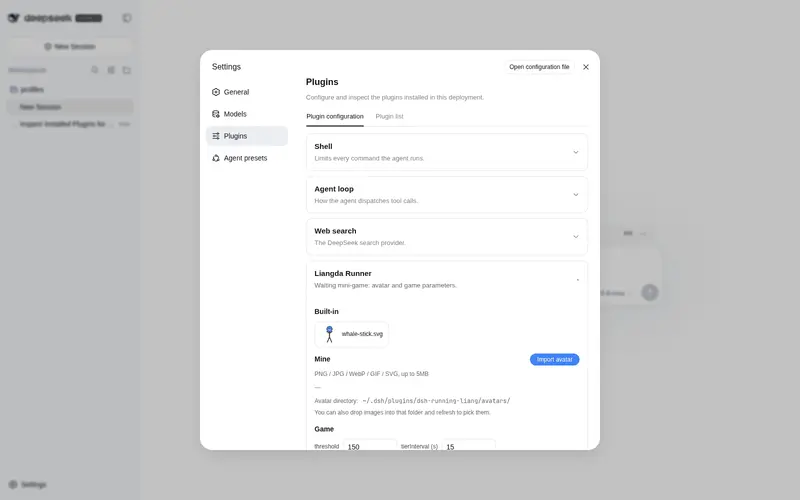
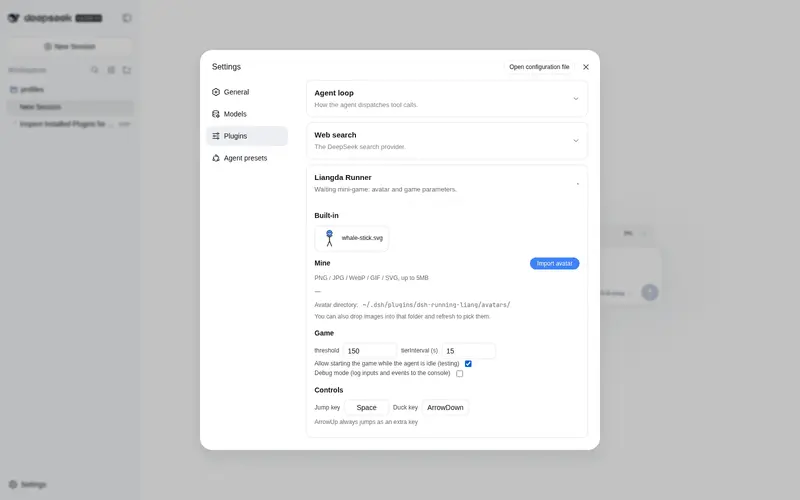
~/.dsh/plugins/dsh-running-liang/avatars/(created on demand) or upload them from Settings → Plugins → plugin configuration → Liangda Runner. Pick any avatar there; a missing file falls back to the default.
Configuration
In Settings → Plugins → plugin configuration → Liangda Runner: threshold (梁圣 threshold, default 150), tierInterval (seconds per tier, default 15), allowIdlePlay (test switch: allow starting the game while the agent is idle), and customizable jump/duck keys (jump defaults Space, ↑ always jumps too; duck defaults ArrowDown). The tier table and physics are fixed constants.
Development
npm install
npm run typecheck   # tsc --noEmit
npm test            # vitest (engine / tiers / layout / store / render / avatar-files)
npm run build       # lib/index.js (host) + lib/client.js (browser bundle)
npm run check       # pre-publish self-check
Architecture notes: the client registers into the official DSH slots — conversation.input.dock (the strip + growing game panel, same flow as the goal bar) and settings.plugin.item (the settings card under Plugins → plugin configuration); the host registers a webServer route /dsh-running-liang/avatars (list / serve / upload). Long-lived state lives in localStorage; avatar files live on disk so they survive browser storage wipes.
License
MIT — see LICENSE.
Frequently Asked QuestionsFAQ
Use the verified command dsh plugin --profile default add github:skiuniverse/dsh-running-liang in a DSH-enabled shell. The command resolves the public package metadata and keeps the plugin attached to the catalog identity shown on this page.
Compatibility follows the bundle and profile status shown above. If a profile is not detected, keep the plugin disabled there and check the repository documentation before enabling it in production.
The GitHub link and activity metadata are the source of truth for releases and maintenance. Revisit this page after a new release to confirm the catalog has observed the latest version.