THEWOLFWALKER/dsh-coyote
Agent- and GUI-controlled DG-LAB Coyote e-stim plugin for DeepSeek Harness: safety-bounded strength, programmable waveforms, DSH-aligned web panel
Listed
1
Fun
Bundle verified
Preview
What it does
Agent- and GUI-controlled DG-LAB Coyote e-stim plugin: eight `coyote_*` tools plus a DSH web panel behind one safety envelope (soft limits, asymmetric rate limiter, session cooldown, playback caps, disconnect fail-safe); optional auto-stim layer maps agent events (tool calls, errors, turn end) to bounded pulses; official V3 socket protocol with QR pairing, programmable waveforms. Adults only.
Best for
- Consenting adult DG-LAB Coyote users who want agent and web-panel control under the same enforced safety limits.
- Interactive sessions needing programmable waveform playback, QR pairing, strength control, and an emergency stop.
- Users who want optional, bounded stimulation mapped to agent events such as tool calls, errors, or turn completion.
- Setups where the phone running the official DG-LAB app can reach the plugin's V3 WebSocket endpoint.
Not ideal for
- Minors, use without informed adult consent, or any situation where the device's safety guidance cannot be followed.
- Users without compatible DG-LAB Coyote hardware, the official app, and network reachability for pairing.
- Workflows requiring unrestricted strength, unlimited playback, or bypassing cooldown and rate limits.
- Use involving unsafe electrode placement on the chest, neck, or head.
README
dsh-coyote
English · 简体中文







Agent- and GUI-controlled DG-LAB Coyote e-stim plugin for DeepSeek Harness (DSH).
One safety envelope serves two faces with equal bounds: eight model-facing coyote_* tools and a DSH-aligned browser panel. Neither can bypass soft limits, the asymmetric increase rate limiter, session cooldown, playback caps, or the disconnect fail-safe. Since v0.2 an opt-in auto-stim layer can also map agent events (tool calls, errors, turn ends…) to bounded pulses — see Auto-stim.
Adults only. This plugin controls a real e-stim power box. Read Safety before use.
Control panel — the DSH-aligned web GUI (⚡ Coyote button in the DSH sidebar footer):

How it works
DSH agent ──coyote_* tools──┐
                             ├─▶ CoyoteRuntime (safety envelope) ─▶ V3 socket server ─▶ DG-LAB App (QR) ─▶ Coyote device
DSH web GUI ──/gui bridge───┘         soft limits · rate limit · cooldown · hard caps · fail-safe
agent events ──auto-stim (opt-in)──┘  armed gate · cooldown · maxIntensity cap · baseline restore
The plugin is the WebSocket server side of the official DG-LAB V3 socket protocol: pairing mints a QR the official App scans; from then on the plugin is the control terminal and the App relays commands to the device.
Quick start
dsh plugin --profile web add dsh-coyote
The plugin’s bundle patch inserts its row automatically — zero config needed, the defaults below apply. To tune, target the inserted row in your profile overlay:
- id: coyote
  config:
    port: 9999          # WebSocket port; the phone must reach this machine
    softLimitA: 60      # agent-side caps, 0..200 — tune to the user's comfort
    softLimitB: 60
- The DSH web GUI shows a ⚡ Coyote button in the sidebar footer — it opens the control panel.
- Tap 开始配对 (pair); a QR appears.
- Scan it with the official DG-LAB App on a phone on the same network (or set
publicWsUrlbehind awss://reverse proxy). - The panel and the agent can now both drive the device — always within the same limits.
The eight tools
| Tool | What it does |
|---|---|
coyote_status |
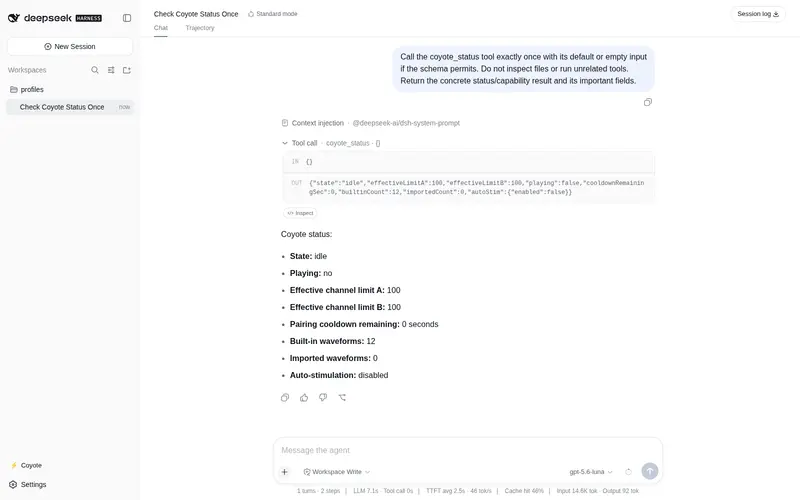
Full snapshot: link state, QR, device strengths, effective caps, cooldown, and (when enabled) the auto-stim block. Read-only. |
coyote_pair |
Start pairing; returns QR payload + renderable QR image. |
coyote_disconnect |
End the session: stop everything, break the App relation, arm the cooldown. |
coyote_set_strength |
Set A/B/both in the raw 0..200 domain. Absolute value or relative delta. Reports clamping. |
coyote_play_wave |
Play by preset name, declarative spec, or raw hex entries; once/loop, intensity scale, B-mirror. |
coyote_stop_wave |
Stop waveform playback, keep strength levels. |
coyote_panic_stop |
Emergency: clear both waveform queues, zero both strengths. Idempotent, always safe. |
coyote_waveforms |
List the library; import Game-Hub .pulses JSON or bare hex lists. |
Tool descriptions teach the safety model, so the model behaves well without reading source.
Safety model
Every bound — enforced in CoyoteRuntime before anything is sent:
| Mechanism | Default | Effect |
|---|---|---|
Soft limits softLimitA/B
|
100 | Agent-side cap per channel, 0..200. |
| Device hard limits | App-side | Effective cap = min(soft, device); re-read on every report, so lowering the limit on the phone wins immediately. |
| Asymmetric rate limit | 40/s, burst 40 | Strength increases draw from a refilling token bucket; decreases always pass instantly. |
Session cooldown sessionCooldownSec
|
3 s (adjustable, 0 disables) | A fresh pairing must wait after the previous session ended. Prevents rapid re-pair abuse. |
Session hard cap maxSessionSec
|
3600 s (0 disables) | One bound session auto-ends (stop + zero). |
Playback cap maxPlaySec
|
600 s | Every playback self-terminates; the device queue is cleared at the cap. |
| Disconnect fail-safe | always on | App socket loss stops playback, clears queues, resets state. |
The GUI panel goes through the identical runtime — the browser cannot bypass the agent’s bounds, and vice versa.
Waveforms
-
12 built-in presets (呼吸 Breathing, 心跳 Heartbeat, 惩罚 Punish, …) with suggested starting intensities, synthesized deterministically from declarative specs (frequency sweep 10..1000 ms, intensity sweep 0..100, curves
linear|sine|pulse|random, optional on/off duty cycle). -
Community import: paste Game-Hub
.pulsesJSON ([{name, pulseData:[hex…]}]) or bare hex lists; validated, persisted underwaveformDir, reloaded on start. Re-importing a name replaces it.
Auto-stim
Opt-in event-driven stimulation (v0.2): the plugin listens to the DSH session event firehose plus the agent/error / agent/status runtime events, reduces them to a closed vocabulary of eleven domain events, and fires a bounded pulse for each rule you enable. Off by default — nothing listens and no section appears until autoStim.enabled: true.
Every pulse is an absolute transient: channel strength is boosted to min(rule.intensity, maxIntensity) (the runtime still clamps to soft/device limits and the rate limiter), the waveform plays once, then the pre-pulse strength is restored. Works from a freshly paired device at strength 0.
Gate chain — a pulse fires only if every gate passes, and gated events are dropped and counted, never queued:
| Gate | Effect |
|---|---|
| rule enabled | Events without an enabled rule do nothing. |
| armed | The GUI 布防/解除 switch; disarmed drops every event silently. |
| not busy | One pulse at a time, restore included. |
| cooldown | Default 5 s minimum between auto triggers. |
| App bound | No device connected → skipped, counted. |
| maxIntensity | Independent cap (default 30) on top of every rule. |
Default rule table (all intensities ≤ the default maxIntensity 30):
| Event | Fires when | Default |
|---|---|---|
turn_start |
A new agent turn begins | tap @12, 2 s, on |
assistant_start |
First streamed chunk of a turn | tap @15, 2 s, on |
stream_tick |
Every tickIntervalSec (5 s) of streaming |
tremor @15, 2 s, off |
tool_call |
The model invokes a tool | tap @20, 2 s, on |
tool_error |
A tool call fails | punish @25, 6 s, on |
agent_error |
Turn fails (deduped per turn across both event sources) | punish @30, 8 s, on |
turn_end_completed |
Turn completes | heartbeat @20, 4 s, on |
turn_end_aborted |
Turn aborted / interrupted / blocked | calm @12, 3 s, off |
turn_end_max_tokens |
Turn hit the token ceiling | saw @20, 3 s, off |
todo_clear |
Todo list becomes all-completed (fires once per list) | heartbeat @18, 4 s, on |
agent_idle |
Agent running→idle edge | calm @12, 4 s, off |
- id: coyote
  config:
    autoStim:
      enabled: true          # opt-in master switch
      maxIntensity: 30       # cap over every rule, 1..200
      cooldownSec: 5         # min seconds between auto triggers
      tickIntervalSec: 5     # stream_tick cadence
      restoreBaseline: true  # restore pre-pulse strength after each pulse
      events:
        tool_error: { intensity: 25, durationSec: 6, waveform: punish, channel: A }
        agent_error: { enabled: false }   # any field overrides, the rest inherit
Unknown event names fail loudly at startup with the valid list. Waveform names resolve case-insensitively: built-in id first, then imported waveform names (a typo fails soft per pulse and is logged — it cannot crash the host). The GUI panel gains an 自动电击 section with live armed state, fire/skip counters, and the 布防/解除 button; coyote_status carries the same block for the model. Teardown disarms, cuts an in-flight pulse short, and restores the baseline immediately.
Configuration
All fields optional; defaults shown.
| Key | Default | Notes |
|---|---|---|
host |
0.0.0.0 |
Bind address. 0.0.0.0 lets LAN phones reach the QR URL. |
port |
9999 |
WebSocket port. 0 = OS-assigned. |
publicWsUrl |
— | QR base override for wss:// reverse proxies. |
waveformDir |
coyote-waveforms |
Where community imports persist. |
softLimitA / softLimitB
|
100 |
Per-channel agent-side caps, 0..200. |
sessionCooldownSec |
3 |
Cooldown before re-pairing; 0 disables. |
maxSessionSec |
3600 |
Hard cap per bound session; 0 disables. |
maxPlaySec |
600 |
Hard cap per playback. |
defaultPlaySec |
30 |
Duration when a tool call omits one. |
increaseRatePerSec |
40 |
Sustained increase speed (units/s). |
increaseBurst |
40 |
Immediate increase budget (units). |
autoStim |
enabled: false |
The whole Auto-stim block: enabled, maxIntensity (30), cooldownSec (5), tickIntervalSec (5), restoreBaseline (true), and per-events rule overrides. |
Architecture
src/
  protocol/   pure V3 codec: frames, wave entries, QR payload
  waveform/   composer (spec→windows), library (12 presets), importer, scheduler
  transport/  WebSocket server + control-terminal role (bind, heartbeat, fail-safe)
  runtime/    the safety envelope everything routes through
  auto-stim/  rules (vocabulary+defaults+normalize), mapper (host→domain events), engine (gates+pulse), attach (cordis listeners)
  gui/        /gui bridge: JSON ops ↔ runtime, broadcasts status
  tools/      the 8 coyote_* tool definitions
client/index.js   browser panel (no build step, loader-injected React, DSH CSS variables)
tests/            148 tests: unit + protocol-level MockApp + offline client harness
Design rules: pure protocol functions, one safety choke point, thin honest tools, no over-design. Evidence for every protocol decision is the official DG-LAB-OPENSOURCE socket/V3 documentation.
Development
pnpm install
pnpm test         # 148 tests
pnpm typecheck
pnpm build        # lib/ (tsdown)
Note: pnpm build prints one tsdown↔rolldown upstream validation warning (Invalid input options … "define"); it is cosmetic, the artifacts are correct.
Safety
This plugin drives a real e-stim device on a human body. Follow the DG-LAB safety guidance that ships with your device. In short:
- Start from single-digit strength; increase gradually; agree on limits and a stop signal with the user before starting.
- Keep the App-side hard limit as the final guard — the runtime honors it dynamically.
- Chest, neck, and head are unsafe electrode placements; stop immediately at any discomfort or unexpected behavior (
coyote_panic_stopnever makes things worse). - Use only with informed adult consent.
License
Frequently Asked QuestionsFAQ
Use the verified command dsh plugin --profile default add github:THEWOLFWALKER/dsh-coyote in a DSH-enabled shell. The command resolves the public package metadata and keeps the plugin attached to the catalog identity shown on this page.
Compatibility follows the bundle and profile status shown above. If a profile is not detected, keep the plugin disabled there and check the repository documentation before enabling it in production.
The GitHub link and activity metadata are the source of truth for releases and maintenance. Revisit this page after a new release to confirm the catalog has observed the latest version.