tiantyu/dsh-skin-toggle
皮肤管理🐋切换按钮,用于 DeepSeek Harness (DSH)网页 GUI 的皮肤管理。纯客户端插件。
Listed
3
Theme
Bundle verified
Preview
What it does
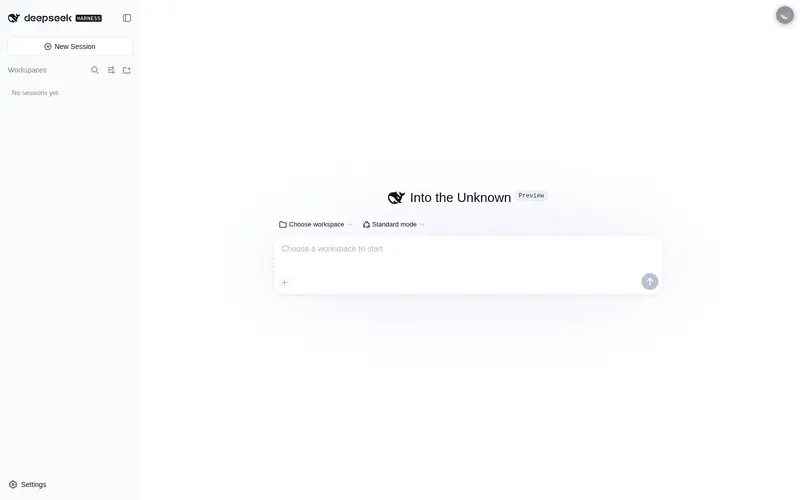
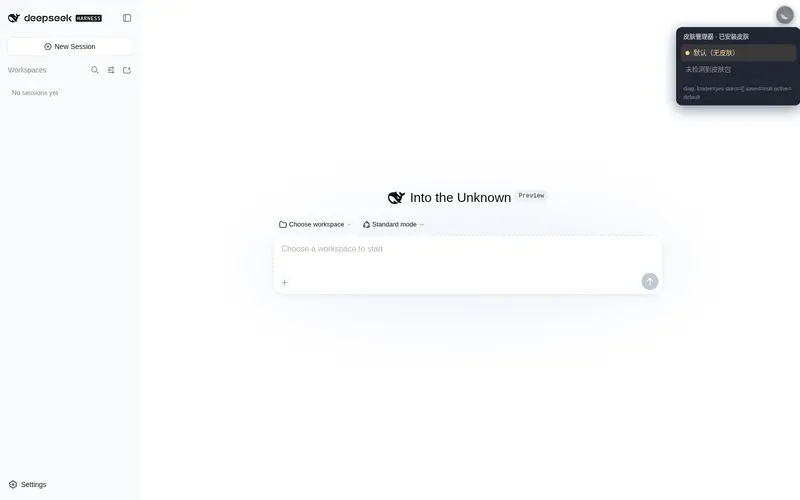
Skin manager for the DeepSeek Harness web GUI: a draggable whale button that restores the default look on left-click and switches between installed skins on right-click.
Best for
- DSH Web users with several installed skins who switch between them frequently.
- Users who want a draggable, persistent control for returning to the default appearance.
- Skin collections that follow the `dsh-client-ui-skin-<id>` package convention.
Not ideal for
- Installations with no additional skins, where the switcher adds little value.
- Non-Web DSH interfaces, because this is a client-side visual plugin.
- Users expecting it to install, enable, or remove skins; it only controls their visibility.
README
dsh-skin-toggle · DSH 皮肤管理器
DeepSeek Harness Web GUI 的皮肤管理器:一个 🐋 悬浮按钮(默认在右上角,可任意拖动)——
- 拖动:按住左键把按钮拖到界面上任意位置,松手即固定并记住位置(刷新后保持)
- 左键点击:恢复默认界面(无皮肤)
- 右键点击:弹出小面板(跟随按钮位置),列出所有已安装皮肤,点选即切换(皮肤互斥,同时只生效一个)
- 当前选择会记住(localStorage),刷新后保持
皮肤列表自动从 Cordis Loader 检测:包名匹配脚手架约定 dsh-client-ui-skin-<id>
(如 @dsh-external/dsh-client-ui-skin-maid-atelier → maid-atelier)即视为皮肤。
dsh-deep-whale / maid-atelier 及其它
dsh-web-ui 皮肤都遵循此约定,装多少就能管理多少。
- 包名:
dsh-skin-toggle(客户端插件,纯展示层,不触达模型请求) - 作者:tiantyu(MIT 许可;皮肤本体各自遵循其许可,见各皮肤
NOTICE) - 仓库:https://github.com/tiantyu/dsh-skin-toggle
工作原理
-
纯视觉管理(v0.3):不修改任何插件状态(Loader 只读),只控制显隐——
每个脚手架皮肤的全部 CSS 都挂在其
<body>门控属性data-dsh-<id>下, 注入的装饰元素都带data-skin-owner="<id>"。 - 切换皮肤:只保留目标皮肤的门控属性,移除其他皮肤的(使其 CSS 失效),
并用动态
[data-skin-owner='<id>']{display:none!important}规则隐藏其他皮肤的装饰元素。 - 恢复默认:移除所有已检测皮肤的门控属性 + 抬起
data-dsh-skin-manager-default隐藏层 (!important清背景、隐藏全部皮肤装饰)。 - 启动时短时重述(约 9 秒)自动修复皮肤与本插件的加载顺序竞态。
- 皮肤显示名为其包名 id(宿主不对外提供
skin.json,无法取本地化名称)。
安装
从 GitHub(推荐)
dsh plugin --profile web add https://github.com/tiantyu/dsh-skin-toggle
从本地目录(本机开发版)
dsh plugin --profile web add D:\harness\dsh-skin-toggle
安装后重启 dsh web 并硬刷新浏览器(Ctrl+Shift+R),右上角出现 🐋 按钮即成功: 金色 = 有皮肤生效,灰色 = 默认界面。
卸载
dsh plugin --profile web remove dsh-skin-toggle
重启 dsh web 后按钮消失(已安装的皮肤不受影响)。
发布信息
- GitHub:https://github.com/tiantyu/dsh-skin-toggle (含
dsh-plugin主题,自动被 dshfind、dsh-plugin-marketplace、WhaleHub 等插件市场收录)
Frequently Asked QuestionsFAQ
Use the verified command dsh plugin --profile default add github:tiantyu/dsh-skin-toggle in a DSH-enabled shell. The command resolves the public package metadata and keeps the plugin attached to the catalog identity shown on this page.
Compatibility follows the bundle and profile status shown above. If a profile is not detected, keep the plugin disabled there and check the repository documentation before enabling it in production.
The GitHub link and activity metadata are the source of truth for releases and maintenance. Revisit this page after a new release to confirm the catalog has observed the latest version.