Tkingxiao/dsh-any-background
一个自定义主题插件,包括背景图(大小和位置),主界面和设置界面(透明度,色轮全色主题色)插件
Listed
9
Theme
Bundle verified
Preview
What it does
A theme appearance plugin that lets you fully customize the Web UI with custom theme colors, background wallpapers, and fine-grained transparency and blur controls for each section of the homepage, plus import/export support for easy theme sharing.
Best for
- Users who want extensive visual customization of the DeepSeek Harness Web UI.
- People who use image, video, or generated dynamic wallpapers and want precise positioning controls.
- Teams or individuals who share complete themes through import/export, including embedded wallpaper media.
Not ideal for
- Users who only need a fixed, ready-made theme with no detailed tuning.
- Desktop-client users who require identical opacity behavior; a known Electron packaging issue can invert sidebar and center-area opacity.
- Environments where storing theme settings and media under the local DSH home directory is undesirable.
README
dsh-any-background

| English | 中文 |
A DeepSeek Harness appearance plugin that lets you fully customize the Web UI — custom theme color, background wallpaper, and fine-grained per-part opacity & blur controls.
Screenshots

Custom homepage · wallpaper + theme color applied

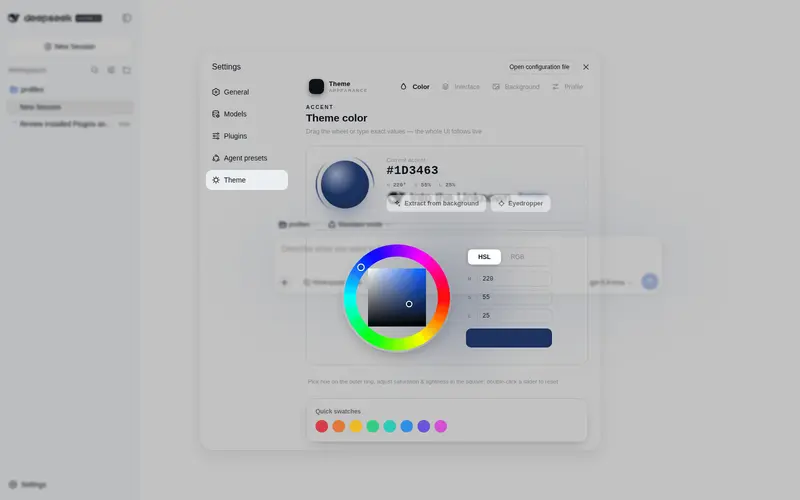
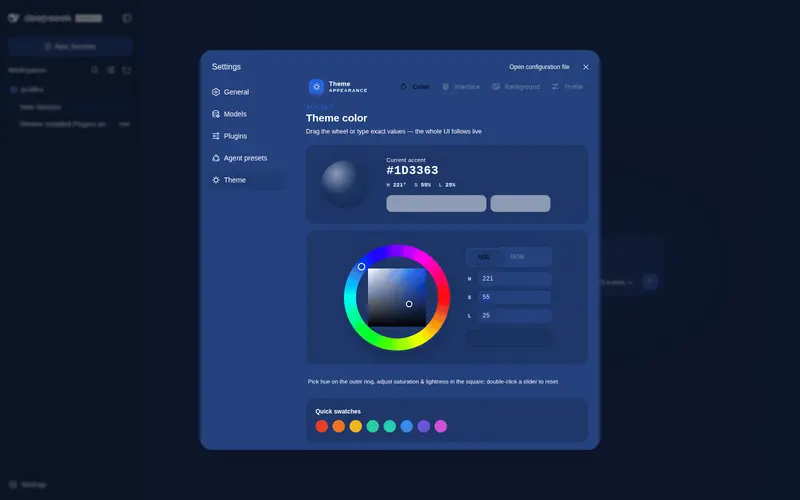
Theme color picker · PS-style wheel + precise HSL/RGB inputs

Per-part opacity and blur · main background, sidebar, cards, settings

Background editor · image/video wallpapers support drag-to-pan and scroll-to-zoom

Generated dynamic background · mesh gradient / Shader / geometric presets

Generated dynamic background · geometric low-poly mode preview

Export and import configs to share
Features
- PS-style Color Wheel — Pick hue on the ring, adjust saturation & lightness in the inscribed square. Generates 30+ CSS design tokens in real time.
- Precise HSL / RGB Input — Enter exact color values numerically with instant bidirectional sync to the wheel.
- Smart Color Extraction — One click derives a theme color from your wallpaper by sampling the visible region, quantizing, and filtering out gray / near-black / near-white pixels. Video wallpapers contribute via an auto-captured frame. Fully client-side.
- Eyedropper — Hover the wallpaper to preview a color and click to pick it as the theme color.
- Background Wallpaper — Upload any image as your wallpaper. Drag to pan and scroll to zoom inside a viewport-proportional editor.
- Video Wallpaper — Use a video as a live wallpaper: muted looping playback that survives refreshes (file persistence + HTTP streaming with Range seek), with an auto-captured frame powering the preview, theme-color extraction, and the position editor.
- Position Editor — One shared editor for images and videos: drag to pan, scroll to zoom, one-click reset. Image and video placements are stored separately and never overwrite each other.
- Layout Modes — Fit / Fill / Stretch / Tile / Center for both images and videos; in Fit mode the editor-committed framing stays consistent across window resizes and cross-monitor moves.
- Generated Dynamic Backgrounds — Choose mesh gradient, Shader, or geometric patterns with adjustable spread, intensity, and seed locking.
- Per-part Interface Opacity — Independent sliders for main background, sidebar, cards & panels, plus the settings panel and wallpaper.
-
Per-part Interface Blur — Frosted-glass
backdrop-filterblur (0–60 px) for each interface part. - Conversation View Cards — The message list is wrapped in a translucent card automatically, and the trajectory page gets whole-page opacity & blur controls, letting the wallpaper shine through the content.
-
Theme Export / Import — One-click export to a self-contained
dsh-any-theme.json(config + wallpaper, video embedded as a data URL) and import to restore it anywhere. -
File-based Persistence — All settings are stored on the filesystem under
~/.dsh/.dsh-any-background-data/, notlocalStorage. - Bilingual — Full Chinese / English UI with automatic locale detection.
- Theme Watchdog — Re-asserts the custom theme if the host resets it.
Recent Optimizations
-
Video wallpaper end-to-end — Videos are stored under MIME-derived names (
wallpaper.mp4/webm/...) and streamed over the plugin’s own HTTP route; they restore automatically after refresh or restart and travel inside exported configs. - Binary upload for large videos — Uploads stream raw bytes over an HTTP POST straight to disk instead of a base64 detour through RPC (no channel body limit, any size works); aborted transfers clean up after themselves.
- Video position editing — The placement editor works on a captured frame reference with zoom/pan, adapted to all five layout modes; image and video framings persist independently.
- Conversation view cards — The message column gains an automatic card (border/radius/padding) and the trajectory page gets whole-page opacity & blur; switching views restores the previous host.
-
Boot flicker eliminated — Theme tokens are injected through a dedicated
!importantstylesheet instead of inlinebodystyles, surviving host theme service resets. - Color wheel overlap fixed — The hue ring is drawn on top of the saturation/lightness square so the square corners no longer cover the ring.
- Inspiration palette selection cleared — Picking a theme color from the wheel deselects any previously selected inspiration swatch.
-
Debug telemetry removed — Temporary boot-time logging and
MutationObserverinstrumentation have been cleaned out. -
Per-part blur isolated — Blur is applied on
::beforeunderlays so it never traps the host’s fixed-position settings dialog.
Installation
Method 1: npm install (Recommended)
dsh plugin --profile web add github:Tkingxiao/dsh-any-background
# or, if published to the registry:
dsh plugin --profile web add dsh-any-background
Then launch:
dsh web
The plugin appears as a “Theme” section in Settings.
Method 2: npx (No Global Install)
npx @deepseek-ai/dsh plugin --profile web add github:Tkingxiao/dsh-any-background
npx @deepseek-ai/dsh web
Method 3: Local Build (Development)
The lib/ directory is committed, so installs need no build step. To rebuild after editing src/:
git clone https://github.com/Tkingxiao/dsh-any-background.git
cd dsh-any-background
pnpm install
pnpm run bundle
pnpm dsh plugin --profile web add "dsh-any-background"
pnpm dsh web
Compatibility
-
dsh web— Full support. - deepseek-harness-desktop — Supported; a known Electron packaging issue makes the left sidebar and center area opacity appear inverted — awaiting a desktop-client update to fix it.
Star History
License
MIT
Frequently Asked QuestionsFAQ
Use the verified command dsh plugin --profile default add github:Tkingxiao/dsh-any-background in a DSH-enabled shell. The command resolves the public package metadata and keeps the plugin attached to the catalog identity shown on this page.
Compatibility follows the bundle and profile status shown above. If a profile is not detected, keep the plugin disabled there and check the repository documentation before enabling it in production.
The GitHub link and activity metadata are the source of truth for releases and maintenance. Revisit this page after a new release to confirm the catalog has observed the latest version.