WenhongPan/dsh-projects
Project and session organization for DeepSeek Harness: multi-folder projects, searchable chats, attention summaries, and native folder picking.
Listed
1
Session
Bundle verified
Preview
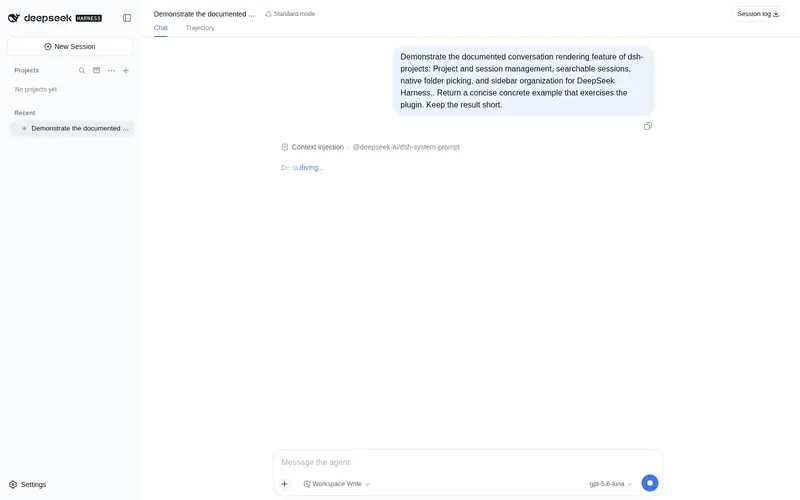
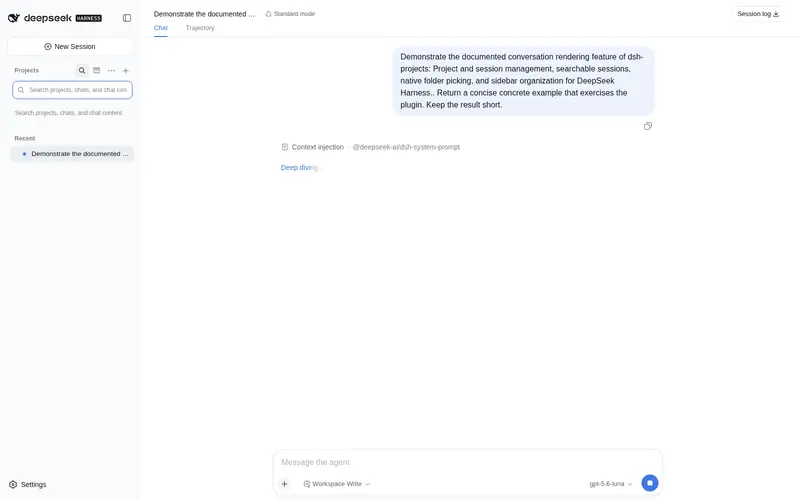
What it does
Project and session organization with multi-folder groups, attention summaries, grouped chat search, native folder picking, pinning, favorites, ordering, and an archive center.
Best for
- Users managing enough workspaces and sessions that the native workspace list has become difficult to navigate.
- Projects spanning several existing workspace folders while retaining a designated primary folder for new sessions.
- Workflows needing project-grouped chat search, attention summaries, pinning, favorites, ordering, and centralized archive browsing.
- Desktop users who prefer native folder selection while creating or switching projects.
Not ideal for
- Teams requiring broadly production-validated cross-platform behavior; the documented release is alpha and primarily verified on Windows x64 with DSH Desktop 2.0.1.
- Workflows requiring guaranteed archive restoration, because restoration depends on DSH exposing an unarchive interface.
- Users who expect multi-folder project definitions and display preferences to survive browser site-data clearing; those settings live in `localStorage`.
- Small setups with only a few workspaces or sessions, where the additional organization layer adds little value.
README

dsh-projects
把零散的 Workspace 和会话,变成真正清晰、可搜索的项目工作流。
English · 简体中文


DSH 原生界面擅长直接进入 Workspace,但项目多起来以后,目录选择和会话列表很快会变得混乱。dsh-projects 在 DSH 原生 Workspace/Session 数据之上增加一层项目体验:选择项目、创建项目、整理侧边栏、搜索聊天和查看归档内容,不复制或迁移已有会话。
v0.3 新增
- 多文件夹项目:把多个现有 Workspace 组合为一个项目,并明确指定新会话使用的主文件夹。
- 待处理摘要:关闭、简洁数字或展开列表三种模式,直接看到等待输入、运行中和已完成的会话。
- 更好用的搜索:项目、标题和聊天正文结果直接按项目分组,命中文字清晰高亮。
- 更顺手的目录窗口:记住上次位置,也可固定从桌面、用户主目录或当前项目父目录开始。
所有高级能力均为可选项;不启用时仍然是轻量的 Workspace/Session 整理层。
一眼看懂
| 能力 | 使用效果 |
|---|---|
| 项目入口 | 在输入框上方搜索和切换项目;也可以不选项目直接开始聊天 |
| 创建项目 | 显示名称和磁盘文件夹相互独立;本机优先使用操作系统目录窗口 |
| 侧边栏 | 按项目或单列表显示,提供“最近”、置顶、收藏、拖动排序;待处理状态可关闭、显示简洁数字或展开列表 |
| 项目管理 | 重命名、在文件管理器中打开、归档聊天、移除项目注册 |
| 多文件夹项目 | 可选地把多个现有 Workspace 组合成一个项目;不移动文件或聊天,随时可以拆分 |
| 全局搜索 | 结果按项目直接分组;启用 DSH 索引后还能搜索聊天正文 |
| 归档中心 | 集中查看已归档聊天;恢复能力取决于 DSH 是否公开取消归档接口 |
| 外观与数据 | 跟随 DSH 浅色/深色主题;继续使用 DSH 自己的 Workspace 和 Session 数据 |


快速安装
当前版本为 0.3.0-alpha.1,主要验证环境是 Windows x64、DSH Desktop 2.0.1 和 DeepSeek Harness 0.1.0-rc.6。
DSH Desktop
dsh plugin --profile desktop add https://github.com/WenhongPan/dsh-projects/releases/download/v0.3.0-alpha.1/dsh-projects-0.3.0-alpha.1.tgz
DSH Web UI
dsh plugin --profile web add https://github.com/WenhongPan/dsh-projects/releases/download/v0.3.0-alpha.1/dsh-projects-0.3.0-alpha.1.tgz
安装或升级后,完整退出并重新启动对应的 DSH profile。Desktop 和 Web 是两个独立 profile,需要分别安装。
如果更喜欢从源码安装:
git clone https://github.com/WenhongPan/dsh-projects.git
cd dsh-projects
npm install
npm run verify
dsh plugin --profile desktop add link:/absolute/path/to/dsh-projects
Windows PowerShell 示例路径可写为 link:C:/path/to/dsh-projects。
原生目录窗口
dsh-projects 已经自带原生目录桥,普通用户不需要替换 Desktop:
- DSH Desktop 调用 Electron 的操作系统目录窗口。
- 首次从系统桌面打开,之后可记住上次项目的父目录;也可选择桌面、用户主目录或当前项目的父目录。
- 同一台电脑上的本机 Web UI 调用 DSH 官方跨平台目录选择器。
- 远程 Web UI 或调用失败时,自动回退到 DSH 应用内目录浏览器。
如果希望让其他兼容插件也获得 Desktop 级原生目录窗口,可以选择安装仓库 Release 中的 修复版 DSH Desktop。它是可选方案,不是安装 dsh-projects 的前置条件。具体区别和校验方式见原生目录选择方案。

不选择项目也能聊天
普通聊天会自动获得独立任务目录:
~/Documents/DSH-Default/YYYY-MM-DD/new-chat[-N]
默认任务不会混入项目列表,但仍会出现在“最近”区域。每次聊天都有自己的工作目录,不会把整个 Documents 或用户主目录当作 Workspace。
兼容性
| 场景 | 当前状态 |
|---|---|
| DSH Desktop 2.0.1 / Windows x64 | ✅ 已进行实际界面与原生目录窗口验证 |
| 本机 DSH Web UI / Windows | 🟡 设计支持;仍需更多人工回归 |
| DSH Desktop / macOS Apple Silicon | 🟡 CI 通过;原生目录窗口和文件管理器操作待人工验证 |
| 本机 Web UI / macOS、Linux | 🟡 CI 通过;Host 路径和本地目录规则待人工验证 |
| 远程 Web UI | ✅ 使用 Host 端应用内目录浏览器,不打开远程机器的系统窗口 |
完整边界见兼容性矩阵和架构说明。DeepSeek Harness 仍处于 Developer Preview,升级后可能需要适配。
可选:聊天正文搜索
项目名和聊天标题搜索开箱即用。聊天正文搜索需要在目标 profile 的 cordis.patch.yml 中启用 DSH 会话索引:
- id: session-query-sqlite
  config:
    path: !!js dshHomePath('session-search.sqlite')
    openAt: first-search
索引包含由聊天内容派生的数据,应与原始会话数据采用同等隐私保护。
数据与卸载
基础模式不建立第二套项目数据库,也不会在卸载时删除项目文件夹或会话记录。按项目/单列表视图、排序方式、置顶、收藏等显示偏好保存在浏览器 localStorage。可选的多文件夹项目同样只在这里保存组合名称、Workspace ID 和主 Workspace ID,不保存聊天正文或移动磁盘文件;清除站点数据会拆分这些本地组合,但不会影响 DSH Workspace、聊天或项目文件。
多文件夹项目的中文边界说明见高级项目模式说明。
开发与反馈
npm install
npm run verify
npm pack --dry-run
这是 Alpha 版本。遇到问题可以提交缺陷报告,也欢迎填写平台兼容性报告或提出功能建议。提交前请移除私密路径、提示词和凭据。
贡献方式见 CONTRIBUTING.md,版本变化见 CHANGELOG.md,后续方向见公开路线图。
如果 dsh-projects 解决了你的 Workspace 或侧边栏整理问题,欢迎点一个 Star。它能帮助更多 DSH 用户发现这个项目;实际平台反馈也会直接决定下一版优先修复什么。
许可证
MIT
Frequently Asked QuestionsFAQ
Use the verified command dsh plugin --profile default add github:WenhongPan/dsh-projects in a DSH-enabled shell. The command resolves the public package metadata and keeps the plugin attached to the catalog identity shown on this page.
Compatibility follows the bundle and profile status shown above. If a profile is not detected, keep the plugin disabled there and check the repository documentation before enabling it in production.
The GitHub link and activity metadata are the source of truth for releases and maintenance. Revisit this page after a new release to confirm the catalog has observed the latest version.