Wine-Red/dsh-prompt-stash
Local, per-session prompt stash for DeepSeek Harness Web | 本地、分对话的提示词输入暂存工具。写了一半的长提示词,临时需要先问一个短问题? 同时准备多个方案,但尚未决定发哪一个?将未完成的想法放入草稿架中,准备好后再继续完成
Listed
3
Session
Bundle verified
Preview
What it does
Local, per-session LIFO prompt stash for temporarily setting aside unfinished composer text and safely restoring it later.
Best for
- Users who need to pause a long unfinished prompt, ask a short detour question, and then restore it.
- People preparing several alternative text prompts within one session and preferring a newest-first stack.
- Privacy-conscious workflows that want temporary prompt copies kept in the current browser.
Not ideal for
- Prompts containing images, attachments, or file references; only plain text is supported.
- Cross-device or cross-browser draft synchronization, because stash contents live in browser localStorage.
- Long-term prompt libraries or workflows needing more than ten saved items per session.
README

dsh-prompt-stash





| 简体中文 | English |
DeepSeek Harness Web 的本地输入暂存插件。把尚未发送的纯文本压入当前会话的 LIFO 暂存栈,先处理临时问题,之后再安全恢复原输入。
输入暂存不是草稿同步。DSH 已负责保存当前输入框草稿;本插件提供的是一组可明确存入、恢复和删除的临时输入副本。
功能
- 每个 DSH 会话独立保存,最新内容优先,最多保留 10 条。
- 暂存后立即在输入框上方显示折叠栏,可展开预览、恢复、删除或清空。
- 当前输入非空时不会直接覆盖;恢复前必须确认先暂存当前内容。
- 使用 DSH 官方
inputActions.setDraft()清空和恢复,不操作textarea或内部 Store。 - 暂存内容只保存在当前浏览器的
localStorage;快捷键配置通过 DSH Host settings 保存,可跨刷新和浏览器生效。 - 支持中英文、深浅主题、键盘操作和 DSH 原生队列组合布局。
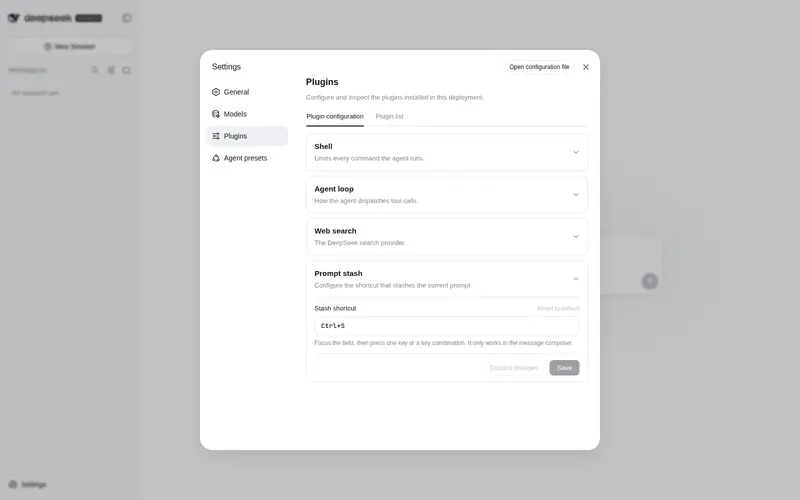
- 可在“设置 → 插件 → 插件配置”中录入单键或组合键快捷键,默认使用
Ctrl+S。
当前版本仅支持纯文本。带图片、附件或文件引用的输入不会被暂存。
效果

暂存内容默认折叠;展开后可查看创建时间与两行文本预览,并执行恢复、删除或清空操作。
要求
- DeepSeek Harness
0.1.0-rc.6、0.1.0-rc.7或0.1.0-rc.8 - Web profile
- Node.js 20 或更高版本(仅源码开发需要)
插件的 Host、设置、样式和 slot 注册均采用故障隔离;单个挂载点冲突时会禁用对应功能并记录错误,不会把异常抛回 DSH 启动链。
安装
npm registry(推荐)
直接安装到 DSH Web profile:
dsh plugin --profile web add dsh-prompt-stash
npm 包已包含构建产物,不需要允许安装期构建脚本。安装后重启 DSH Web。
更新到最新版本:
dsh plugin --profile web update dsh-prompt-stash
GitHub Release tarball(备用)
从 Releases 下载 dsh-prompt-stash-0.2.5.tgz,然后安装到 Web profile:
dsh plugin --profile web add ./dsh-prompt-stash-0.2.5.tgz
tarball 同样包含预构建产物。安装后重启 DSH Web。
本地源码 checkout
git clone https://github.com/Wine-Red/dsh-prompt-stash.git
cd dsh-prompt-stash
pnpm install --frozen-lockfile
pnpm build
dsh plugin --profile web add .
dsh plugin 会把组合包加入目标 profile 的 dsh.profile.bundles。可在启动前检查最终配置:
dsh --profile web --dump-config
输出中应包含 dsh-prompt-stash 组合层与 prompt-stash 插件行。
卸载
dsh plugin --profile web remove dsh-prompt-stash
卸载插件不会主动删除浏览器中已有的 dsh.promptStash.v1 数据。如需清除,可在浏览器站点数据中删除对应 localStorage 项。
使用
- 在输入框中编写一段纯文本。
- 点击工具栏中的“暂存”,或在消息输入框内按下暂存快捷键。输入框会被清空,上方立即出现折叠的暂存消息栏。
- 输入并发送临时问题。
- 展开暂存消息,点击目标内容恢复。
- 如果输入框已有内容,选择“暂存当前内容并恢复此条”,或取消操作。
添加或删除成功时不会弹出通知;只有存储或输入更新失败时才会显示错误提示。
消息输入框为空时按下快捷键,会恢复并弹出最新一条暂存。恢复后若内容保持不变,继续按同一快捷键会按“最新 → 较早”的顺序轮换其他暂存,当前显示的内容会安全放到轮换队尾,循环一周后再次出现。只要修改了恢复内容、清空后重写或输入了新消息,再按快捷键就会退出轮换,将当前内容新增到暂存并清空输入框,因此仍可连续加入多条暂存。只有一条内容可轮换时,再按一次也按普通暂存处理。快捷键不会覆盖空白字符、图片或文件引用等当前输入。
配置快捷键
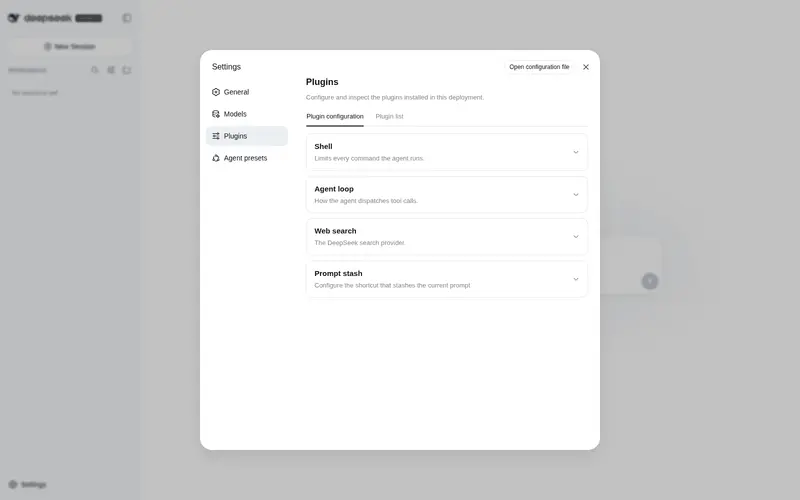
打开“设置 → 插件 → 插件配置 → 输入暂存”,点击快捷键输入框后直接按下一个按键或组合键,再保存即可立即生效。默认快捷键为 Ctrl+S,也可以配置为 F8 等单键。输入非空时快捷键执行暂存,输入为空时恢复最新一条;进入恢复状态后,重复按键可循环轮换其余暂存。快捷键只在消息输入框内生效;使用单个可打印字符会占用该字符原本的输入行为。
数据与安全边界
- 存储键:
dsh.promptStash.v1 - 设置命名空间:
dsh-prompt-stash(DSH Hostsettings.yaml) - 暂存范围:当前浏览器、按
sessionId隔离 - 内容:文本、ID、创建与更新时间、结构版本
- 不存储:图片二进制、附件正文、文件内容、凭据或环境信息
- 暂存内容不发送网络请求、不收集遥测;快捷键只通过 DSH 内置 settings 通道读写 Host 配置
浏览器站点数据被清理时,暂存内容也会被删除。
开发与打包
pnpm install --frozen-lockfile
pnpm format
pnpm typecheck
pnpm test
pnpm build
pnpm pack
项目按照 DSH 官方组合包格式提供:
-
package.json中的dsh.bundle.patch声明配置层。 -
cordis.patch.yml通过包名挂载插件。 -
lib/是预构建运行入口,并被收录进 tarball。 - Host 注册
dsh-prompt-stashsettings 命名空间;客户端注册conversation.input.left、conversation.input.dock和以该命名空间为键的settings.plugin.item插槽。
打包与安装机制参见 DeepSeek Harness 官方文档。
许可证
Frequently Asked QuestionsFAQ
Use the verified command dsh plugin --profile default add github:Wine-Red/dsh-prompt-stash in a DSH-enabled shell. The command resolves the public package metadata and keeps the plugin attached to the catalog identity shown on this page.
Compatibility follows the bundle and profile status shown above. If a profile is not detected, keep the plugin disabled there and check the repository documentation before enabling it in production.
The GitHub link and activity metadata are the source of truth for releases and maintenance. Revisit this page after a new release to confirm the catalog has observed the latest version.