wuxiangru915/dsh-session-manager
DSH 会话管理插件:归档会话恢复/删除、全部会话总览、内容预览 · Session manager for DeepSeek Harness: restore archived sessions, delete-all, inline content preview.
Listed
0
Session
Bundle verified
Preview
What it does
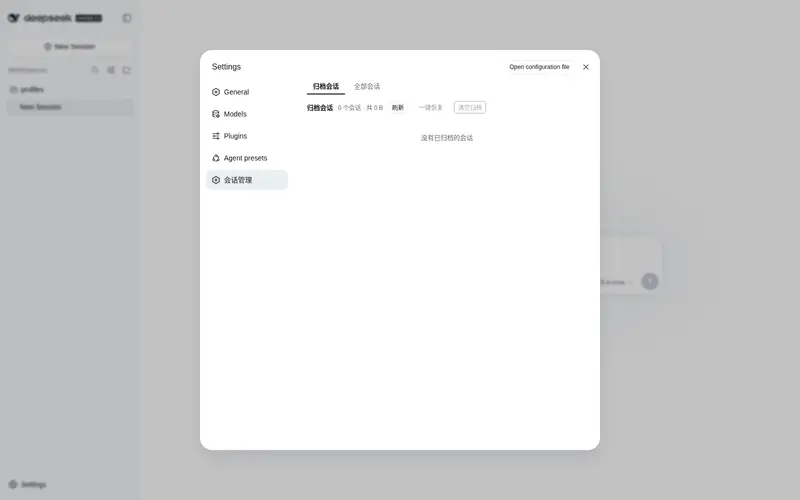
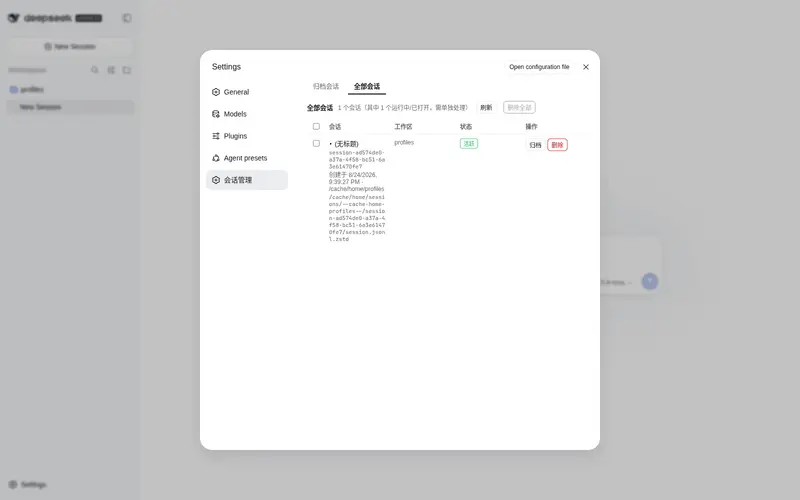
Session manager for the DSH Web UI: browse all and archived sessions, restore/unarchive, delete with two-step confirmation, and preview conversation content from the Settings panel.
Best for
- DSH Web users who need to find, preview, restore, archive, or delete persisted sessions from one Settings view.
- Users managing many workspace-attached, ungrouped, or archived sessions who need status and disk-footprint visibility.
Not ideal for
- Users who only need the stock sidebar’s basic session list and archive action.
- Workflows requiring recoverable soft deletion; the documented recycle-bin feature is not yet available.
README
dsh-session-manager
Session manager for DeepSeek Harness.
dsh-session-manager gives the Harness Web UI a full session-management surface: browse all sessions and the archived ones, restore (unarchive) archived sessions back to their original workspace, archive any session, delete sessions with a two-step confirmation, and preview conversation content — all from the Settings panel, with zero modification to official packages.
What it solves
Stock DSH archives sessions one-way: the sidebar’s Archive action hides a session from every view (workspace groups, ungrouped, search, flat list), and there is no view or API to bring it back — archived sessions are effectively lost until you hand-edit ~/.dsh/storages/workspace.json. This plugin makes archiving a reversible, manageable state and adds an overview of every session on disk:
right-click a session -> Archive (stock DSH)
  -> the session vanishes from the sidebar (nowhere to see it again)
  -> this plugin: Settings -> Session manager -> archived tab
       preview its content, Restore it (back to its original workspace
       position), or Delete it from disk (two-step confirmation)
  -> the all-sessions tab lists every persisted session (grouped by
     workspace, ungrouped ones included) so nothing is ever lost sight of
Features
- Restore archived sessions: an archived session keeps its workspace accounting slot, so unarchiving puts it back exactly where it was — single, batch, or all at once.
- Delete with two-step confirmation: the Delete button arms first and needs a second click within 5 seconds; sessions whose agent is running are rejected server-side.
- Delete all: clears every deletable session (archived, ungrouped, and workspace-attached alike) in one confirmed action, skipping sessions that are currently running or open, and reports per-session success / failure / skip.
- All-sessions overview: every session known to the persistence layer — title, id, creation time, owning workspace (or ungrouped), status badges (archived / live / running) — with archive and delete actions.
- Content preview: click a session title to expand the first 100 user / assistant / tool messages without opening the conversation.
- Disk footprint: per-session size and the full on-disk path help you find what is eating space.
-
Zero core modification: a pure bundle plugin (
dsh.bundlepatch layer); every operation goes through official services (workspaceRegistry,sessionPersistence,sessionQuery,fs,shell, …) — no official package is patched or overridden. -
Loopback-only API: the
/dsh-sm/*routes reject non-loopback hosts and cross-origin requests (Host + Origin / Sec-Fetch-Site fence).
Installation
# one line, from a git source
dsh plugin --profile web add github:omdsh-dev/dsh-session-manager

# restart the web server, then hard-refresh the page
Local development:
dsh plugin --profile web add /path/to/dsh-session-manager
The repository ships plain-JS lib/ artifacts with no build step, so git-source installs work without any build tooling on the user’s machine.
Usage
Web UI

Open Settings → Session manager:
- Archived tab (default): every archived session with title, id, creation time, cwd, disk size and the full on-disk path; status badges for running and missing files. Buttons: Restore (single / batch / all), Clear archive (delete all archived, two-step), row-level Delete (two-step).
-
All sessions tab: every persisted session grouped by workspace (ungrouped sessions show a
—), status badges for archived / live / running. Actions: Archive, Delete, and Delete all (two-step; skips running/open sessions). - Click any session title to preview its content inline (user / assistant / tool messages, first 100).
Architecture
lib/
├── index.js   Host half: cordis plugin (injects webServer) exposing POST /dsh-sm/* routes
└── client.js  Browser half: __ModuleLoader__ bundle registering the Settings section
cordis.patch.yml   dsh.bundle patch layer — one insert row drives both halves
browser (Settings page) --POST /dsh-sm/*--> host handlers
   archived/list · archived/unarchive · sessions/list · sessions/archive
   · sessions/delete · sessions/detail
   workspaceRegistry (archive-set read/write) + sessionPersistence (headers/locate)
   + sessionQuery (titles/content) + fs/shell (size/delete) + agents (running guard)
Host routes:
| Route | Payload | Returns |
|---|---|---|
POST /dsh-sm/archived/list |
{} |
{ items, totalBytes } |
POST /dsh-sm/archived/unarchive |
{ sessionId } |
{ ok, changed, archivedSessionIds } |
POST /dsh-sm/sessions/list |
{} |
{ items } |
POST /dsh-sm/sessions/archive |
{ sessionId } |
{ ok, archivedSessionIds } |
POST /dsh-sm/sessions/delete |
{ sessionId } |
{ ok, deleted, sessionId, path?, reason? } |
POST /dsh-sm/sessions/detail |
{ sessionId } |
{ id, createdAt, cwd, totalEvents, messageCount, truncated, messages } |
The unarchive path rewrites the durable archive set through workspaceRegistry.setState (with a workspace storage-domain fallback), so the registry’s in-memory state and the on-disk global.archivedSessionIds stay consistent; the client refreshes the workspace/session stores afterwards so the sidebar updates immediately.
Testing
node test/smoke.mjs # 10 host-logic checks against stub services
The smoke test drives apply(ctx) with stub services and covers the route wiring, the loopback/origin fence, archive-set read/write, delete bookkeeping and detail extraction. End-to-end verification was performed against a real profile (a second instance on a separate port plus a browser walkthrough of restore / archive / delete-all).
Roadmap
- Archived-session list / restore / delete (two-step)
- All-sessions overview + archive any session
- Delete all (skips running/open) with per-item results
- Inline content preview
- Recycle bin (soft delete with undo window)
- Sidebar entry in addition to the Settings page
- npm release
Frequently Asked QuestionsFAQ
Use the verified command dsh plugin --profile default add github:wuxiangru915/dsh-session-manager in a DSH-enabled shell. The command resolves the public package metadata and keeps the plugin attached to the catalog identity shown on this page.
Compatibility follows the bundle and profile status shown above. If a profile is not detected, keep the plugin disabled there and check the repository documentation before enabling it in production.
The GitHub link and activity metadata are the source of truth for releases and maintenance. Revisit this page after a new release to confirm the catalog has observed the latest version.