xiekai886/dsh-MusicPlayer
这是一个可以让你边对话边听歌的 DeepSeek Harness 插件:折叠/展开两种可自由拖动的悬浮窗口形态,利用 Meting API 等解析源接入网易云音乐,支持歌单导入和按歌名或歌手搜索单曲导入。Chat and listen at the same time.
Listed
2
Fun
Bundle verified
Preview
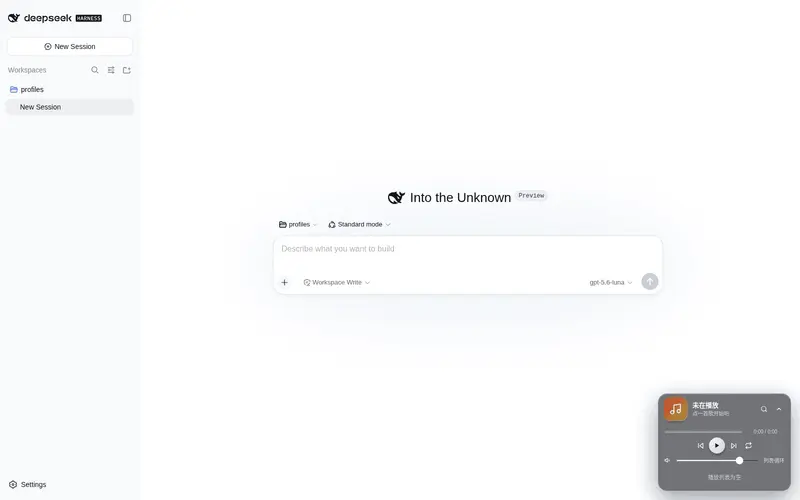
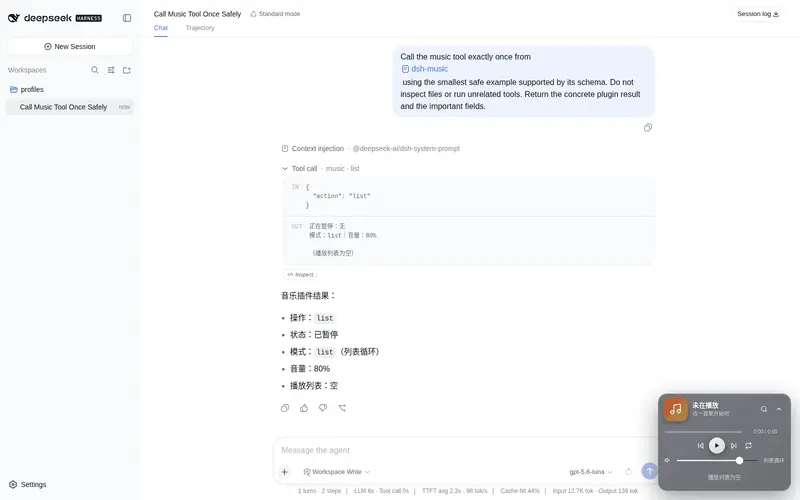
What it does
A collapsible/expandable draggable floating music player with NetEase Cloud Music playlist import and song/artist search — chat and listen at the same time.
Best for
- DSH Web users who want music controls available while continuing a conversation.
- NetEase Cloud Music listeners who import playlists or find tracks by song title or artist.
- Users who want either direct player controls or agent-driven queue, playback-mode, and volume commands.
Not ideal for
- Listeners who require guaranteed playback of every track; copyrighted, removed, restricted, or VIP songs may be unavailable or limited to previews.
- Users who do not want to depend on NetEase Cloud Music and, for anonymous resolution, third-party Meting services.
- Workflows requiring playback state to survive restarts, since state is not persisted.
- Users requiring stable full VIP playback without supplying an entitled cookie or operating a suitable proxy.
README
dsh-MusicPlayer 🎵

这是一个可以让你边对话边听歌的 DeepSeek Harness 插件,具有折叠和展开两种可自由拖动的悬浮窗口形态,利用 Meting API 等解析源接入网易云音乐,支持网易云歌单导入和按歌名或歌手搜索单曲导入。
An animated floating music player plugin for DeepSeek Harness Web with a collapsible/expandable draggable frosted-glass card, deep NetEase Cloud Music integration (playlist import by link/ID, search by title/artist), a multi-layer audio source resolver (Meting → outer/url) that works around browser CORS and anti-leeching for maximum playable coverage, and an agent-facing music tool — queue, skip, pause, and control volume right from the chat. Zero external front-end dependencies.
Features
- 悬浮播放器:右下角深色毛玻璃小卡片,可拖动记忆位置,展开/收起带物理曲线动画;播放/暂停、上下首、可点进度条、音量、列表循环/单曲循环/随机、播放列表
- 网易云音乐接入:一键导入/切换歌单(粘贴链接或 id)、搜索单曲(搜索 + 加入);host 端代理搜索/歌单/音频流,绕过浏览器跨域与防盗链,支持解析 Meting 同源地址(能播 VIP 试听/下架类歌曲)
-
默认曲库可配置:通过环境变量
DSH_MUSIC_PLAYLIST指定歌单 id,启动时自动加载为内置曲库(未配置则播放列表为空,可在播放器内手动导入) -
agent 音乐工具:对模型说”放首歌 / 把我的歌单放进去”即可——
music工具支持播放指定歌曲(本地无匹配自动搜网易云)、导入歌单、搜索、切歌、暂停、调音量、切模式、恢复/隐藏默认歌单、查看/添加/移除队列 -
状态同步:浏览器播放器与 host 状态机通过 REST 同步(
/dsh-music/state轮询 +/dsh-music/command控制),无持久化,每次启动全新加载默认曲库 -
零外部前端依赖:播放器为手写
__ModuleLoader__格式,内联 SVG 图标,不依赖 CDN
Install
需要 DSH CLI 与 pnpm:
dsh plugin --profile web add "github:你的用户名/dsh-music"
# 重启 dsh web(dsh --profile web)后生效,页面右下角出现 🎵 播放器
源码本地开发调试也可以:
dsh plugin --profile web add "file:/path/to/dsh-music"
配置默认歌单
播放器启动时自动加载的内置曲库来自网易云歌单,通过环境变量配置:
# 例如把默认曲库设为歌单 13060319975
set DSH_MUSIC_PLAYLIST=13060319975
dsh --profile web
未设置时播放列表为空,可打开播放器 🔍 手动导入歌单。
可选:登录态解锁全曲(含 VIP)
默认匿名解析下,网易云对免费歌曲返回全曲、对受限/VIP 歌曲只返回 30 秒试听。若希望受限歌曲也能播放完整音频,可配置你自己的网易云登录 cookie(含 MUSIC_U):
# 从浏览器网易云登录态中复制 MUSIC_U=...(和必要 cookie)拼成 Cookie 串
set DSH_MUSIC_COOKIE=MUSIC_U=xxxx;__csrf=xxxx
dsh --profile web
配置后插件将通过官方 weapi 协议携带该登录态解析播放地址(有对应权益的歌曲返回完整音频)。Cookie 仅保存在本机环境变量中,不会上传到任何第三方。未配置时自动回退匿名解析。
⚠️ 注意:匿名解析依赖第三方 Meting 服务,受限歌曲可能失效;若需稳定播放 VIP 全曲,推荐搭配自建云端代理(见下)。
可选:云端代理解锁 VIP 全曲(推荐)
本地 weapi 受网易云频率风控影响,且需要本机保留 Cookie。更稳的方式是部署一个自建云端代理(服务器上持有 VIP 登录态,走官方 eapi 协议,不受匿名风控影响),插件通过环境变量指向它:
# 云端代理地址(形如 http://<服务器IP>:3000/<令牌>)
set DSH_MUSIC_API=http://1.2.3.4:3000/abcdef123456
dsh --profile web
配置后插件解析播放地址时优先走云端代理(VIP 全曲 320k,可用 level 参数取无损),云端不可用时自动回退到本地 weapi / Meting / 外链。代理地址与令牌请勿公开传播。
Usage
- 点右下角 🎵 卡片展开播放器;拖动卡片顶部任意位置可移动(位置自动记忆);点右上角箭头展开/收起(带动画)
- 点 🔍 进入网易云搜索:输入歌名/歌手回车搜索,点 + 加入播放列表
- 第一行输入框粘贴网易云歌单链接或 id,回车一键导入(替换当前曲库)
- 对话里直接说「放首歌 / 放一首周杰伦的晴天 / 导入我的歌单 / 下一首 / 暂停 / 随机播放 / 音量调到 50%」,agent 会调用
music工具控制播放器
免责声明
- 本项目与 DeepSeek、网易云音乐无关;音频来自网易云公开接口与第三方 Meting 解析服务,仅供学习交流
- 受版权/VIP 限制的歌曲可能无法播放
-
music工具与 UI 的操作均在本地 DSH 实例内完成
Structure
-
index.js— host 端:状态机、REST API(state / command / netease search / playlist / stream)、music工具、多层音频源解析(Meting → outer/url) -
client.js— 浏览器端:悬浮播放器(手写__ModuleLoader__格式,内联 SVG 图标,零外部依赖) -
cordis.patch.yml— bundle 层声明
Uninstall
dsh plugin --profile web remove @dsh-external/dsh-music
License
Frequently Asked QuestionsFAQ
Use the verified command dsh plugin --profile default add github:xiekai886/dsh-MusicPlayer in a DSH-enabled shell. The command resolves the public package metadata and keeps the plugin attached to the catalog identity shown on this page.
Compatibility follows the bundle and profile status shown above. If a profile is not detected, keep the plugin disabled there and check the repository documentation before enabling it in production.
The GitHub link and activity metadata are the source of truth for releases and maintenance. Revisit this page after a new release to confirm the catalog has observed the latest version.