Xplore-LAB/dsh-plugin-asmemory
Action-State Memory Engine: typed time-series memory (states + actions) with trend/anomaly/causal analysis for DeepSeek Harness
Listed
0
Memory
Bundle verified
Preview
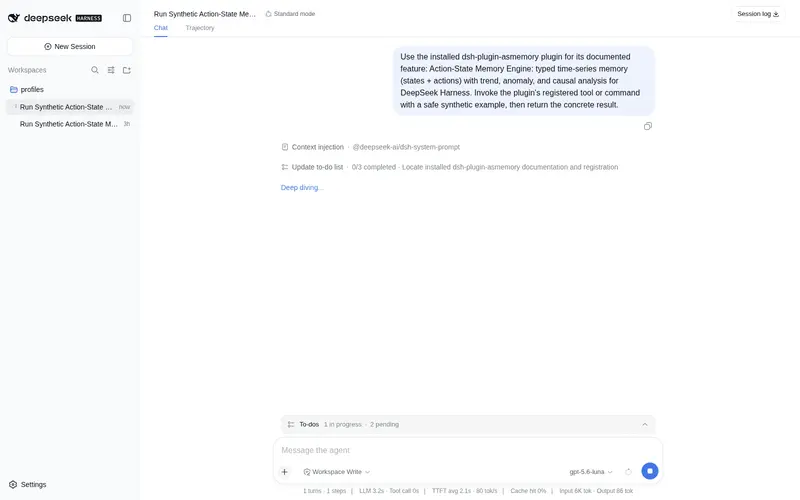
What it does
Action-state time memory: record typed states and actions, then analyze trends, anomalies, and causality.
Best for
- Agents tracking typed operational actions alongside resource or process states over time.
- Industrial monitoring workflows analyzing trends, z-score anomalies, and before/after action effects.
- Personal metric tracking for sleep, weight, spending, or exercise.
- Workflows exporting process data to DataLens for visualization.
Not ideal for
- Conversation or document memory workflows centered on storing raw text.
- Data that cannot be represented as typed state and action events.
- Environments without Python 3.10+ or without an installed/configured `asmemory-mcp` command.
- Analyses requiring methods beyond the documented slope, z-score, and before/after mean calculations.
README
asmemory — Action-State Memory Engine
Give your agent a time memory: record what happened and what changed, then analyze trends, anomalies, and causality — not just what was said.
| Language: English | 简体中文 |




⭐ If this helps you, a star is the best way to say thanks — it keeps the project visible to others.
What it does
asmemory stores two kinds of typed events, not raw text:
-
State — a value of some entity/metric at a point in time (
gpu.temperature = 78°C) -
Action — something that happened (
agent ran training,operator adjusted a valve)
On top of this memory it provides four analyses:
| Analysis | Question it answers |
|---|---|
| Trend | Is my metric going up or down? (slope + direction) |
| Anomaly | Which readings are outliers? (z-score) |
| Causal | Did action X move metric Y? (before/after delta) |
| Summary | What’s in my memory? (counts + entities) |
Why asmemory
Most memory plugins store conversations or documents, so they answer “what did you say”. asmemory stores actions and states, so it answers “what happened, and why”:
“Did GPU temperature rise after training started?” → causal “Is my sleep trending down this week?” → trend “Which readings are outliers?” → anomaly
It is the memory layer for the physical and operational world — agents observing themselves, industrial processes, and personal metrics.
Example: agent self-tracking
Record your agent’s own actions and resource states, then ask why the GPU got hot:
from asmemory import StateEvent, ActionEvent, MemoryStore, analysis

store = MemoryStore("memory.db")
store.add_state(StateEvent("gpu", "temperature", 78.5, "celsius"))
store.add_action(ActionEvent("agent", "run_training", "qwen3.6", ts=1723500000))

# Did training actually heat the GPU?
causal = analysis.causal_effect(store, "run_training", "gpu", "temperature")
print(causal["before_mean"], "->", causal["after_mean"], f"(Δ={causal['delta']})")
Real output (24h simulated agent, 72 states + 20 actions):
【因果】run_training → gpu.temperature:  45.3 → 78.7  (Δ=33.4, up)   ← significant
【因果对照】git_commit → gpu.temperature: 53.7 → 56.4  (Δ=2.7, up)    ← no effect
【异常】ram.usage: 1 outlier (z=-2.4)
The engine cleanly separates real causality (training) from coincidence (git commits) — no LLM guessing involved, just time-series math.
Example: industrial monitoring → DataLens
Air-separation plant: oxygen purity (monitored metric) vs. valve opening (control action). asmemory remembers the causality, then exports to DataLens for over-control optimization:
from asmemory.export import export_datalens

export_datalens(store, entity="oxygen", metric="purity",
                action_verb="valve_adjust",
                pollutant="氧纯度", regulator="导叶开度",
                regulatory_limit=99.5)
# → data_datalens.csv + data_datalens.config.json
Real output (240 min, 240 states + 240 actions):
【因果】valve_adjust → oxygen.purity: Δ=0.0009 (up)
✅ CSV → data_datalens.csv          (时间,指标值,控制量,整点标记)
✅ config → data_datalens.config.json (pollutant/regulator/limit)
Open data_datalens.csv in DataLens to visualize the “still over-controlling in the safe zone” savings space.
Tools
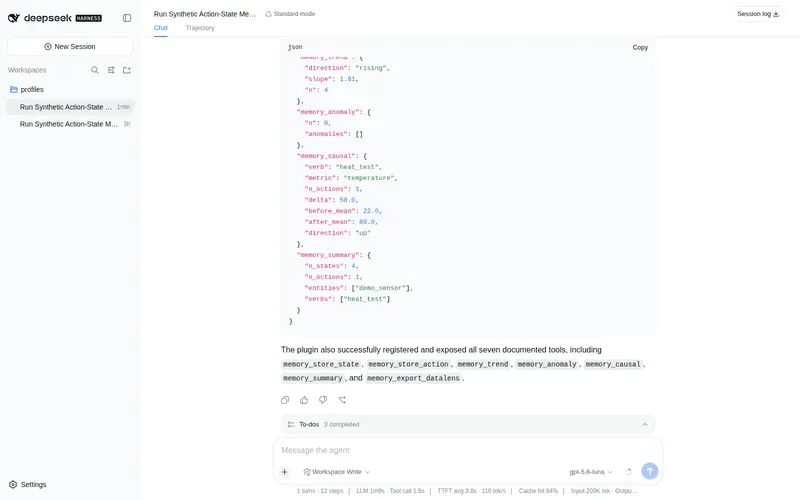
Seven MCP tools, exposed to the model as mcp__asmemory__<tool>:
| Tool | What it does |
|---|---|
memory_store_state |
Record a state event (entity / metric / value / unit / tags) |
memory_store_action |
Record an action event (actor / verb / object / amount) |
memory_trend |
Trend direction + slope of a metric |
memory_anomaly |
z-score outlier detection |
memory_causal |
Mean change of a metric before/after an action |
memory_summary |
Library statistics |
memory_export_datalens |
Export CSV + config for DataLens visualization |
Installation
The server runs from the asmemory-mcp command (or an absolute path via ASMEMORY_MCP_PATH). Install the command first, then register the MCP bridge with DSH.
-
Install the
asmemory-mcpcommand:pip install .(Or skip the install and set
ASMEMORY_MCP_PATH=/path/to/bin/asmemory-mcpinstead.) -
Launch DSH with the plugin patch:
dsh web --patch "$PWD/cordis.yml"(Once published, you can also run
dsh plugin add dsh-plugin-asmemory.) -
Done. The server is a single stdio process using only the Python 3.10+ standard library.
Persistence defaults to ~/.asmemory/memory.db (override with ASMEMORY_DB_PATH).
Verified
The full loop is tested end-to-end on a real DSH instance (headless profile + a local Qwen3.6 model): the agent called memory_store_state, memory_store_action, and memory_summary, and the events landed in SQLite — exactly the data it was asked to record.
Quick start
python3 examples/demo_agent_self_tracking.py   # agent self-tracking demo
python3 examples/demo_datalens_export.py       # industrial → DataLens export demo
Use cases
- Agent self-tracking — record the agent’s own actions and resource states
- Industrial monitoring — process variables and operator actions (air separation, emission control)
- Personal data — sleep, weight, spending, exercise trends
License
MIT — use it, fork it, ship it. And if it earns you a star-shaped reward in return, all the better. ⭐
Frequently Asked QuestionsFAQ
Use the verified command dsh plugin --profile default add github:Xplore-LAB/dsh-plugin-asmemory in a DSH-enabled shell. The command resolves the public package metadata and keeps the plugin attached to the catalog identity shown on this page.
Compatibility follows the bundle and profile status shown above. If a profile is not detected, keep the plugin disabled there and check the repository documentation before enabling it in production.
The GitHub link and activity metadata are the source of truth for releases and maintenance. Revisit this page after a new release to confirm the catalog has observed the latest version.