yushi-xxh/dsh-homepage-skin
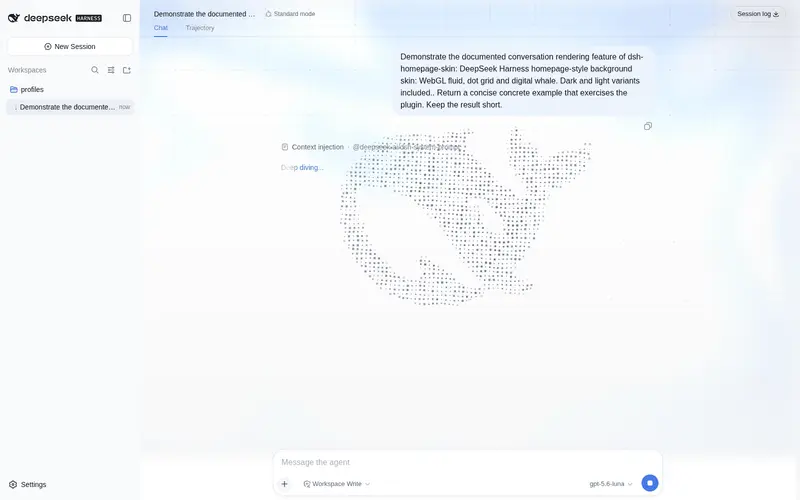
给 dsh web 换上 DeepSeek Harness 首页同款背景:深海流体、点线网格、数字鲸鱼,深浅双主题
Listed
1
Fun
Bundle verified
Preview

What it does
Adds the DeepSeek Harness homepage background to dsh web: WebGL fluid light, dot-line grid and a digital point-cloud whale, with dark and light palettes.
Best for
- DSH Web users who want the homepage-style fluid light, grid, and point-cloud whale behind the chat interface.
- Users who want coordinated dark and light background variants without changing layout or information density.
- Users who prefer an optional visual skin that can be disabled from Settings.
Not ideal for
- Headless or TUI workflows, where there is no Web interface to style.
- Users seeking layout, navigation, or functional changes; the plugin is limited to background and sidebar presentation.
- Mobile users expecting the full composition, because the grid and whale are hidden below 768px.
README
dsh-homepage-skin
给 dsh web 界面铺上 DeepSeek Harness 首页同款背景:WebGL 流体光效、点线网格和数字点云鲸鱼。


深色沿用首页深海蓝配色;亮色是适配变体(浅色流体 + 深灰蓝网格与鲸鱼)。亮 / 暗 / 跟随系统仍走自带的「外观」。
安装
# npm(推荐)
dsh plugin --profile web add dsh-homepage-skin

# 或从 GitHub
dsh plugin --profile web add github:yushi-xxh/dsh-homepage-skin
重启 dsh web,再硬刷新浏览器(Ctrl+Shift+R)。默认开启。
打开 设置 → 通用 → 首页皮肤。标题旁绿点表示已开启。
装完怎么验
| 现象 | 结论 |
|---|---|
| 聊天区背后出现流体光效 + 点线网格 + 鲸鱼 | 已生效 |
| 外观切到亮色 → 出现亮色变体 | 已生效 |
| 关掉开关背景立刻消失 | 正常 |
改了什么
| 出厂 DSH | 本皮肤 | |
|---|---|---|
| 页面背景 | 纯色 | 流体光效 + 点线网格 + 数字鲸鱼 |
| 深色配色 | 自带深色 | 首页深海蓝(#0a0a0a 基底) |
| 亮色配色 | 自带亮色 | 浅色流体 + 深灰蓝网格/鲸鱼 |
| 侧栏 | 实底 | 半透明玻璃 |
| 输入区 | 实底 | 不动(保持出厂原样) |
关掉或卸载后,出厂样式立刻恢复。
不做的事
- 不改布局和信息密度
- 不改品牌色、标签页图标或桌面壳图标
-
prefers-reduced-motion时不动画;768px 以下隐藏网格与鲸鱼 - headless / TUI 没有界面,不必装
许可
MIT
Frequently Asked QuestionsFAQ
Use the verified command dsh plugin --profile default add github:yushi-xxh/dsh-homepage-skin in a DSH-enabled shell. The command resolves the public package metadata and keeps the plugin attached to the catalog identity shown on this page.
Compatibility follows the bundle and profile status shown above. If a profile is not detected, keep the plugin disabled there and check the repository documentation before enabling it in production.
The GitHub link and activity metadata are the source of truth for releases and maintenance. Revisit this page after a new release to confirm the catalog has observed the latest version.