adithya-hmt/fullstack-expert
Cordis-native, evidence-driven full-stack engineering discipline for DeepSeek Harness agents
已收录
0
Workflow
Bundle 已验证
预览
功能介绍
以证据驱动的全栈工程工作流:先勘察后规划、要求显式验证证据、敏感操作走审批门控。
适合
- 希望在 DSH 编码会话中执行先勘察后规划并记录显式验证证据的工程团队。
- 需要对敏感操作实施审批感知控制的工作流。
- 已经提供该工作流所协调的 Harness shell、文件系统、工具和模型能力的项目。
不适合
- 期望获得更强模型或替代 agent 框架的用户;该插件只为现有 Harness 能力提供流程约束。
- 期望插件自带浏览器自动化、shell 执行、文件系统、数据库、部署或模型提供方实现的项目。
- 需要直接执行 Supabase 操作的工作流;其支持仅限只读检测和建议。
- 要求插件自身执行浏览器验证的场景;文档所述版本仅提供指导和证据记录。
README
@deepseek-ai/fullstack-expert


Make coding agents show their work. Fullstack Expert is a Cordis-native workflow and safety layer for DeepSeek Harness coding agents. It makes repository inspection, vertical-slice planning, sensitive-operation boundaries, and fresh verification evidence explicit—without introducing a second agent framework, shell, filesystem, browser, database, or model provider.
This is not a smarter model. It is a more disciplined engineering loop around the Harness capabilities you already use.
-
Install:
QUICKSTART.md -
See it in action:
docs/demo.md - Latest release: GitHub Releases
- Questions and bugs: GitHub Issues
What V0.1 provides
- A scoped methodology prompt: understand → inspect → design → plan → implement → test → review → verify.
- Two deep model-facing operations:
-
fullstack_plan: bounded repository inspection plus a vertical-slice plan. -
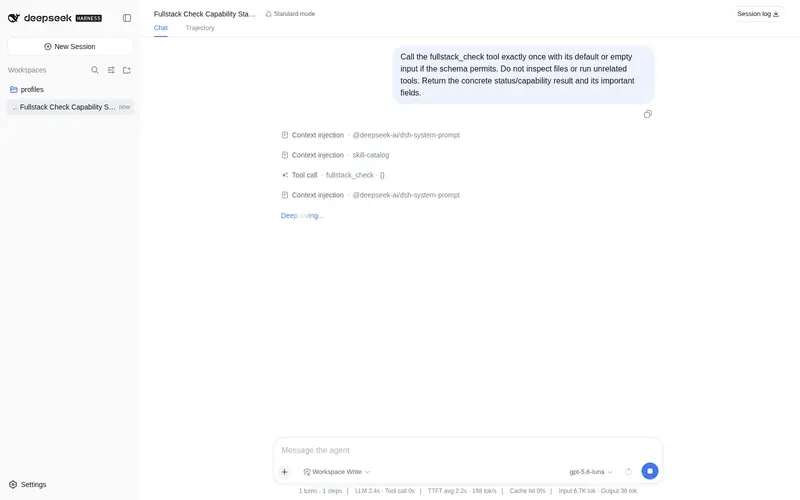
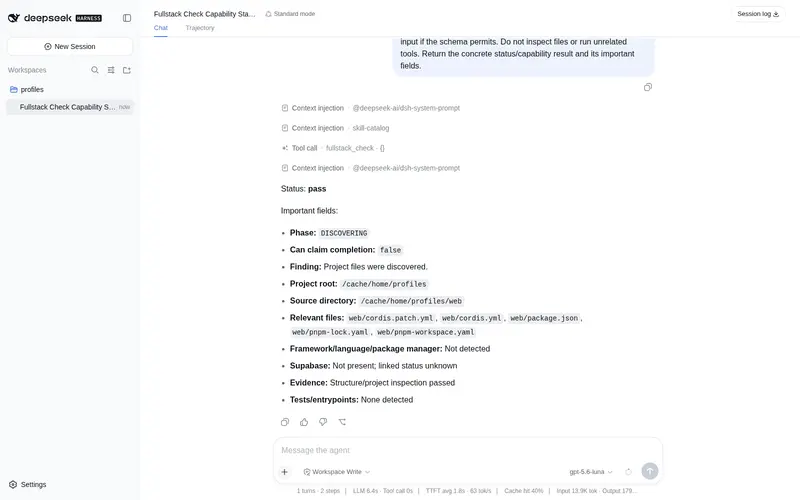
fullstack_check: read-only project checks and explicit evidence recording.
-
- A deterministic
FullstackExpertRuntimestate seam for phase, tasks, evidence, and compact event facts. - Embedded narrow skills registered through native
ctx.skills. - Complexity-governor decisions based on requirement, reuse, native platform, dependencies, and safety controls.
- Permission classification and an approval-aware pre-execute gate that delegates sensitive operations to native Harness approval and fails closed when approval is unavailable.
- Optional, read-only Supabase project evidence detection.
- Session/tool outcome observation using native
session/eventandtools/result; the Harness session log remains the durable source of truth. - Provider-neutral operation: the plugin never selects or hard-codes an LLM adapter. GPT-5.6 Max is configured in the Harness model route.
Honest scope
V0.1 does not provide a browser driver, shell executor, filesystem backend, dev-server registry, Supabase SDK, database client, deployment adapter, or model provider. It reuses those capabilities when the selected Harness composition exposes them. Browser verification is therefore guidance plus evidence recording until a stable browser tool is composed. Supabase operations are detection/advice only; migrations, linking, login, pushes, resets, pulls, function deploys, and external writes remain explicit sensitive actions.
Install as a profile bundle
Fastest path
With the DeepSeek Harness CLI installed, add the tagged release directly from GitHub:
dsh plugin --profile web add git+https://github.com/adithya-hmt/fullstack-expert.git#v0.1.1
dsh --profile web --dump-config
dsh --profile web
Replace web with your profile name. The first command installs the package and activates its declared patch layer. The second confirms the composed row before booting. Once npm publication is enabled, the shorter @deepseek-ai/fullstack-expert package spec will work too. For a complete setup, troubleshooting, and a local-checkout path, see QUICKSTART.md.
Manual profile overlay
Build/publish this package into a profile’s dependency closure, then add the supplied cordis.patch.yml overlay after the profile’s base bundle:
- insert:
    - id: fullstack-expert
      name: '@deepseek-ai/fullstack-expert'
      config:
        registerSkills: true
The overlay is intentionally small. The profile must already compose native Harness rows such as dsh-fs, dsh-fs-local, dsh-shell, a shell executor, dsh-tools, dsh-skill, and the relevant model adapter.
For a user-owned preset, copy the shipped standard preset rather than editing the install, then add the row to the copied agent.cordis.yml. Give the copied preset a preset.yml with a human-readable name and description, or it may appear only as its directory id in pickers. A plugin row that contributes a Service must be placed in the host composition or in an entry-local isolated realm when its consumers are session-owned.
GPT-5.6 Max / OpenAI-compatible CLI proxy
Keep provider configuration outside this package. Configure the existing OpenAI-compatible CLI proxy using the Harness provider/model settings surface, selecting:
provider: <your proxy adapter>
model: GPT-5.6 Max
The exact provider id, endpoint, credential binding, and CLI command are deployment-specific. Do not put credentials in this repository or prompt context. The plugin consumes the provider-neutral agent/session interfaces only.
Usage
- Start with a composition containing the plugin and native Harness filesystem/tool/skill rows.
- Ask for a feature, bug fix, review, refactor, or application build.
- The agent should call
fullstack_planfor substantial work, inspect actual files, state assumptions/unknowns, and implement a vertical slice with native tools. - Use
fullstack_checkfor bounded structure/command/Supabase checks and to record non-verification review facts. Verification evidence must come from a native Harness check; V0.1 rejects self-attested verification records. - Completion is only justified after a native
verificationevidence record passes and relevant failures are absent.
The native shell tool reports its [exit code: N] marker; investigate every non-zero result. For browser work, use the composed browser capability and record actual console/network/UI evidence rather than treating a build as proof.
Development
Requirements: Node.js >=22 and the Harness peer composition installed by npm ci.
npm ci
npm run verify
npm run test:consumer
npm run test:profile
test:consumer installs the packed tarball into a temporary consumer and mounts fullstack_plan and fullstack_check against the real peer packages. test:profile installs that tarball into a disposable Harness profile and checks the composed patch layer; it requires dsh and pnpm (or uses the documented pnpm fallback).
The repository is intentionally dependency-light. Source is plain ESM JavaScript and the package publishes the source entrypoints plus the Cordis patch, matching the plugin’s plain-runtime contract.
Documentation
docs/architecture.mddocs/methodology.mddocs/skills.mddocs/workflows.mddocs/complexity-policy.mddocs/verification.mddocs/permissions.mddocs/supabase.mddocs/model-provider.mddocs/extending.mddocs/demo.mddocs/releasing.mddocs/reference-methodologies.mddocs/harness-seams.md
Community and promotion
If Fullstack Expert helps with a real project, share the task and verification evidence (without secrets) in an issue or discussion. Add the dsh-plugin topic to help DeepSeek Harness users discover it. A short demo is more useful than a claim: start with docs/demo.md.
License and provenance
The plugin implementation is MIT-licensed. The methodology report in docs/reference-methodologies.md records the pinned MIT sources consulted for Superpowers, mattpocock/skills, and Ponytail, with citations and a clear separation between inspiration and copied code. No reference implementation text is bundled.
常见问题常见问题
在启用了 DSH 的终端中执行已验证命令 dsh plugin --profile default add github:adithya-hmt/fullstack-expert。命令会解析公开 package 元数据,并保持插件与本页展示的目录身份一致。
兼容性以页面上展示的 bundle 与 profile 状态为准。如果某个 profile 尚未检测到,请先保持禁用,并在生产启用前阅读仓库文档。
GitHub 链接和 activity 元数据是 release 与维护状态的来源。新版本发布后重新查看本页,确认目录已经观察到最新版本。