GodD6366/dsh-sub2api
Connect your sub2api gateway to DeepSeek Harness: OpenAI-compatible multi-provider routes (OpenAI / Claude / Grok / Gemini) behind one base URL, with per-key model discovery, usage lookup, and a settings page.
Listed
0
Model
Bundle verified
Preview
What it does
Connect a sub2api gateway to DeepSeek Harness: OpenAI-compatible multi-provider routes (OpenAI / Claude / Grok / Gemini) behind one base URL, with per-key model discovery, usage lookup, and global vision/image tools.
Best for
- Teams already operating a sub2api gateway and wanting OpenAI, Claude, Grok, and Gemini routes in one DSH configuration.
- Multi-key setups that need each key's models discovered according to its bound sub2api group and usage inspected from the gateway.
- Text-only model workflows that need dedicated global image analysis or generation tools, or optional automatic vision wrappers.
Not ideal for
- Users without a sub2api gateway and provider keys bound to the appropriate groups.
- Setups that cannot supply the required pi-ai adapter used for protocol serialization, streaming, and accounting.
- Workflows that need model capability metadata to be strictly authoritative when models.dev data is absent, because image support may then be inferred from the model ID.
README
dsh-sub2api
Connect your sub2api gateway to DeepSeek Harness as model providers.
Sub2API is an AI API gateway that turns subscription quota into OpenAI-compatible endpoints. In its model, each API key is bound to a group, and the group decides the platform (OpenAI / Claude / Grok / Gemini) and the models that key can serve. The four provider routes (sub2api-openai, sub2api-claude, sub2api-grok, sub2api-gemini) are served by the harness’s own pi-ai adapter (dsh-llm-pi-ai): this plugin translates its llm-sub2api: settings into llm-pi-ai: provider profiles (all sharing one bare-host base URL, no /v1), and protocol serialization, streaming, and usage accounting all live in pi-ai. The same gateway serves OpenAI, Claude, Grok, and Gemini models side by side, and the harness routes each request to the key whose group owns the requested model.
Features
-
One base URL, four provider routes:
sub2api-openai,sub2api-claude,sub2api-grok,sub2api-gemini— each configured with its own key, registered as a live LLM provider the moment the key is set. -
Streaming chat (backed by pi-ai): SSE streaming, tool calls, reasoning deltas, and token usage are mapped to the harness protocol by
dsh-llm-pi-ai, which natively handles wire-format details like top-levelfunction_callitems in the Responses API. -
Model discovery: one-click “fetch models” calls
GET {baseURL}/modelswith the key, so each route’s catalog matches exactly what the sub2api group serves. -
Reasoning effort (thinking mode):
reasoning_effortis passed straight through to the gateway and adjustable right in the chat model selector; the settings page’s per-model “reasoning strength” column fills each model’s real levels from models.devreasoning_options(e.g.gpt-5.6-sol→ none/low/medium/high/xhigh/max,deepseek-v4-flash→ low/high/max), with editable levels and an explicit opt-out. -
Usage lookup: “view usage” calls
GET {baseURL}/usageand summarizes quota, balance, rate limits, and subscription windows. -
Standards-based config: base URL and model catalogs live in the
llm-sub2api:settings section ($DSH_HOME/settings.yaml, written by the web Models page); keys go through the harness credential store. -
Global vision / image tools:
analyze_imageandgenerate_imagestay available even when the current chat model cannot see or create images. They call a dedicated vision or image model configured on the settings page, and return a description or a workspace file path rather than injecting image blocks into a text-only session. -
Auto Vision wrapper: image capability for text-only models. Every registered text-only provider route gets a same-name twin (
<route>-vision, shown as “… + 自动识图”) — our ownsub2api-*routes and external providers (officialdeepseek-official,llm-pi-ai, routes added by other plugins). Twin models carry a-visionid/name suffix (e.g.deepseek-v4-flash-vision) so the picker shows at a glance which models accept images; the suffix is stripped again when the call is delegated back to the base route. The twin’s catalog declaresinputModalities: ['text', 'image']so the harness attachment admission passes, and the twin’s stream rewrites image blocks into vision-model transcriptions (via the configuredtools.analyzemodel, cached per attachment) before delegating the text-only turn to the original route’s adapter. DeepSeek stays the brain; the vision model is only the eyes. Twins followllm/adapters-updatedand skip names already taken by other plugins. Disable withautoVision: false. - Provider icons from lobehub/lobe-icons, embedded as SVG in the settings page.
Install
dsh plugin --profile web add @godd6366/dsh-sub2api
or, from this repository:
dsh plugin --profile web add .
Configure
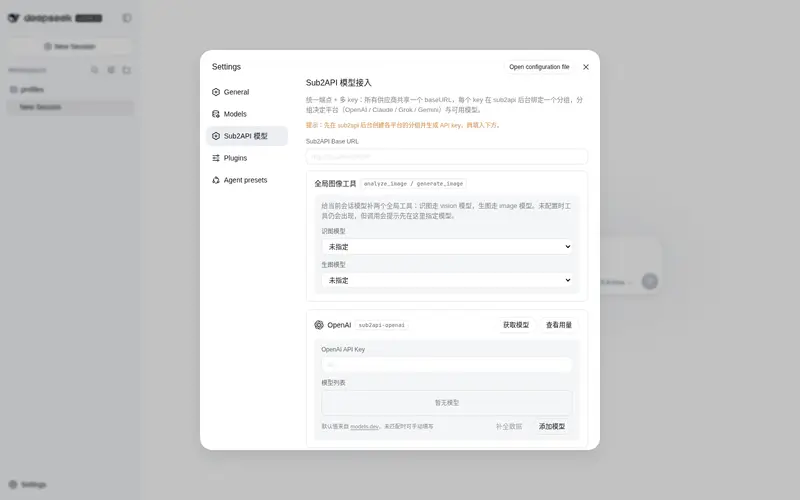
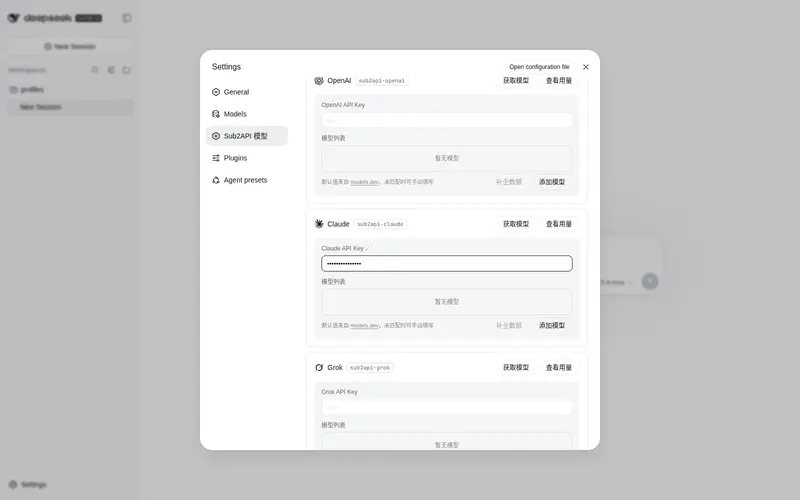
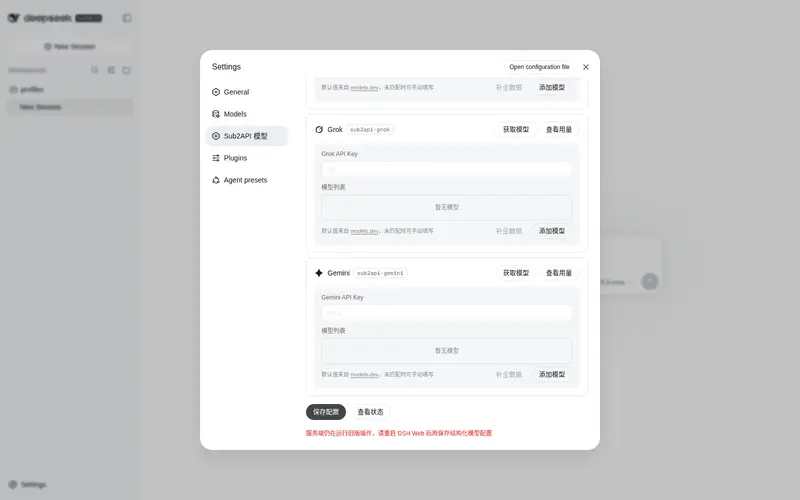
Open Settings → Sub2API 模型 (or edit $DSH_HOME/settings.yaml directly):
llm-sub2api:
  baseURL: http://localhost:8080
  providers:
    openai:
      apiKeyEnv: SUB2API_OPENAI_API_KEY
      models:
        - id: gpt-4o
    claude:
      apiKeyEnv: SUB2API_CLAUDE_API_KEY
    grok:
      apiKeyEnv: SUB2API_GROK_API_KEY
    gemini:
      apiKeyEnv: SUB2API_GEMINI_API_KEY
  tools:
    analyze:
      provider: openai
      model: gpt-4o
    generate:
      provider: openai
      model: gpt-image-1
Store each key through the credentials service (the web Models page writes it, or export SUB2API_OPENAI_API_KEY=… etc.). A route activates only when its platform has a key; clear the key to drop the route again.
Wire protocol (automatic per group)
The gateway serves each platform group upstream through its NATIVE protocol, and pi-ai picks the endpoint automatically from the key’s group — no configuration needed. Configure the bare host (no /v1): OpenAI-style endpoints get /v1 appended automatically, and the Anthropic SDK appends /v1/messages itself:
| Group | Protocol used | Endpoint |
|---|---|---|
| openai | openai-responses |
POST {baseURL}/v1/responses |
| claude | anthropic-messages |
POST {baseURL}/v1/messages |
| grok / gemini | openai-completions |
POST {baseURL}/v1/chat/completions |
Speaking the native protocol means the gateway never has to convert chat/completions — that conversion is what drops/misaligns tool-call names and ids for parallel calls (unknown tool "", missing required property …). To force a different endpoint for a group whose gateway does not serve it natively, declare api on the provider in $DSH_HOME/settings.yaml (advanced; no settings-page control):
llm-sub2api:
  baseURL: http://localhost:8080
  providers:
    openai:
      apiKeyEnv: SUB2API_OPENAI_API_KEY
      api: openai-completions   # optional: openai-completions / openai-responses / anthropic-messages
      models:
        - id: gpt-4o
api accepts openai-completions (/v1/chat/completions), openai-responses (/v1/responses), or anthropic-messages (/v1/messages); omitted means the automatic group default above.
Relationship to dsh-llm-pi-ai
This plugin no longer implements the LLM protocol layer itself: the four sub2api-* routes are served by dsh-llm-pi-ai (shipped dormant with dsh-base) through llm-pi-ai: settings profiles. On every llm-sub2api: change (and at boot) the plugin translates the bare-host base URL, per-group models, and key references into hand-declared profiles and writes them to llm-pi-ai:, so routes register/drop live. The settings page, model discovery (GET /v1/models), usage lookup (GET /v1/usage), the vision/image tools, and the Auto Vision twins remain this plugin’s own.
Dependency (pi-ai multi-turn crash; attribution: dsh-llm-pi-ai violates pi-ai’s contract): pi-ai’s
AssistantMessage.usageis a required field that its prefix-token estimation dereferences, but the harness’s owndsh-llm-pi-airebuilds assistant history withoutusage(the harnessMessagetype records none), so multi-turn conversations throwCannot read properties of undefined (reading 'totalTokens'). The root fix belongs in dsh-llm-pi-ai (attach a zeroUsage); this plugin applies a defensive guard at boot (assistant.usage !== undefinedbefore counting prefix tokens) to@earendil-works/pi-ai/dist/utils/estimate.jsinside the dsh install — idempotent, re-applied automatically after a dsh upgrade, so a fresh install works out of the box; on a read-only install runnode scripts/patch-pi-ai.mjsmanually.Auto Vision twins and replay: the twin delegates history to the base route with the base provider id, so pi-ai stamps its replay state with that provider while the harness records the message under the twin route — replaying it would fail pi-ai’s
provider does not match assistant sourcecheck (INVALID_REPLAY_STATE). The twin therefore stripsreplayStatefrom assistant history before delegating (pi-ai then treats it as foreign); twin conversations intentionally skip provider-native replay.
Image input & reasoning effort (auto-filled)
Attaching an image to the session model requires that model to declare the image input modality — otherwise the harness refuses before sending (“model does not support images”). Both fields are auto-filled from models.dev — no manual selection (the model details panel shows the derived values read-only):
-
Image input: derived from models.dev
attachment/modalities.inputwhen present (e.g. gpt-5.6-luna → text+image, deepseek-v4-flash → text); otherwise guessed from the model id (gpt-*,claude-*,gemini-*,grok-*,glm-*, … default to text+image). Pin a model to text-only withinput: [text]in$DSH_HOME/settings.yaml. -
Reasoning effort: derived from models.dev
reasoning_optionswhen present (e.g. deepseek-v4-flash → high/max); otherwise the default low/medium/high, and models withreasoning: falseare marked unsupported.
When the model accepts images, the request carries the image in the group’s native protocol: openai → Responses input_image, claude → Messages image (base64), grok/gemini → chat-completions image_url.
Pick the dedicated vision / image models under Settings → Sub2API 模型 → 全局图像工具. Those two tools stay global: a text-only chat model can still call analyze_image (local file or URL) and generate_image (writes into the session workspace). Generation first tries POST {baseURL}/images/generations, then falls back to chat completions when the gateway has no images endpoint.
Development
npm install
npm run build     # tsdown → lib/ + client wrapper
npm run typecheck
License
MIT
Frequently Asked QuestionsFAQ
Use the verified command dsh plugin --profile default add github:GodD6366/dsh-sub2api in a DSH-enabled shell. The command resolves the public package metadata and keeps the plugin attached to the catalog identity shown on this page.
Compatibility follows the bundle and profile status shown above. If a profile is not detected, keep the plugin disabled there and check the repository documentation before enabling it in production.
The GitHub link and activity metadata are the source of truth for releases and maintenance. Revisit this page after a new release to confirm the catalog has observed the latest version.