ringoage/dsh-subagent-model-picker
The visual, manual subagent-model picker for DeepSeek Harness — predictable per-session routing with global coverage of every in-process subagent path, complementary to auto-routing plugins.
Listed
0
Model
Bundle verified
Preview
What it does
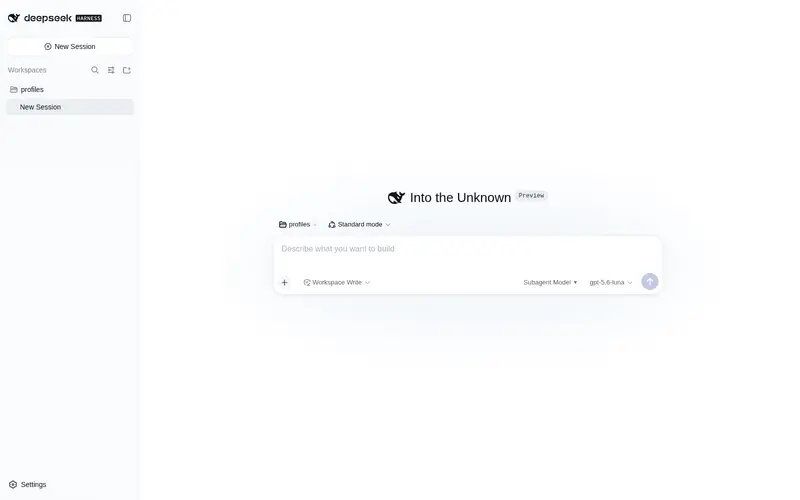
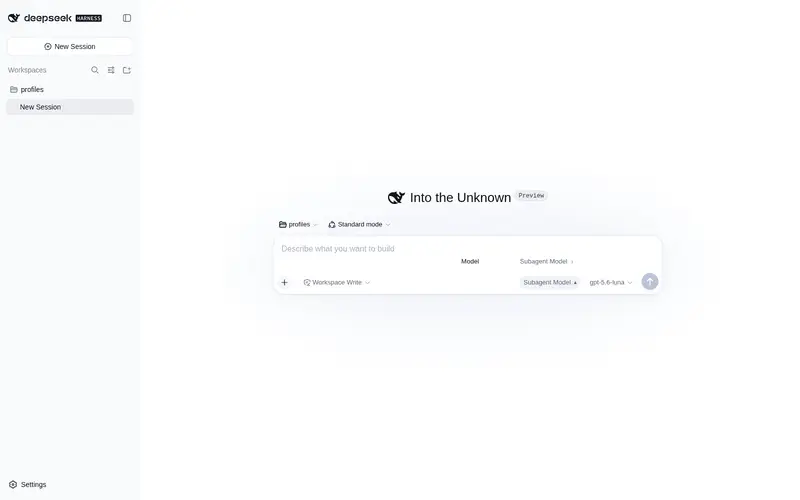
A GUI subagent-model selector beside the main model seat: pick a model and reasoning effort per session, applied to every in-process subagent.
Best for
- Users who want explicit, visible control over the subagent model and reasoning effort for each session.
- Cost- or latency-conscious workflows that deliberately assign a cheaper or faster model to every in-process child.
- Sessions that need a manual override alongside an automatic routing policy.
Not ideal for
- External CLI agents such as Claude Code or Codex; their model selection is not affected.
- Users who want policy-based automatic routing instead of choosing a model manually per session.
- Deployments without the Web composer when users need to change the selection; routing persists host-side, but editing the choice is a Web UI feature.
README
dsh-subagent-model-picker
The visual, manual subagent-model selector for DeepSeek Harness.
Pick a cheaper / faster model — and its reasoning effort — for every in-process subagent, right beside the main model seat, per session, with zero guessing.
Why this exists
“Route subagents to a cheaper model” has been done many ways in the last few days, but they all decide for you:
| Approach | How it picks | Who decides | Predictable? |
|---|---|---|---|
| Tool-based | a tool the model itself calls | the model | ❌ run-dependent |
| Auto-routing | rules / plan-mode classification | the plugin’s policy | ⚠️ only as good as its rules |
| Command-based | a /command you type |
you, imperatively | ✅ but no visible state |
| Manual GUI (this) | a seat beside the model seat | you, visually | ✅ deterministic + always visible |
dsh-subagent-model-picker is the only visual, manual selector in this
category: a GUI control next to the main model seat, so the choice is explicit,
visible at a glance, and applies deterministically to every subagent path.
What it gives you
- Manual — you choose; not a policy, not the model itself.
- Visual — a dropdown beside the main model seat (hover pill + click-outside-to-close + Escape).
- Predictable — the selection is per-session state; every child gets exactly what you picked.
-
Global coverage — one host-side
agent/requestlistener coverssubagent,subagent_fork, and workflow fan-out children at any depth. -
Reasoning effort — models that expose effort levels (e.g.
off/high/max) get a matching “Thinking effort” menu. - Inherit by default — subagents stay on the main model until you opt in.
- Per-session + durable — the choice follows the session and survives restart.
-
Localised —
zh/enUI copy.
Complementary, not a replacement
Auto-routing plugins (tier/smart/adaptive routers, plan-mode classification) and tool/command approaches answer “pick for me”. This plugin answers “let me pick”. They compose: keep an auto-router as the default policy and use the picker to override a specific session manually — or the other way around.
How it works
Two halves cooperate without touching the apiProxy settings whitelist:
-
Host (
lib/index.js) registers oneagent/requestwaterfall listener.dsh-scopeadmits events up the scope chain, so this host-root listener sees every agent’s requests; a child is recognised byagent.options.subagentDepth >= 1. It walks the parent chain to the root session and overrides{ provider, model, reasoningEffort? }only for subagents. -
Persistence + transport go through a Typert Remote service (
subagent-model-picker, wire namespacesubagent-model-picker) exposingget/set/clear. The client half mounts the Remote contribution (ctx.remote.$mount) and callsremote.subagent-model-picker.*; the service persists thesessionId -> { provider, model, reasoningEffort? }map host-side, so the apiProxyexposedNamespaces()whitelist is never consulted.
Install
One-liner (GitHub, market-compatible)
dsh plugin --profile web add github:ringoage/dsh-subagent-model-picker
This is the same github: install path the DSH plugin market uses, so it can be
installed straight from this repository.
Manual (edit the profile)
In your web profile (.dsh/profiles/web/package.json), add the package as a
dependency and list it in dsh.profile.bundles:
{
  "dependencies": {
    "dsh-subagent-model-picker": "^1.0.0"
  },
  "dsh": {
    "profile": {
      "bundles": ["dsh-subagent-model-picker"]
    }
  }
}
Then restart the harness. For a local checkout use a link: dependency pointing
at this directory.
Usage
To the left of the main model selector you will see Subagent Model (or 子代理模型). Pick a model — and, if offered, a Thinking effort — and every subagent spawned from that session uses it. Choose Inherit main model (default) to restore default routing.
Limitations
- Only in-process subagents are routed:
subagent,subagent_fork, and workflow fan-out children driven by DSH itself. External CLI agents (e.g.claude-code,codex) manage their own model selection and are not affected. - The selector is a web client feature; host routing works regardless of whether the web GUI is open, but the selection itself is edited from the web composer.
Development
-
lib/index.js— host half (Remote service +agent/requestrouting). -
lib/client.js— client half (slot UI + Remote contribution + locale). -
cordis.patch.yml— thedsh.bundle.patchinsert that mounts the plugin row.
The Remote service runs in SRC mode: methods are marked with the
@Remote(name) contract applied in plain JS (no generated typert.host.js),
and the client contribution ships hand-written strict descriptors.
License
Frequently Asked QuestionsFAQ
Use the verified command dsh plugin --profile default add github:ringoage/dsh-subagent-model-picker in a DSH-enabled shell. The command resolves the public package metadata and keeps the plugin attached to the catalog identity shown on this page.
Compatibility follows the bundle and profile status shown above. If a profile is not detected, keep the plugin disabled there and check the repository documentation before enabling it in production.
The GitHub link and activity metadata are the source of truth for releases and maintenance. Revisit this page after a new release to confirm the catalog has observed the latest version.